


One day I will need this: Terry L@u’s blog: Manage non-domain Hyper-V servers (Windows Server 2016 Technical Preview) by Hyper-V Manager [WayBack]
Via: Matthijs ter Woord
–jeroen
Posted by jpluimers on 2017/09/11
One day I will need this: Terry L@u’s blog: Manage non-domain Hyper-V servers (Windows Server 2016 Technical Preview) by Hyper-V Manager [WayBack]
Via: Matthijs ter Woord
–jeroen

Posted in Hyper-V, Power User, Virtualization, Windows, Windows Server 2016 | Leave a Comment »
Posted by jpluimers on 2016/09/20
In the 2009 past, sdelete used the -c parameter to zero wipe clean a hard drive and -z would clean it with a random pattern.
That has changed. Somewhere along the lines, -c and -z has swapped meaning which I didn’t notice.
This resulted in many of my virtual machines image backups were a lot larger than they needed to be.
The reason is that now:
-c does a clean free space with a random DoD conformant pattern (which does not compress well)-z writes zeros in the free spaceIncidently, -c is a lot slower than -z as well.
sdelete -z C:
Where C: is the drive to zero clean the free space.
–jeroen
Posted in Batch-Files, Development, Fusion, Hyper-V, Power User, Proxmox, Scripting, sdelete, Software Development, SysInternals, View, VirtualBox, Virtualization, VMware, VMware ESXi, VMware Workstation, Windows | Leave a Comment »
Posted by jpluimers on 2016/04/11
After updating a Windows 8.1 machine that had Hyper-V running, none of the VMs could access any networking: Windows 10 build 1511 completely broke the vSwitch infrastructure.
This is what I had to do:
This was the umpteenth time Hyper-V let me down, so in the future I’m back to VMware or Virtual Box.
Windows 10 also broke Everything Search Engine and UBCD4Win. I could not get UBCD4Win to work again, but a reinstall of Everything made it to work again.
And Windows 10 moved a lot of things away from the Control Panel, which means that things that basically worked for more than a decade are now gone. For instance, Windows updates now must be run with a shortcut like this:
%LocalAppData%\Packages\windows.immersivecontrolpanel_cw5n1h2txyewy\LocalState\Indexed\Settings\nl-NL\AAA_SystemSettings_MusUpdate_UpdateActionButton.settingcontent-ms
Note that’s for a DUTCH system. For a US-English system of course the shortcut is different:
%LocalAppData%\Packages\windows.immersivecontrolpanel_cw5n1h2txyewy\LocalState\Indexed\Settings\en-US\AAA_SystemSettings_MusUpdate_UpdateActionButton.settingcontent-ms
This feels like “1998 wants its VBA translated languages back”.
Of course I could get around this by building a table translatingto a text language code from the numeric language code* from the below command, but that’s not the point: Windows 10 makes life harder.
reg query “hklm\system\controlset001\control\nls\language” /v Installlanguage
returns codes like 0407, 0409, 040D, 0413, etc.
–jeroen
*: Heck if Microsoft cannot even update their 2002 Table of Language Culture Names, Codes, and ISO Values Method [C++] and has trouble keeping the various .NET version pages updated**, how could I?
**: these are the only .NET versions the table is documented
Posted in Everything by VoidTools, Hyper-V, Power User, Virtualization, Windows | 1 Comment »
Posted by jpluimers on 2015/04/27
Edit 20210727:
- A lot of the links below have died due to link rot (sometimes even the domains have gone), but most of the WayBack machine links marked [Wayback] still work.
- The same stop [Wayback] stop
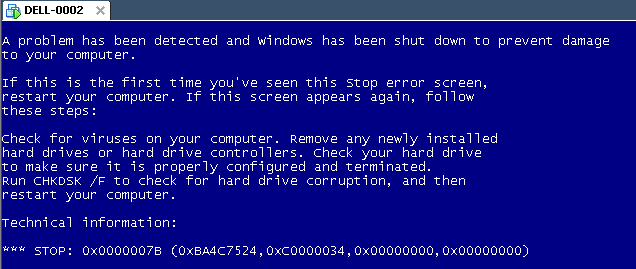
0x0000007Bcan happen when converting a physical machine to VMware (I will schedule a separate post about this):Windows XP Virtual Machine failing with stop 0x0000007B
Steps:
0x0000007B (usually because of SATA/AHCI/IDE or other MassStorage controller driver issues), then read [Wayback] Jon’s Project Blog » disk2vhd using [Wayback] UBCD for Windows to solve the issue as there is no BIOS screen in Hyper-V that allows you to switch from AHCI to SATA and back.Some links that helped me get at these steps:
–jeroen

Posted in BIOS, Boot, Hyper-V, Internet, link rot, Power User, Virtualization, Windows, Windows 8, Windows 8.1, Windows XP, WWW - the World Wide Web of information | Leave a Comment »
Posted by jpluimers on 2014/03/30
Read this very nice post on Nex7’s Blog: ECC vs non-ECC RAM: The Great Debate.
There is no debate. Use ECC dude.
Use ECC especially for server side things (storage, virtualization, databases, etc) where you employ some kind of redundancy/correction in the storage (ZFS, RAID, etc) side of things.
And think about using ECC for the rest of your stuff, especially when things stay in memory for a longer period of time (in-memory processing of data can speed up things a lot, but also increase the risk).
Summary:
There is no debate here. None.
[…]
if you think non-ECC RAM can compete with ECC RAM, you are mistaken. If you think there’s a risk/reward analysis here, you’re correct. The risk is not gigantic, and there’s a real cost to alleviating that risk. You have to decide if that cost is worth alleviating that risk.
[…]
If you believe there’s a risk/reward plan where you can take the reward and apply to to mitigate the risk, you are back to being mistaken. The only benefit of non-ECC RAM (and thus the only reward in its choice over ECC RAM) is it will make the solution cheaper. There is not, however, any way (that I’ve heard of, yet) you can use the cost savings to mitigate the risk using non-ECC RAM will introduce.
[…]
If you choose to use non-ECC RAM, you open yourself up to a new vector for data corruption/loss/downtime/errors/etc,
one that could (rarely) even cause you to lose your entire filesystem, and one ZFS does not (cannot) resolve for you. Indeed, one it likely can’t even see at all. If you choose to employ non-ECC RAM, or are forced to do so because of circumstance or environmental constraint, that’s potentially understandable (and even acceptable) – but do not then attempt to validate or explain away that choice with pseudoscience or downplaying the risk you’ve added. You are using an inferior solution with an extra vector for data corruption/loss that ECC RAM solutions simply do not have. It is that simple.
[…]
Hint 3: There’s a reason we’re so gung-ho about using ECC RAM for ZFS, and it’s not just because we’re paranoid about data loss (which goes hand in hand with being a ZFS zealot, really). It is because you likely don’t realize how at risk you are. Due to the nature of how ZFS handles writes, your incoming (write) data is at risk of RAM-related bit errors for likely significantly longer than traditional storage solutions or alternative filesystems. 5, 10, 30, 60 or more seconds in a state where it is at risk.
Posted in *nix, ECC memory, Endian, ESXi4, ESXi5, ESXi5.1, ESXi5.5, Hardware, Hyper-V, Linux, Memory, Power User, SuSE Linux, VMware, VMware ESXi, Windows, Windows 7, Windows 8, Windows 8.1, Windows Server 2008, Windows Server 2008 R2 | Tagged: ECC RAM, ZFS | Leave a Comment »
 The Wiert Corner - irregular stream of stuff