The Wiert Corner – irregular stream of stuff

Jeroen W. Pluimers on .NET, C#, Delphi, databases, and personal interests

  • My badges

  • Twitter Updates

  • My Flickr Stream

  • Pages

  • All categories

  • Enter your email address to subscribe to this blog and receive notifications of new posts by email.

    Join 1,862 other subscribers

Archive for the ‘Web Browsers’ Category

Automatically reload page in Chrome without plugin – Super User

Posted by jpluimers on 2022/07/14

Below is a cool solution to refresh a page using a bookmarklet is to embed it into an iframe, then automatically reload it every interval.

It for instance works for the [Wayback/Archive.is] Woonveilig and often in Fritz!Box environments.

[Wayback] Jon described the below method as a solution for his own question, 6 years after asking it in [Wayback/Archive.is] Automatically reload page in Chrome without plugin – Super User.

So I made this a bookmark:


javascript:document.getElementsByTagName("body")[0].innerHTML = "<iframe id=\"testFrame\" src=\""+window.location.toString()+"\" style=\"position: absolute; top:0; left:0; right:0; bottom:0; width:100%; height:100%;\"><\/iframe>";reloadTimer = setInterval(function(){ document.getElementById("testFrame").src=document.getElementById("testFrame").src },5*60*1000)

(it is in a gist as the WordPress editors keep killing the embedded html code, despite it being escaped within <code> tags.

–jeroen

Posted in Bookmarklet, Chrome, Chrome, Development, Firefox, Google, HTML, JavaScript/ECMAScript, Power User, Scripting, Software Development, Web Browsers, Web Development | Leave a Comment »

A twitter call to say nice things about technology sparked interesting threads

Posted by jpluimers on 2022/05/27

A while ago [Archive.is] Adam Jacob on Twitter: “Let’s say nice things about technology today. I’ll start. If it wasn’t for @lkanies and @puppetize, there is no way we would have been able to adapt as an industry to the rise of the cloud. Quote tweet me with your own.” sparked some interesting threads.

First posts are below; click on them to see the full threads.

Read the rest of this entry »

Posted in Chrome, Configuration Management, Development, DevOps, Firefox, History, IaC - Infrastructure as Code, Infocom and Z-machine, Infrastructure, KVM Kernel-based Virtual Machine, LSI/3ware, Open Source, PDP-11, Power User, PowerShell, Puppet, Python, Qemu, Rust, Safari, Scripting, Software Development, UCSD Pascal, Vagrant, Veewee, Virtualization, Web Browsers, Xen | Leave a Comment »

How to view the html page source of a website in Safari – Macintosh How To

Posted by jpluimers on 2022/04/14

[Wayback] How to view the html page source of a website in Safari – Macintosh How To

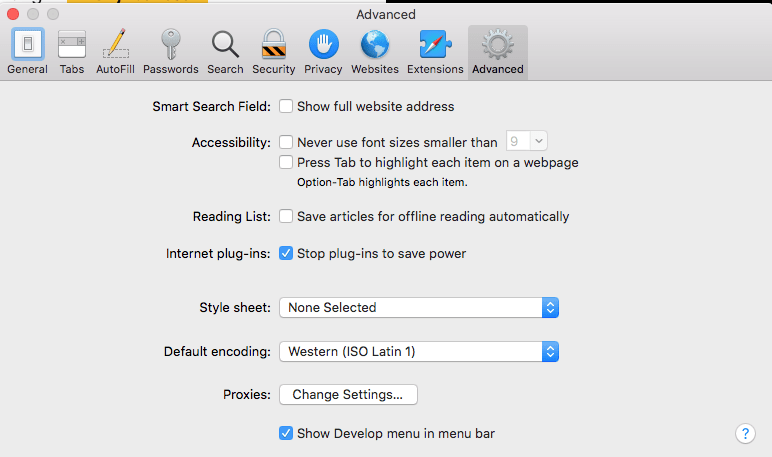
You can enable the extra menu in Safari by selecting ‘Preferences’ under Safari in the OS X menu bar  and then under the ‘Advanced’ pane select the checkbox that says ‘Show Develop menu in menu bar.’

This is the option you need:

a

MacOS - Safari - Show Develop menu in menu bar

MacOS – Safari – Show Develop menu in menu bar

–jeroen

Posted in Apple, Development, Mac OS X / OS X / MacOS, Power User, Safari, Software Development, Web Browsers, Web Development | Leave a Comment »

Prevent link rot before the public condemns you

Posted by jpluimers on 2022/04/05

I’ve written about link rot quite a few times (it even has a category on my blog).

Preventing it is important, as it improves user experience.

For most users this is an unconscious thing when it works and becomes consciously annoying when it fails.

Some user groups are vocal enough to force you to fix link rot after the fact, causing brand reputation damage.

One good example was last year: [Wayback] Users condemn Microsoft for removing KB IDs from some bug documentation | Computerworld.

Read the rest of this entry »

Posted in Bookmarklet, Development, Internet, link rot, Power User, Software Development, Web Browsers, Web Development, Windows, WWW - the World Wide Web of information | Leave a Comment »

Mumen Rusto: “Ceci n’est pas une Captcha.… “

Posted by jpluimers on 2022/04/01

Every site should present this as a captcha today.

Via [WayBack] Mumen Rusto on Twitter: “Ceci n’est pas une Captcha.… “

The captcha is by [WayBack] Senior Oops Engineer on Twitter: “Captcha: select all squares that contain a pipe Magritte: 😓”.

He posted it about 2 years ago as [WayBack] Senior Oops Engineer on Twitter: “oh fuck oh no… “.

–jeroen

Read the rest of this entry »

Posted in Apri1st, Development, Fun, Hosting, Power User, Software Development, Web Browsers, Web Development | Leave a Comment »

Bookmarklet to force WordPress classic-editor

Posted by jpluimers on 2022/03/29

A while ago, WordPress.com heavily started to de-emphasise the Classic Editor in order to boost the Gutenberg editor which is bloaty (in both browser DOM usage (heavily slowing down editing) and content (lots of meta tags that are added to blog source) and is missing essential features (especially nesting of blocks often breaks things).

With 7000+ blog posts in the Classic Editor format (a few in still supported markdown format: that experiment failed horribly!) that still require editing  (especially because of link rot)

So here is the Bookmarklet code to switch back an editing URL that you can use for as long as the Classic Editor is there:

javascript:location.href=document.location.href+'&classic-editor';

Yup, it is that simple: it appends &classic-editor to the URL.

Read the rest of this entry »

Posted in Bookmarklet, Classic editor, Development, Gutenberg editor, Internet, link rot, Power User, Software Development, Web Browsers, Web Development, WordPress, WWW - the World Wide Web of information | Leave a Comment »

The Delphi documentation site docwiki.embarcadero.com has been down/up oscillating for 4 days is now down for almost a day.

Posted by jpluimers on 2022/03/08

The [Wayback/Archive] Embarcadero/IDERA Documentation Wiki has been mostly down since March 3rd, 2022 (not the main page, but almost all other pages are).

I modified [Wayback/Archive] Docwiki https – EmbarcaderoMonitoring to show the actual status of a deeper page as the (mostly static) top page is up, so monitoring that is useless as the deeper pages are down.

The deeper pages are dynamic and require a functioning MySQL database connection. That connection is mostly down (the error message is not clear, so this could be a network or a database server problem, or maybe even a loadbalancer gradually entering bit heaven).

Since it had been down for like 6 days in February*, I’d expect Idera to keep an eye on it and prepare for more downtime. Apparently that’s either not a 24×7 thing for them or  they missed the “pre” in preparation as it is dead-silent on .

It also runs on an unsupported version of Mediawiki 1.31** which by itself does not explain the outage, but does indicate that their idea of handling their internal lifetime management is different than what they advocate to clients in their software subscription model, see [Wayback/Archive] Delphi – Embarcadero store, [Wayback/Archive] Update Subscription – Embarcadero and [Wayback/Archive] Special Offers on RAD Studio, Delphi & C++Builder – Embarcadero:

Read the rest of this entry »

Posted in *nix, Bookmarklet, Delphi, Development, JavaScript/ECMAScript, Lightweight markup language, MediaWiki, Monitoring, Power User, Scripting, SocialMedia, Software Development, Twitter, Uptimerobot, Web Browsers | Leave a Comment »

Force downloading Windows 10 ISOs instead of Media Creation Tool

Posted by jpluimers on 2022/02/25

When downloading Windows 10 builds, I usually want them as ISO files because I test them out as Virtual Machines before running on real hardware.

Downloading can be done from [WayBack] www.microsoft.com/en-us/software-download/windows10, however what you get depends on what machine you start browsing.

The above WayBack link, because it got archived from a non-Windows machine redirects from https://web.archive.org/web/20210321163339/https://www.microsoft.com/en-us/software-download/windows10 to https://web.archive.org/web/20210321143203/https://www.microsoft.com/en-us/software-download/windows10ISO.

On Windows systems the redirect goes from https://web.archive.org/web/20210321143203/https://www.microsoft.com/en-us/software-download/windows10ISO to https://web.archive.org/web/20210321163339/https://www.microsoft.com/en-us/software-download/windows10

By default, when you are on a Windows machine, the download link only provides the Media Creation tool. This forces an extra step into getting the ISO file on the virtual machine host.

When downloading from a non-Windows machine, you get a possibility to download the ISO file directly after selecting which kind of build and language you need. This provides you with a time limited https link to download the ISO (in practice this seems to last at least an hour).

I didn’t dig into this before, but luckily others did, and the difference is as easy as changing the User-Agent in your browser, as these posts describe:

Luckily, since ESXi 6.7, VMware ESXi added https as protocol to wget, so now you can download the https link you get via the above trick without hassle.

Oh, this answers my question from a few years back too: How can I get Win10_1511_1_English_x64.iso or Win10_1511_1_EnglishInternational_x64.iso ?

jeroen

Posted in Chrome, ESXi6.7, Power User, Virtualization, VMware, VMware ESXi, Web Browsers, Windows, Windows 10 | Leave a Comment »

I consider stealing the user’s time because of a bad UX design among the Dark Patterns

Posted by jpluimers on 2022/02/22

I an with [Wayback] Craig Buckler to consider Dark Patterns being wider than the strict sense.

For me anything that costs a user extra time or makes accessibility harder is a Dark Pattern.

So I agree with the issues he explains at [Wayback] The Web’s Most Annoying Dark Patterns – SitePoint

Does the web delight or displease you? Craig lists his least favourite UI and marketing dark patterns. Have you developed on the dark side?

Paste is enabled, but does not function

Paste is enabled, but does not function

A while ago, I got into one myself. Let me explain.

Having had RSI, I’m dependent on keeping my hands and arms in good shape. This means minimising the use of pointing devices and also trying to minimise typing.

In addition, I have heavily segmented my use of email addresses (among others for cutting down SPAM). Basically any point of contact gets a new email address.

This means I realy on tooling like password managers and email address generators. It means copying and pasting information.

So I bumped into a web-site that disallowed pasting the (unique and long!) email address into the email verification field.

[Archive.is] Jeroen Wiert Pluimers on Twitter: “The @olvg #mijnOLVG site is now on my Dark Patterns list as they make #accessibility harder by blocking pasting into the email address verification field. Blocking the paste-blocker. CC some people advocating mijnolvg.nl @MauricevdBosch @ronklitsie63 @kyntha”

Despite the popup menu, paste didn’t work. Chrome autofill did, but didn’t have the information for this particular (new and unique) email address yet, so could not be used yet.

Disabling the paste block

It is relatively easy to disable a paste block. In this case, I was using chrome, but this can be done with any browser. Some browsers even have optional extensions that can do this for you.

In the case of Chrome, when right clicking, there is an “Inspect” option
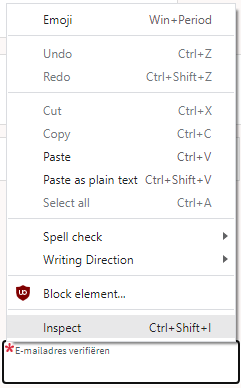
Inspect is enabled and actually works.

Inspect is enabled and actually works.

It inspects the current element, which on this site looks like this:

The element does not contain event handlers. But the code hooks them behind our backs.

The element does not contain event handlers. But the code hooks them behind our backs.

On the “Event Listeners” tab on the right, you can see there are two JavaScript methods hooked to the paste handler:

The paste handlers. The first is OK, the second blocks paste.

The paste handlers. The first is OK, the second blocks paste.

The first one is OK, though I did not really look into what the proxy does.

Second paste event handler: remove this one.

First paste event handler: keep this one.

First paste event handler: keep this one.

The second is not OK, as it effectively prevents the event from being handled any further at all by calling preventDefault

Second paste event handler: remove this one.

Second paste event handler: remove this one.

By clicking on the second Remove button above, the paste blocker is gone and you can paste again.

–jeroen

Read the rest of this entry »

Posted in Chrome, Chrome, Dark Pattern, Development, Google, JavaScript/ECMAScript, Power User, Scripting, Software Development, User Experience (ux), Web Browsers | Leave a Comment »

Archive.is is more like a thread unroll service than an archival service

Posted by jpluimers on 2022/02/14

An interesting take a while ago on [Wayback] Archive.is blog — People often compare various features of…

People often compare various features of archive.is to those of archive.org being mistaken by name similarity (and recently added “save a page” function to archive.org).

This project is different in at least two respects:

  1. We have no goal to save the entire Internet. Only manually submitted pages which may be deleted/altered soon. We are about 100x smaller than archive.org in the storage space (700TB vs. 70PB) and expenses (X,000 $/mo vs. X00,000 $/mo).
  2. The pages are not saved in their network form. Archive.today launches real browsers (not even headless) and tries to load lazy images, unroll folded content, login into accounts if prompted with login form, remove “subscribe our maillist” modals, … So archive.today is not suitable for making notarized or digitally signed snapshots.

It would be more correct to compare it with other thread unrollers.

The RSS feed of blog.archive.today is at blog.archive.today/rss

Read the rest of this entry »
Posted in archive.is / archive.today, Bookmarklet, Conference Topics, Conferences, Development, Event, Internet, InternetArchive, JavaScript/ECMAScript, Power User, Scripting, Software Development, Web Browsers | Leave a Comment »