Posted by jpluimers on 2022/01/25
In Get Formatted Value of Cell in Excel – Stack Overflow, I focused on the =TEXT function, then indicated I would look into Excel format strings later.
Below are just a few links and a very short description as hopefully later I will have more time to dig into this.
The basic format is this (where all bits other than Format1 are optional):
[Locale]Format1;Format2;Format3;Format4
For now this is for my link archive:
- [Wayback] Excel number format strings (e.g. “@”, “$-409]d-mmm-yy;@”) – Complete reference availability? – Stack Overflow has two answers of which the second one is deleted, but very useful:
- Here’s a list of the Number Format Codes for Excel.
- Second option for link: Ecma-376 4th Edition Part 1, Section 18.8.31
- If you are looking for the international number codes try at http://office.microsoft.com/en-gb/excel-help/creating-international-number-formats-HA001034635.aspx
- The
HA001034635 link has disappeared, which is a pity as it explains the localisation; luckily two forms of the URL have been saved where [Locale] is constructed like this example (all Locale digits are hexadecimal):
[$-24050412]m/d/yy
In the preceding example:
24 is the numeral shape component (Korean 1).
05 is the calendar type component (Korean (Tangun era)).
0412 is the locale and language designation component (Korean).
- [Wayback] Archive.is: Creating international number formats – Excel … HA001034635.aspx
- [Wayback] Archive.is: Creating international number formats – Excel – Office.com … HA001034635.aspx?redir=0
- More
[Locale] information is explained in [Wayback] What does the 130000 in Excel locale code [$-130000] mean? – Stack Overflow by [Wayback] User IrwinAllen13 – Stack Overflow and has more calendar formats than the above Microsoft links.
- [Wayback] Number format codes – Excel for Mac has the base and sort of explains what the
@ is for: the content of the cell.
First the base:
When you create custom number formats, you can specify up to four sections of format code. These sections of code define the formats for
- positive numbers,
- negative numbers,
- zero values, and
- text,
in that order. The sections of code must be separated by semicolons (;).
The following example shows the four types of format code sections.

 Format for positive numbers
 Format for negative numbers
 Format for zeros
 Format for text
Then on on specifying less than 4 sections:
- If you specify only one section of format code, the code in that section is used for all numbers.
- If you specify two sections of format code, the first section of code is used for positive numbers and zeros, and the second section of code is used for negative numbers.
- When you skip code sections in your number format, you must include a semicolon for each of the missing sections of code.
- You can use the ampersand (&) text operator to join, or concatenate, two values.
Then on the @ sign (which is under “Text and spacing”):
To create a number format that includes text that is typed in a cell, insert an “at” sign (@) in the text section of the number format code section at the point where you want the typed text to be displayed in the cell.
…
For example, to include text before the text that’s typed in the cell, enter “gross receipts for “@ in the text section of the number format code.
Finally it explains how to colorise the formatting or hide particular values under “Decimal places, spaces, colors, and conditions”:
The color code must be the first item in the code section.
[Black] [Blue] [Cyan] [Green] [Magenta] [Red] [White] [Yellow]
…
Hiding various values:
| To hide |
Use this code |
| Zero values |
0;–0;;@ |
| All values |
;;; (three semicolons) |
- [Wayback] ECMA-376 – Ecma International where Ecma-376 4th Edition Part 1, Section 18.8.31 is supposed to have format strings (will dig into this later)
Office Open XML file formats – This Standard defines Office Open XML’s vocabularies and document representation and packaging
- [Wayback] ECMA-376, Part 1
- Not sure where Part 2 is
- [Wayback] ECMA-376, Part 3
- [Wayback] ECMA-376, Part 4
- Not sure where Part 5 is
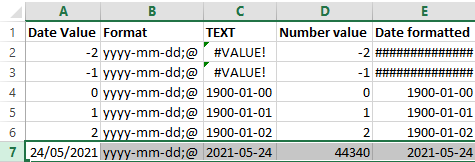
Below a few screenshots while experimenting.
The first one shows the formulas, the second one the content. The Date value cells shows the values when entered as shown; the Date formatted cells are all formatted with yyyy-mm-dd;@ formatting.
I still need to figure out why using a =TEXT function shows #VALUE! whereas using cell formatting just a bunch of ############### (15 times a #, not sure if that is always the same number).

–jeroen
Posted in Development, Excel, Office, Office Development, Power User, Software Development | Leave a Comment »
Posted by jpluimers on 2022/01/24
For my link archive:
Problem was that the privacy statement was not on a separate page during DigiD logon: you had to copy/paste to word in order to save it.
–jeroen
Posted in About, GDPR/DS-GVO/AVG, LifeHacker, Personal, Power User, Privacy | Leave a Comment »
Posted by jpluimers on 2022/01/24
Just found out about [Wayback] Lode Runner Web Game:
A HTML5 (CreateJS) remake of Lode Runner
I have played that way too much in my Apple ][ and //e days.
Hopefully I won’t be addicted to it as back in those days.
Just watching the demo mode is soooooo cool!
I remember designing my own lievens, then winning from the local Apple shop (Vlasveld Computers, which also had a country wide Apple magazine). Cool days!
–jeroen
Read the rest of this entry »
Posted in //e, 6502, About, Apple, Apple ][, History, Personal, Retrocomputing | Leave a Comment »
Posted by jpluimers on 2022/01/21
Since dd on Apple does not support progress parameters via [Wayback] macos dd progress – Google Search:
- [Wayback] Quick: dd with progress indication on macOS
A nice way I found to get progress indication whilst still being able to benefit from the huge speed increase in using /dev/rdiskX is to install a tool called pv, also known as [WayBack] Pipe Viewer.
Example:
sudo dd if=/dev/rdiskX bs=1m | pv -s 64G | sudo dd of=/dev/rdiskY bs=1m
Another way to achieve something similar would be to use brew to install coreutils, which will come with a newer version of dd that supports the status option.
Example:
gdd if=/dev/diskX of=/dev/diskY bs=1m status=progress
- [Wayback] el capitan – How can I track progress of dd – Ask Different
You just need to enter a controlT character from the keyboard while the dd command is executing.
By pressing the controlT character, you are sending the same SIGINFO signal to the dd command that the command pkill -INFO -x dd sends.
dd itself doesn’t provide a progress bar. You may estimate the progress of the dd copy process by adding a pkill -INFO command though.
Example:
dd if=/dev/zero of=/dev/null bs=64m count=1000 & while pkill -INFO -x dd; do sleep 1; done
- [Wayback] dd progress indicator on OSX
signal siginfo is coupled to key-combination CTRL-T. No need to use kill, you can just type CTRL-T in the terminal window where dd is running.
–jeroen
Posted in *nix, *nix-tools, Apple, iMac, Mac, Mac OS X / OS X / MacOS, MacBook, MacBook Retina, MacBook-Air, MacBook-Pro, MacMini, Power User | Leave a Comment »
Posted by jpluimers on 2022/01/20
Note
Though there are .example.edu and .example.info, though used in documentation and registered by IANA, have a status is different from the official Reserved Top Level DNS Names:
This is not exactly the same situation as for say ".example.org", where IANA is the registrant *and* registrar.
Wikipedia links:
Read the rest of this entry »
Posted in Development, DNS, Documentation Development, Internet, Power User, Software Development, Testing | Leave a Comment »
Posted by jpluimers on 2022/01/20
For quite some time now, Chrome (think years) refuses to prompt for saving passwords whereas Firefox and Safari do prompt and save them, even for site types that it used to save passwords for in the past.
It has been annoying enough for too long now that I tried to do better than the Google searches I used back when I saw this happen first.
Below are some links based on new searches (starting with [Wayback] adding a password in chrome settings – Google Search); hopefully I can try them after I made a list of sites that Chrome does not show the password save prompt for.
Solutions I tried that failed (but maybe useful for others):
Solutions still to try:
Read the rest of this entry »
Posted in Chrome, Chrome, Communications Development, Development, Encryption, ESXi6, ESXi6.5, ESXi6.7, Firefox, Fritz!, Fritz!Box, Fritz!WLAN, Google, https, HTTPS/TLS security, Internet, Internet protocol suite, Let's Encrypt (letsencrypt/certbot), Power User, routers, Safari, Security, TCP, TLS, Virtualization, VMware, VMware ESXi, Web Browsers, Web Development | Leave a Comment »
Posted by jpluimers on 2022/01/20
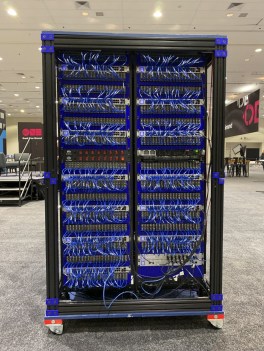 On the reading list: [Wayback/Archive.is] The Seven Step Process to Creating an Amazing Demo | by Chris Bensen | Oracle Developers | May, 2021 | Medium
So you have some crazy idea and want to build a demo. This seven step process should help you turn that idea into something amazing
Chris created the World’s Largest 3D Printed Brick Computer and was the driving force behind the Raspberry Pi Mini Super Computer [Wayback].
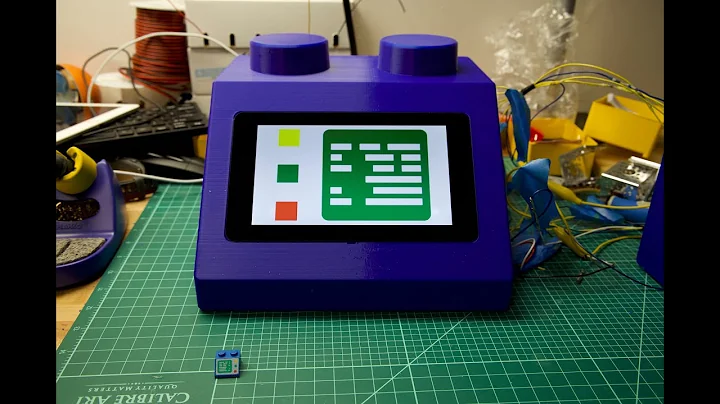
World’s Largest 3D Printed Brick Computer

Raspberry Pi Mini Super Computer
–jeroen
Read the rest of this entry »
Posted in Development, Geeky, Hardware Development, Raspberry Pi, Software Development | Leave a Comment »


 The Wiert Corner - irregular stream of stuff