The Wiert Corner – irregular stream of stuff

Jeroen W. Pluimers on .NET, C#, Delphi, databases, and personal interests

  • My badges

  • Twitter Updates

  • Pages

  • All categories

  • Enter your email address to subscribe to this blog and receive notifications of new posts by email.

    Join 1,839 other subscribers

Some things I learned from “Git tips and tricks | GitLab”

Posted by jpluimers on 2020/01/21

Via [WayBackGit tips and tricks | GitLab “Handy Git commands for everyday use” I learned these:


–jeroen

Via: [WayBack] GitLab on Twitter: Ready to get #backtowork? Brush up on a few tips and tricks we use at GitLab everyday: https://t.co/W8zFjxnSN6

Read the rest of this entry »

Posted in Development, DVCS - Distributed Version Control, git, Software Development, Source Code Management | Leave a Comment »

How to change the control of a Somfy RTS roller blind from 2 to 1 remote – Projectionscreen.net

Posted by jpluimers on 2020/01/20

This procedure works for Somfy RTS motors to:

  • removing an additional channel
  • removing an additional remote

The trick is to have one remote/channel that you want to keep working as you need that one to initiate the deletion process:

  1. On the channel/remote you want to delete
    • Test with the up/down button that it is indeed the one you want to delete
  2. On the channel/remote you want to keep
    1. Test with up/down button
      • The Somfy RTS motor show now work
    2. Press the  small button with a pen
      • The Somfy RTS motor now should “wiggle”
  3. On the channel/remote you want to delete
    1. Press the  small button with a pen
      • The Somfy RTS motor now should “wiggle” again
    2. Test with up/down button
      • The somfy RTS motor should now do nothing
  4. On the channel/remote you want to keep
    1. Test with up/down button
      • The Somfy RTS motor show still work

Via: [WayBack] How to change the control of a Somfy RTS roller blind from 2 to 1 remote – Projectionscreen.net

Videos below the fold:

–jeroen

Read the rest of this entry »

Posted in Hardware, LifeHacker, Power User | Leave a Comment »

OpenSuSE: location of cron jobs

Posted by jpluimers on 2020/01/20

When you look at how to find listed cron jobs, usually the answer is cron -l or cron -u username -l.

However, on OpenSuSE systems, cron jobs can be in different places, and the sysconfig settings have influence on them too.

These files and directories all influence cron:

Directories:

/etc/cron.d/
/etc/cron.daily/
/etc/cron.hourly/
/etc/cron.monthly/
/etc/cron.weekly/

Files:

/etc/sysconfig/cron
/etc/init.d/rc2.d/K01cron
/etc/init.d/rc2.d/S14cron
/etc/init.d/rc3.d/K01cron
/etc/init.d/rc3.d/S14cron
/etc/init.d/rc5.d/K01cron
/etc/init.d/rc5.d/S14cron
/etc/init.d/cron
/etc/news/crontab.sample
/etc/pam.d/crond
/etc/systemd/system/multi-user.target.wants/cron.service
/etc/omc/srvinfo.d/cron.xml
/etc/cron.deny
/etc/crontab

Most are available for other Linux distributions as well, but each one might have slightly different configurations (especially for the directories). Some background reading:

Some details:

  • The crontab -l will only list what is in /etc/crontab.
  • These directories are influenced by/etc/sysconfig/cron, especially the DAILY_TIME variable (see below) for the daily jobs.
    All of the directories are checked every 15 minutes through /usr/lib/cron/run-crons:/etc/cron.daily/
    /etc/cron.hourly/
    /etc/cron.monthly/
    /etc/cron.weekly/
  • That script then uses these files for checking when to run:/var/spool/cron/lastrun/cron.weekly
    /var/spool/cron/lastrun/cron.daily
    /var/spool/cron/lastrun/cron.hourly

The DAILY_TIME variable:

## Type: string
## Default: ""
#
# At which time cron.daily should start. Default is 15 minutes after booting
# the system. Example setting would be "14:00".
# Due to the fact that cron script runs only every 15 minutes,
# it will only run on xx:00, xx:15, xx:30, xx:45, not at the accurate time
# you set.
DAILY_TIME=""

–jeroen


Posted in *nix, *nix-tools, cron, Linux, openSuSE, Power User, SuSE Linux, Tumbleweed | Leave a Comment »

SpaceX: Task failed successfully

Posted by jpluimers on 2020/01/20

(thanks John!)

Posted in Uncategorized | Leave a Comment »

Delphi: A few notes on tracking down a use-after free related issue involving interfaces crashing inside System._IntfClear.

Posted by jpluimers on 2020/01/20

A few notes on tracking down a use-after free related issue involving interfaces.

The crash message is like this:

Project UseAfterFreeWithInterface.exe raised exception class $C0000005 with message 'access violation at 0x004106c0: read of address 0x80808088'.

Two things here:

An important note first

Basically any memory value in an exception starting with $8080 and sometimes even $80 should raise suspicion: it usually means a use-after-free case.

You see these errors with FastMM and not with the memory manager as [WayBack] delphi • View topic • Problem with FastMM and D7 explains:

Read the rest of this entry »

Posted in Conference Topics, Conferences, Delphi, Development, Event, Software Development | 8 Comments »

Always use SCSI for your VM guest disks – Jeroen Wiert Pluimers – Google+

Posted by jpluimers on 2020/01/20

Rephrased from [WayBackJeroen Wiert Pluimers – Google+:

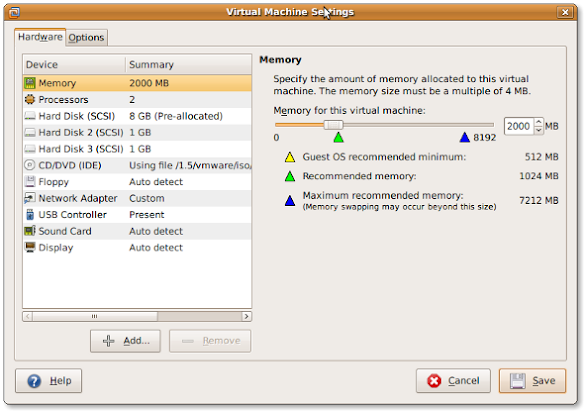
If you install a virtual machine, ensure the disk controller and disks are SCSI based.

This has many advantages, including:

  • speed (usually the SCSI drivers can be paravirtualised)
  • hot addition of new disks

It holds for virtually any virtualization platform including all non-ancient (less than ~10 year old) versions of:

  • VMware (Workstation, Viewer, but I expect this also to work on vSphere, ESXI, Fusion)
  • Hyper-V
  • KVM (and therefore Proxmox)
  • VirtualBox

Based on my notes in the above link and the links below:

Note this isn’t just for Linux guests/hosts: Most guests (including Windows) can do a SCSI bus re-scan and detect new SCSI devices.

The trick here is that the guest must already have a virtual SCSI controller (adding that will require a reboot of the guest).

Then adding a new SCSI disk on that controller from any host (Windows, Mac, ESXi, vSphere) should work fine.

–jeroen

Posted in ESXi4, ESXi5, ESXi5.1, ESXi5.5, ESXi6, ESXi6.5, Fusion, Hyper-V, KVM Kernel-based Virtual Machine, Power User, Proxmox, View, VirtualBox, Virtualization, VMware, VMware ESXi, VMware Workstation | Leave a Comment »

Tweaking4All.com – Topics – Delphi – How to change the font of a hint window

Posted by jpluimers on 2020/01/19

[WayBack] Tweaking4All.com – Topics – Delphi – How to change the font of a hint window: Delphi THintWindow are odd, as you cannot set the Vcl.Forms.HintWindowClass before uses it to initialise the hint window in the Application instance from the initialisation section in the Vcl.Forms unit.

The only way to change it is to:

  1. Set the HintWindowClass to a new class
  2. Toggle the state of Application.ShowHint

So the duplicate line below is no accident:

  HintWindowClass := TMyHintWindow;
  Application.ShowHint := not Application.ShowHint;
  Application.ShowHint := not Application.ShowHint;

References:

–jeroen

Posted in Delphi, Development, Software Development | Leave a Comment »

Waze “Isolated segment – all turns from it are closed” – Google Search

Posted by jpluimers on 2020/01/17

A blog entry since it was hard to find about [WayBack] “Isolated segment – all turns from it are closed” – Google Search as the source reveals not much: no explanation at [WayBack] wme-history/index.html at master · wazers/wme-history · GitHub (A repository containing the pretty-printed index and JavaScript files of the WME to investigate version differences – wazers/wme-history).

Same for [WayBack] “Added big junction” waze – Google Search and [WayBack] wme-history/index.html at master · wazers/wme-history · GitHub

Note that updates you make to the map can take a while to update to the actual live map (even after approval).

You can check at [WayBack] Waze Status for the latest updates.

I added a piece of road in between Thunstetten and Herzogenbugsee, but could not save it:

Read the rest of this entry »

Posted in LifeHacker, Power User, Waze | Leave a Comment »

XW6600 WOL – stopped working on Windows 10 – my trusty APC PDU to the rescue

Posted by jpluimers on 2020/01/17

A long time ago I wrote in Mac/PC: sending Wake-on-LAN (WOL) packets « The Wiert Corner – irregular stream of stuff “I’ve succesfully woken up these machines: HP XW6600 running ESXi 5.1 ThinkPad W701U running Windows 7”.

The XW6600 have now been demoted to Windows 10 machines that I only need every now and then, so most of the time they are shutdown.

However, with the installation of Windows 10 however, they stopped reacting to WOL (Wake on LAN).

Per web-search results, I’ve tried all the permutations of the below settings to no avail.

Luckily, my trusty APC PDU AP7921 (and little sister AP7920) helped out: when setting the “Reboot Duration” to 30 seconds or more (so the power fully drains), it can be rebooted.

Note that since I bought these a long time ago, they have been replaced by these:

Firmwares:

Power usage:

  • an XW66000 with 32 gigabytes of RAM and one hard disk takes between 0.6-1.2 Ampère of current, which at 230 Volt is 140-275 Watt.
  • over one day that is between 3.4 and 6.6 kWh

Settings tried

Read the rest of this entry »

Posted in Ethernet, Hardware, HP XW6600, Network-and-equipment, Power User, Wake-on-LAN (WoL), Windows, Windows 10 | Leave a Comment »

Famous Songs in Slightly Odd Time Signatures – A Guide to Rhythms – The Evil Jam

Posted by jpluimers on 2020/01/17

Time signatures, a musicians best friend if used wisely. Time signatures when used correctly can add other dimensions to a song, a feeling of awkwardness, incompleteness, shuffling dancing, rushing…

That’s the start of [WayBackFamous Songs in Slightly Odd Time Signatures – A Guide to Rhythms – The Evil Jam.

It has links to the tracks mentioned (usually as YouTube or Vimeo links) so it is easy to listen back to the marvels using these time signatures.

–jeroen

Posted in LifeHacker, Music, Power User | Leave a Comment »