The Wiert Corner – irregular stream of stuff

Jeroen W. Pluimers on .NET, C#, Delphi, databases, and personal interests

  • My badges

  • Twitter Updates

  • My Flickr Stream

  • Pages

  • All categories

  • Enter your email address to subscribe to this blog and receive notifications of new posts by email.

    Join 1,839 other subscribers

How to Block Ads on YouTube App for Android?

Posted by jpluimers on 2019/03/18

The Android Google YouTube application is showing more and more ads, mostly irrelevant, and has moved the “skip video” button outside of the “countdown timer” control. 

Right now, there is no video – not even short videos lasting like 10 seconds – that goes without ads.

Time to research [WayBack] How to Block Ads on YouTube App for Android?.

The  most promising solutions:

–jeroen

Posted in LifeHacker, Power User, SocialMedia, YouTube | Leave a Comment »

My message was blocked – Google Product Forums

Posted by jpluimers on 2019/03/18

Cool: https://support.google.com/mail/?p=RfcMessageNonCompliant

So Google does RFC checkking: [Archive.isMy message was blocked – Google Product Forums and shows bot the above link and this in the SMTP protocol:

“Our system has detected that this message is not RFC 5322 compliant,”

After that is the actual reason (for instance no From).

–jeroen

Posted in GMail, Google, Power User | Leave a Comment »

GitHub – ArchiveTeam/googleplus-grab: Archiving Google+.

Posted by jpluimers on 2019/03/18

Soon this is a thing of the past, but for just a few more days, you can help: Archiving Google+.

Either run this project: [WayBack] GitHub – ArchiveTeam/googleplus-grab: Archiving Google+.

Or even better: run the appliance, and help the WayBack machine with any archiving projects setup by the virtual appliance: the [WayBack] ArchiveTeam Warrior – Archiveteam.

See some of their other pages for more background information:

You can donate both to the archive team, and the internet archive:

How is G+ archiving doing?

The tracker is well under way: [WayBack] Googleplus tracker Dashboard. History: archive.is 1; archive.is 2

Read the rest of this entry »

Posted in ArchiveTeamWarrior, Development, G+: GooglePlus, Google, Internet, InternetArchive, Power User, Python, Scripting, SocialMedia, Software Development, WayBack machine | Leave a Comment »

Is It Better to Rent or Buy? – The New York Times

Posted by jpluimers on 2019/03/15

[WayBackIs It Better to Rent or Buy? – The New York Times

Via: [WayBack] This is the #calculator you need in your life but no one ever told you about. Is it better for you to #rent or #own a #property? Drag the sliders for yo… – Jason Mayes – Google+

Source: This is the #calculator you need in your life but no one ever told you about….

–jeroen

Read the rest of this entry »

Posted in LifeHacker | Leave a Comment »

scp a remote file to a local machine

Posted by jpluimers on 2019/03/15

For me, scp is like tar; somehow I Google this every time…

  1. On the remote machine, find out the full path of the remote file:
    ~ # ssh username@192.168.71.123
    ...
    ~ # ls -alh `find /vmfs/volumes/ | grep -w W81Entx64CI | grep '\.vmdk$'`
    -rw-------    1 root     root      200.0G Aug 26 22:48 /vmfs/volumes/552f5788-33e30274-8dba-001f29022aed/VM/PSO/W81Entx64CI/W81Entx64CI-flat.vmdk
    -rw-------    1 root     root         500 Aug 19 16:36 /vmfs/volumes/552f5788-33e30274-8dba-001f29022aed/VM/PSO/W81Entx64CI/W81Entx64CI.vmdk
    
  2. On the local machine, go to the right directory, then copy the file from the remote machine:
    ~ # cd /vmfs/volumes/Samsung512NVME/PSO/VM/W81Entx64CI/
    ~ # time scp -v username@192.168.71.123:/vmfs/volumes/552f5788-33e30274-8dba-001f29022aed/PSO/W81Entx64CI/W81Entx64CI-flat.vmdk W81Entx64CI-flat.vmdk


I don't know what's worse--the fact that after 15 years of using tar I still can't keep the flags straight, or that after 15 years of technological advancement I'm still mucking with tar flags that were 15 years old when I started.

I don’t know what’s worse–the fact that after 15 years of using tar I still can’t keep the flags straight, or that after 15 years of technological advancement I’m still mucking with tar flags that were 15 years old when I started.

The last line will logon over ssh and shows the file transfer in a verbose way.

Requirements:

  • both machines have ssh
  • local machine has firewall entry to allow client ssh
  • remote machine has sshd and firewall entry to allow sshd server connections

Via [WayBackshell – How to scp a folder from remote to local? – Stack Overflow (thanks [WayBack] Gryphius)

Image source: [WayBackxkcd: tar

–jeroen

Posted in Communications Development, Development, Internet protocol suite, SSH, TCP | Leave a Comment »

(24) 8 KNOTS You Need to Know – How to tie knots that you will actually use. – YouTube

Posted by jpluimers on 2019/03/15

  1. Chain Sinnet (AKA Daisy Chain or Monkey Chain)
  2. Farrimond Friction Hitch
    https://nl.scoutwiki.org/Farrimond_steek
  3. Trucker’s Hitch
  4. Constrictor Knot
    https://nl.scoutwiki.org/Constrictorknoop
  5. Cow Hitch
    ringknoop
  6. Half hitch
    https://nl.scoutwiki.org/Halve_steek
  7. Fisherman’s Bend
    https://nl.scoutwiki.org/Vissersknoop
  8. Water Knot

Dutch / English knot translations via

Via the comments: the Automatic Trucker’s Hitch:

–jeroen

Posted in LifeHacker, Power User | Leave a Comment »

delphi – Why was TDataSource created originally? – Stack Overflow

Posted by jpluimers on 2019/03/14

From a while ago [WayBackdelphi – Why was TDataSource created originally? – Stack Overflow

5down voteaccepted

It is all about decoupling and indirection.

And with TDataSource there are two kinds of them:

  • Decoupling the master detail relations (TDataSource is in the same module as the TDataSets that are being bound; the detail TDataSet references the master TDataSet by pointing its’ MasterSource property to the TDataSource that points to the master TDataSet)
  • Decoupling the UI from the business layer (TDataSets are in a DataModule; TDataSource is on the Form/Frame which contains your UI controls, UI controls reference their DataSourceproperty).

Since many components can point to the same DataSource, you can quickly switch which underlying TDataSet they use by just flipping one TDataSource.DataSet property.

–jeroen

Posted in Conference Topics, Conferences, Delphi, Development, Event, Software Development | Leave a Comment »

ESXi 6.5: change the automatic startup/shutdown of guest VMs

Posted by jpluimers on 2019/03/14

One more article about differences between the old C# Windows vSphere Client and “new” vSphere HTML5 Web Client in ESXi 6.5 and up.

This time about changing the startup/shutdown sequence so automatically power on and power off virtual machines.

In the old C# Windows vSphere Client, this was at the host level in the configuration tab under Virtual Machine Startup/Shutdown. There you click on Properties, then adjust the order by moving them up and down (screenshots and more detailed instructions are at ESX(i) AutoStart virtual machines: how to change the VM startup/shutdown settings (via: VMware Communities)).

In the vSphere HTML5 Web Client, there are two bits for this:

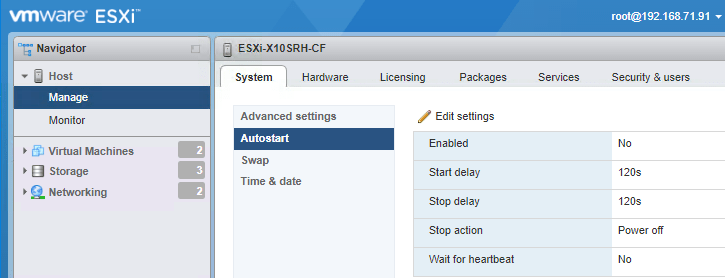
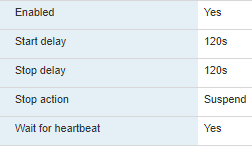
On the server you need to enable AutoStart:

From:  to:

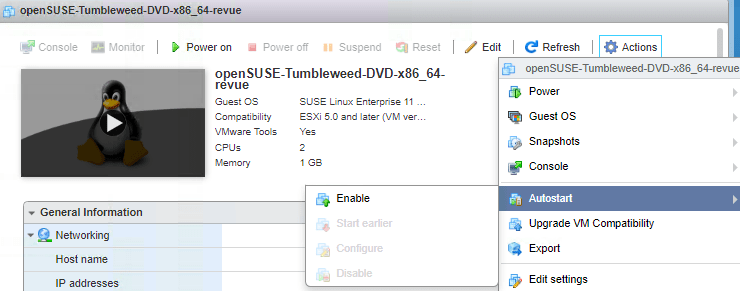
For each VM you have to enable AutoStart, then determine the order

  1. In the left, select the VM
  2. In the right, choose Actions, then Autostart, then Enable:
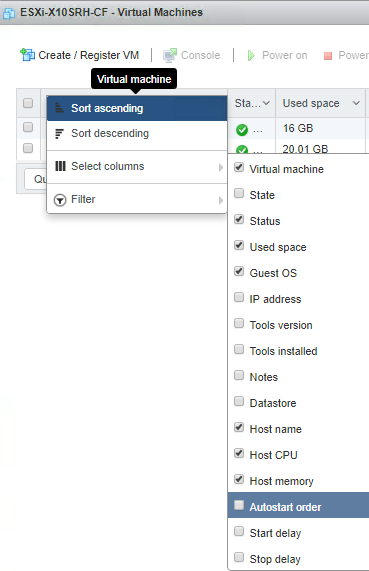
  3. Enable the columns in the VM overview:
  4. Order 1 means highest; adjust accordingly for each VM:

If after boot you get a “Failed – The operation is not allowed in the current state.“, then your machine still is in maintenance mode.

–jeroen

Related: ESXi 6.5: change the host name in the “new” vSphere HTML5 Web Client, or using DHCP option 12 « The Wiert Corner – irregular stream of stuff

Posted in ESXi6.5, Power User, Virtualization, VMware, VMware ESXi | Leave a Comment »

7zip / 7za command-line parameters for highest compression

Posted by jpluimers on 2019/03/14

On my systems these so far give the best compression results with 7zip and p7zip 16.02:

-t7z -m0=lzma2:d=1024m -mx=9 -aoa -mfb=64 -md=32m -ms=on

Note the -d=1024m is mentioned on some sites, but is gone around version 16.

Via:

If you want to delete the files after archiving, then use the -sdel switch: -sdel (Delete files after including to archive) switch

If -sdel switch is specified, 7-Zip deletes files after including to archive. So it works like moving files to archive., moves txt files from disk’s directory to a.7z archive.

–jeroen

Posted in 7zip, Compression, Power User | 1 Comment »

Run cmd as elevated user (via: windows – How to run batch file command with elevated permissions? – Super User)

Posted by jpluimers on 2019/03/13

Based on [WayBack] windows – How to run batch file command with elevated permissions? – Super User:

powershell -command "Start-Process cmd.exe -Verb runas"

This works better than "runas /user:administrator cmd.exe" as that forces to use the specific Administrator account, whereas the PowerShell way allows you to specify the actual account during elevation.

You can extend this to run a command with one or more parameters based on [WayBack] Launch Elevated CMD.exe from Powershell – Stack Overflow (thanks [WayBack] mklement0):

powershell -command "Start-Process cmd.exe -Verb runas -Args /k, call, goto-bin"

This will actually pass “call goto-bin” to cmd.exe which tries to execute the “goto-bin” command (which I have around on the PATH as goto-bin.bat).

You can either use comma-separated parameters or a quoted string. In this expansion, comma-separated is easier in this PowerShell construct.

–jeroen

Posted in Batch-Files, CommandLine, Console (command prompt window), Development, Power User, PowerShell, PowerShell, Scripting, Software Development, Windows | Leave a Comment »