When it finds Chromecast comptible videos ( .webm, .mp4, .mkv etc), count of videos is shown over extension’s menubar icon, which you can click to Select a video and extension will send it to your Chromecast device. Once a casting session is established, you can control video playback from Extension’s popup page.
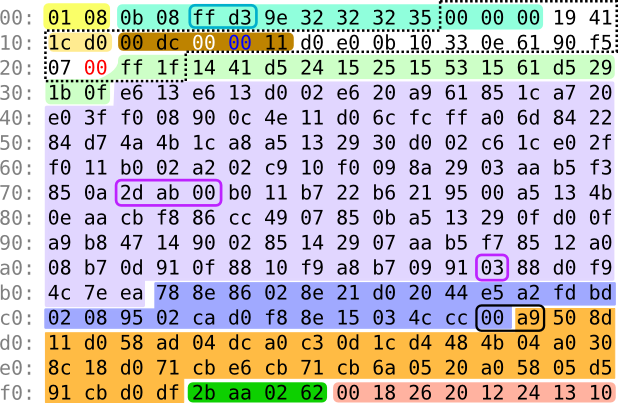
Making a demo in just 256 bytes would be a formidable challenge regardless of platform. A Mind Is Born is my attempt to do it on the Commodore 64. In the absence of an actual 256-byte compo, it was submitted to the Oldskool 4K Intro compo at [WayBack] Revision 2017, where it ended up on 1st place.
Note this works only when the VMs have VMware Tools installed (more on that below):
VMWare provides, not surprisingly, a built in tool for this, vmrun. It’s under /Applications/VMware Fusion.app/Contents/Library/vmrun although it has moved around in other Fusion releases a bit.
🍺 vmrun list Total running VMs: 1 .docker/machine/machines/myvm.vmx

🍺 vmrun getGuestIPAddress ~/.docker/machine/machines/myvm.vmx 172.16.213.128
Based on the above path, I added this to my ~/.bash_profile file:
alias vmrun='/Applications/VMware\ Fusion.app/Contents/Library/vmrun'
alias vmrun-list-running-VMs='vmrun list | grep vmx'
vmrun-list-ipv4-of-running-VMs()
{
  vmrun-list-running-VMs | while read line ; do echo $line && vmrun getGuestIPAddress $line; done
}
Now I can do this:
$ vmrun-list-ipv4-of-running-VMs /Users/jeroenp/VM/W81Entx64DelphiRegression.vmwarevm/W81Entx64.vmx 172.16.172.135 /Users/jeroenp/VM/diaspore-opensuse-Tumbleweed-x64.vmwarevm/diaspore-opensuse-Tumbleweed-x64.vmx Error: The VMware Tools are not running in the virtual machine: /Users/jeroenp/VM/diaspore-opensuse-Tumbleweed-x64.vmwarevm/diaspore-opensuse-Tumbleweed-x64.vmx $ vmrun-list-ipv4-of-running-VMs /Users/jeroenp/VM/diaspore.opensuse-Tumbleweed-x64/diaspore.opensuse-Tumbleweed-x64.vmx Error: Unable to get the IP address /Users/jeroenp/VM/W81Entx64DelphiRegression.vmwarevm/W81Entx64.vmx 172.16.172.135 $ vmrun-list-ipv4-of-running-VMs /Users/jeroenp/VM/diaspore.opensuse-Tumbleweed-x64/diaspore.opensuse-Tumbleweed-x64.vmx Error: Unable to get the IP address /Users/jeroenp/VM/W81Entx64DelphiRegression.vmwarevm/W81Entx64.vmx 172.16.172.135 $ vmrun-list-ipv4-of-running-VMs /Users/jeroenp/VM/diaspore.opensuse-Tumbleweed-x64/diaspore.opensuse-Tumbleweed-x64.vmx 172.16.172.134 /Users/jeroenp/VM/W81Entx64DelphiRegression.vmwarevm/W81Entx64.vmx 172.16.172.135 $ vmrun-list-ipv4-of-running-VMs /Users/jeroenp/VM/diaspore.opensuse-Tumbleweed-x64/diaspore.opensuse-Tumbleweed-x64.vmx 172.16.172.134 /Users/jeroenp/VM/W81Entx64DelphiRegression.vmwarevm/W81Entx64.vmx 172.16.172.142
These are the messages I observed:
Error: The VMware Tools are not running in the virtual machine: /Users/jeroenp/VM/diaspore-opensuse-Tumbleweed-x64.vmwarevm/diaspore-opensuse-Tumbleweed-x64.vmx Error: Unable to get the IP address 172.16.172.135
On basics, sorting, comparison, decomposition, composition, width, whitespace, encoding, emoji, interesting code planes and dark corners. Lots of dark corners.
The examples are in Python, but hold for almost any programming language
As cgrc.exe could build the .rc file [source in Russian; WayBack], I reproduced it from the console with an Empty.rc file that has no content. That way I could rule out file content: now it had to be command-line arguments which is a different cause than any of the search results I found before.
My project was based on one of the DUnitX test projects. It ran in Delphi XE8, but the Delphi version doesn’t matter as BRCC32 hasn’t been updated since 1999.
Further below are the failure/success examples; this went wrong:
DUnitX uses the DUNITX-DEBUG define to enable debugging of DUnitX itself in DUnitX.inc which also supports the DUNITXDEBUG define in the same area.
Delphi will translate a .RC file in a project into a BRCC32.exe call adding the project conditional defines and search paths
BRCC32.exe doesn’t like hyphens in conditional defines throwing a non-descriptive error Fatal error Illegal macro definition in command line or defines page.
So either removing DUNITX-DEBUG or changing it into DUNITXDEBUG solves the problem. Hence my pull-request.
Every now and then I complete more pieces of my early 1990s vector fonts era. This time I’ve found back the name of the company that provided some parts of the software that we used at Polyvroom to produce vector fonts (both PostScript and TrueType): “Galiad Computers Ltd.” from Israel. I don’t remember Eitan Mizrotsky though.
At the time of writing, http://galiad.co.il/ seems down, but the Web Archive has old copies of it. I totally forgot they did some more public Border Software as well.
Another party involved back then was Visualogik. They still exist, so I will get in touch with them one day.
Mecanorma, LetterPress and Letraset dry tansfer lettering (click to enlarge).
Mecanorma was a French company and leading manufacture of instant lettering. The rub down lettering was manufactured by a Dutch company called Polyvroom BV. Around 1985 the company called Trip Productions took over Mecanorma and Polyvroom. In the following years Trip Productions BV developed digital fonts and produced the rub down lettering from Lisse in The Netherlands.
The main product of Mecanorma was always the production of the rub down lettering. It was not easy to to scale down the company when the market of the rub down lettering did almost disappear because of the new technology in the world. Many of the production lines for the rub down lettering were closed down. The rub down lettering is a decal technology and to survive Trip Productions did try to focus on that technology for a long time with success.
In 2012 the decision was made that they had to turn the company around. A new company was formed called Trip Licenses BV and they focus on the license of the Fonts and Patents the company has. The production and sales of the rub down lettering is still active and licensed to ProCraft BV in The Netherlands. The digital fonts are licensed to House of Type (ITF Inc.) in the USA.
FollowAlong with Letraset, the French company Mecanorma was one of the major vendors of instant rub-down lettering. Along with licensing typefaces from other vendors, Mecanorma commissioned original typeface designs.
From 1989 until 1994, Mecanorma worked with another Dutch company Visualogik to create digital versions of their typefaces. These typefaces were released in Type 1 format, bearing a “MN” suffix. In addition, Monotype licensed and digitized some of Mecanorma’s typefaces. In 1995, Mecanorma stepped back from the professional graphics market and entered into other areas such as home decoration. During that time, their decorative materials, including their instant rub-down lettering, were manufactured by the now defunct Dutch company, Trip Productions BV.
In 2004, International TypeFounders (ITF) licensed the digital typefaces from Trip Productions BV and released them as the Mecanorma Collection. This helped to preserve one of the finest digital font libraries of display typefaces around, combining real arts and crafts into the tools of today.
In 2014, International TypeFounders entered into a permanent agreement with Trip Consultants BV, the legal successor of the French type foundry Mecanorma. As the exclusive worldwide digital rights owners of the collection, ITF have now republished the Mecanorma Collection in OpenType for the first time.
Many repositories on GitHub do not have whitespace between the # and headings. This is against the specs, so GitHub fixed their rendering engine. Which means now many files do not render nicely any more.
So if you have headings like this:
##text
Fix them to be like:
## text
If your GitHub repository has less than 50 starts, you did not get an automatic pull request to fix it from https://github.com/bryant1410/readmesfix so you can either:
Recently, GitHub introduced the change in how atx
headers are parsed in Markdown files.
##Wrong
Correct
While this change follows the spec, it breaks many existing repositories. I took the README dataset which we created
at source{d} and ran a simple regexp PySpark job.
It appeared that more than 500,000 repositories have README files which are rendered
with invalid headers.
Among those 0.5mm, there are more than 10,000 which have more than 50 stars. They were
uploaded to data.world.
Glueing together APIs requires working with JSON: parsing it, extracting it, transforming it. JQ is a fast, lightweight, flexible, CLI JSON processor, that does the job well. Learn how to use it by getting your hands dirty with a JSON blob that represents the open issues in the public Docker GitHub repository.




 The Wiert Corner - irregular stream of stuff