The Wiert Corner – irregular stream of stuff

Jeroen W. Pluimers on .NET, C#, Delphi, databases, and personal interests

  • My badges

  • Twitter Updates

  • My Flickr Stream

  • Pages

  • All categories

  • Enter your email address to subscribe to this blog and receive notifications of new posts by email.

    Join 1,860 other subscribers

Hosting an HTML gist containing JavaScript

Posted by jpluimers on 2016/06/22

The

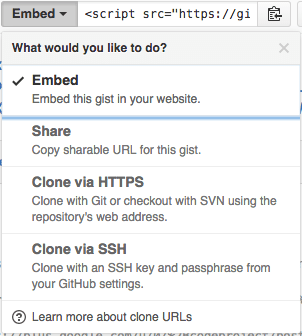
The “embed” dropdown allows to get URLs for sharing and git cloning.

Recently I did my very first JavaScript in HTML development. Since it was a one page experiment, I didn’t want to put it in an official repository of it’s own.

I will explain about the content in a future post, but first about getting it on-line as a HTML file that can run JavaScript.

This is the hosted page: Work around G+ “403. That’s an error.” errors.

Gists are the base

Gists are pretty amazing. They have history, syntax highlighting (which you can embed on your own page, see Using Github as a Syntax Highlighter for Your Blog or Website), can show an overview of files or even raw content. This holds for public and secret gists.

The history of all the files comes from a repository: in fact all gists are in fact git repositories of which you can get the URL (be it https or ssh) is under the “Embed” dropdown: see the screenshot on the right.

So the gist itself is available under these URLs:

The individual files can either be viewed as syntax highlighted (when they’re small enough, not binary and github knows how to highlight them), or as raw files:

Read the rest of this entry »

Posted in Development, DVCS - Distributed Version Control, gist, git, GitHub, rawgit, Source Code Management | 2 Comments »

Some useful links on bash parameters: $1, $*, $@, quotes, etc.

Posted by jpluimers on 2016/06/22

Some notes with the links I found them:

Syntax Effective result
$* $1 $2 $3 … ${N}
$@ $1 $2 $3 … ${N}
"$*" "$1c$2c$3c…c${N}"
"$@" "$1" "$2" "$3" … "${N}"

–jeroen

Posted in bash, Development, Scripting, Software Development | Leave a Comment »

German trains show Kernel, IP-address *and* MAC address

Posted by jpluimers on 2016/06/21

A long time ago, I found out German trains can show a Kernel version number during their boot sequence (sometimes even at their station, in this case Hannover Central Station). Recently, I found who posted the original of the picture (Volker Briegleb) and through reddit that Volker had posted more pictures on a twitter thread.

So this train showed:

  • Kernel: 6.1.0.0
  • IP: 10.0.0.196
  • MAC: 74:38:89:00:66:C9

The MAC address indicates the network device is made by ANNAX Anzeigesysteme GmbH.

–jeroen

Read the rest of this entry »

Posted in Development, Hardware, Software Development | Leave a Comment »

Writing tests for http / https request: Postman, SoapUI, Advanced REST client.

Posted by jpluimers on 2016/06/21

I’m using these Chrome Extensions for most of the http / https call mockups, and after that put them in SoapUI (which despite the name also does REST and has come a long way sinceSource: SoupUI – as sometimes that is the only thing that works):

You can get both Postman versions through GetPostman.com as well.

–jeroen

Posted in .NET, .NET 2.0, .NET 3.0, .NET 3.5, .NET 4.0, .NET 4.5, ASP.NET, C#, C# 3.0, C# 4.0, C# 5.0, Chrome, Communications Development, Development, Google, HTTP, Internet protocol suite, Power User, REST, Software Development, TCP | 1 Comment »

Y Combinator’s Xerox Alto: restoring the legendary 1970s GUI computer

Posted by jpluimers on 2016/06/20

Just wow: Source: Y Combinator’s Xerox Alto: restoring the legendary 1970s GUI computer

Posted in History | Leave a Comment »

On Windows 7, Visual Studio 2015 wanted Internet Explorer 10… here are the direct links to download it

Posted by jpluimers on 2016/06/20

Boy, don’t you dislike how hard it is to find direct download links

Well, thanks to kenorb and jjlin (slightly edited):

Check: IE6, IE7, IE8, IE9, IE10, IE11 Offline Installers Download Links – kenorb Mar 20 ’15 at 13:39 – http://www.itechtics.com/download-internet-explorer-all-versions/ – note this does not provide hashes.

jjlin:

Try these Microsoft offline installer links:

These may refuse to work if you already have IE 11 installed, though. If it is refused, try this: http://stackoverflow.com/questions/20043971/how-to-downgrade-from-internet-explorer-11-to-internet-explorer-10

And in case these links ever stop working and you must obtain a copy from a non-Microsoft source, here are the SHA-512 hashes for posterity:

  • 32-bit: d89ba3f9978be428ac05b182481198ab0f7b0c0651e4716e63cd0cf907d739cbc30f44ec9c444da683869473a548cd99e5c396467b2898f7c382b6345b3e70d2
  • 64-bit: f1752bb6517fe15071e5f7a4fee4b8680da1bdad1df7054ab22bab78fe0f46aee177787f60ea2cfc86a2db2b08429e2cba3cfdd20ba6a2ab69e091c7784dfdae

Source: internet explorer 10 – Does Microsoft still have a link to download IE10 for Windows 7? – Super User

–jeroen

Posted in .NET, Development, Internet Explorer, Power User, Software Development, Visual Studio 2015, Visual Studio and tools, Web Browsers, Windows, Windows 7 | Leave a Comment »

HP Color LaserJet 9500HDN and stock Windows 8.1 x64 drivers: PCL XL error Warning: IllegalMediaSource – via: Server Fault

Posted by jpluimers on 2016/06/20

HP Printers, PCL6 and drivers are always a fight to get right.

In this case the Microsoft stock Windows 8.1 x64 drivers always result in my HP LaserJet 9500 HDN printing a page like this from the same tray the last print job ran:

PCL XL error

        Warning: IllegalMediaSource

I’ve seen similar results with other Windows, printer and driver combinations (not limited to Microsoft drivers, but always PCL related), but never knew the solution.

Reading the answer, I totally recognise it: always some form of PCL6 driver was involved, and switching to PostScript solved it.

Note that there are three varieties of the HP Universal Print Driver for Windows:

  • PCL5
  • PCL6
  • PostScript

So now I know to always install the first and the last (:

–jeroen

via: windows xp – PCL XL error Warning: IllegalMediaSource – Server Fault.

Posted in HP Printer Drivers, Power User, Printer drivers, Windows, Windows 7, Windows 8, Windows 8.1, Windows Vista, Windows XP | Leave a Comment »

#Maths #fun – great graphics help to understand math

Posted by jpluimers on 2016/06/17

Good visualisations make math so much easier to grasp, so I completely agree with Thomas Mueller (dummzeuch)  who wrote “Why didn’t my Maths teachers use this kind of graphic? Why wasn’t it in the expensive book?”

Via #Maths #fun – I’m Programmer – Google+

Actual source: Binomial theorem: Geometric explanation – Wikipedia, the free encyclopedia picture File:Binomial expansion visualisation.svg – Wikipedia, the free encyclopedia (red/purple/blue) and File:Binomial theorem visualisation.svg – Wikimedia Commons (red/orange/green/blue)

I like the last picture best (I wonder though what colour blind people think about them).

–jeroen

Read the rest of this entry »

Posted in LifeHacker, Power User, science | Leave a Comment »

(Roaming) Profile and Folder Redirection

Posted by jpluimers on 2016/06/17

The article I quote from is about Windows Server 2003 and Windows XP, but still holds for modern Windows Server and Client versions:

After you enable roaming profiles for a couple of users, the first thing that you will probably notice is that logins and log offs become extremely slow for those users. […]

The solution to obscenely long logons and log offs is to use folder redirection. Folder redirection allows you to save portions of the user’s profile in a different location on the network. […]

You can’t redirect every folder in a user’s profile.[…] The folders that you can redirect are:

  • Application Data,
  • Desktop,
  • My Documents, and
  • Start Menu.

[…] I recommend creating a share point on the server to which you can redirect these folders.  […]

To redirect a folder, open the Group Policy Editor and navigate to User Settings | Windows Settings | Folder Redirection. The group policy requires you to redirect each of the four folders separately, but the procedure for doing so is the same for each folder:

  1. Set the folder’s Setting option to “Basic – Redirect Everyone’s Folder To The Same Location”.
  2. Next, select the Create A Folder For Each User Under The Root Path option from the Target Folder Location drop down list.
  3. Finally, enter your root path in the place provided.

–jeroen

via: Profile and Folder Redirection In Windows Server 2003 :: Windows 2003 :: Articles & Tutorials :: WindowsNetworking.com.

Posted in Power User, Windows, Windows 7, Windows 8, Windows 8.1, Windows 9, Windows Server 2003, Windows Server 2003 R2, Windows Server 2008, Windows Server 2008 R2, Windows Server 2012, Windows Server 2012 R2, Windows Vista, Windows XP | Leave a Comment »

When a fresh install of Bonobo Git Server on Windows 7 IIS 7 gives you a “HTTP Error 404.0 – Not Found”

Posted by jpluimers on 2016/06/16

HTTP Error 404.0 - Not Found

HTTP Error 404.0 – Not Found

Had this on a fresh Bonobo Git Server on a relatively fresh Windows 7 installation:

HTTP Error 404.0 – Not Found

At first I thought it was missing ASP because of the “StaticFile” in the error information, so I enabled it:

ASP is not enabled by default

ASP is not enabled by default

Enable ASP

Enable ASP

That didn’t help, so I searched for “MapRequestHandler” “HTTP Error 404.0 – Not Found” and found:

  1. HTTP Error 404.0 – Not Found (MapRequestHandler / StaticFile) when deploying WCF Web API on IIS 7.x | Alexander Zeitler
  2. aspnet_regiis.exe -i is still a solution : Fixing HTTP Error 404.0 – Not Found (MapRequestHandler / StaticFile) when deploying an application in IIS 7.x | Michael Hidalgo

Though ASP.NET was clearly enabled according to the Windows features, this was apparently for an old ASP.NET version so I manually re-registered ASP.NET (but now for Version 4: I had 4.6.1 installed):

C:\Windows\System32>%windir%\Microsoft.NET\Framework\v4.0.30319\aspnet_regiis.exe -ir
Microsoft (R) ASP.NET RegIIS version 4.0.30319.0
Administration utility to install and uninstall ASP.NET on the local machine.
Copyright (C) Microsoft Corporation. All rights reserved.
Start installing ASP.NET (4.0.30319.0) without changing existing web applications to use this version of ASP.Net.
.....
Finished installing ASP.NET (4.0.30319.0) without changing existing web applications to use this version of ASP.Net.

Windows 7 is .NET 2.0 all over the place…

Then it still didn’t work, but the second tip above also mentioned the application pool. And since Bonobo insists installing in wwwwroot, it’s using the default application which on Windows 7 – surprise! – is ASP.NET 2.0:

Default Windows 7 application pool for wwwroot uses ASP.NET 2.0

Default Windows 7 application pool for wwwroot uses ASP.NET 2.0

ASP.NET 4.0 needs to be the default.

ASP.NET 4.0 needs to be the default.

Changing that to ASP.NET 4.0 made it all work.

Read the prerequisites

Too bad that ASP.NET registration part is only prominently visible in the readme.md on github, but not in the installation instructions of the web-site with a tiny link (overwhelmed by the screenshots) to prerequisites.

Same for the default credentials:

  • username admin
  • password admin

–jeroen


Posted in .NET, ASP.NET, Development, DVCS - Distributed Version Control, git, Software Development, Source Code Management | Leave a Comment »