The Wiert Corner – irregular stream of stuff

Jeroen W. Pluimers on .NET, C#, Delphi, databases, and personal interests

  • My badges

  • Twitter Updates

  • My Flickr Stream

  • Pages

  • All categories

  • Enter your email address to subscribe to this blog and receive notifications of new posts by email.

    Join 1,861 other subscribers

Archive for July, 2018

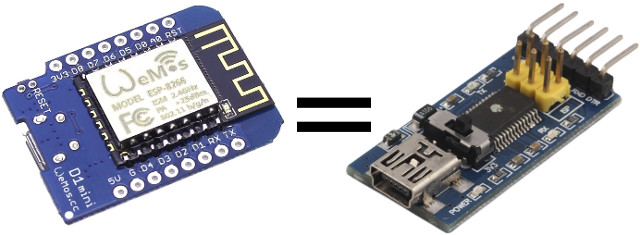
Transform Your ESP8266 Board into a USB to Serial Board Easily with Arduino Serial Bypass Sketch

Posted by jpluimers on 2018/07/11

An interesting re-use: [WayBackTransform Your ESP8266 Board into a USB to Serial Board Easily with Arduino Serial Bypass Sketch

Via: [WayBack] If you don’t have a USB to TTL board around, you can use an +ESP8266 board instead (or any other Arduino compatible boards with USB). – Jean-Luc Aufranc – Google+

–jeroen

Posted in Development, ESP8266, Hardware Development, IoT Internet of Things, Network-and-equipment, Power User | Leave a Comment »

MSSQL: finding column names

Posted by jpluimers on 2018/07/10

This small query gives you the tables, views and columns having characters likely not translating directly to ORM identifiers because they contain other characters than a-zA-Z0-9:

select *
from INFORMATION_SCHEMA.COLUMNS c
where 1=0
or c.TABLE_NAME LIKE '%[^a-zA-Z0-9_]%'
or c.COLUMN_NAME LIKE '%[^a-zA-Z0-9_]%'

The view [WayBack] COLUMNS (Transact-SQL) | Microsoft Docs in the … has been around since at least SQL Server 2000, so this is a pretty safe method for finding those columns.

As a bonus, I learned that SQL Server supports a subset of regular expression matches in like also since at least SQL Server 2000: LIKE.

Via [WayBack] SQL Server 2008 query to find rows containing non-alphanumeric characters in a column – Stack Overflow.

Related:

–jeroen

Posted in Database Development, Development, SQL Server | Leave a Comment »

Professional techniques for C# – Lecture Notes Parts 1..4 of 4 – CodeProject

Posted by jpluimers on 2018/07/10

If you’re new to C#, below is a good series of articles to get started.

Even if you’re not so new, there are quite some interesting bits to learn from them:

  1. [WayBackAn advanced introduction to C# – Lecture Notes Part 1 of 4 – CodeProject
    1. Introduction
    2. The right development environment
    3. Basic concepts
    4. Namespaces
    5. Data types and operators
    6. Reference and value types
    7. Control flow
    8. Object-oriented programming
    9. Inheritance and polymorphism
    10. Access modifiers
    11. Properties
    12. The constructor
    13. Abstract classes and interfaces
    14. Exception handling
    15. Outlook
    16. Other Articles in this Series
    17. References
    18. History
  2. [WayBackMastering C# – Lecture Notes Part 2 of 4 – CodeProject
    1. Introduction
    2. Enumerations
    3. Delegates
    4. Auto-generated properties
    5. Generic types
    6. Generic methods
    7. Constraints
    8. Lambda expressions
    9. Anonymous objects & inferring types
    10. Extension methods
    11. LINQ
    12. Windows Forms development
    13. Custom drawing in Windows Forms
    14. Outlook
    15. Other Articles in this Series
    16. References
    17. History
  3. [WayBackAdvanced programming with C# – Lecture Notes Part 3 of 4 – CodeProject
    1. Introduction
    2. Events
    3. The .NET standard event pattern
    4. Reflection
    5. Dynamic Types
    6. Accessing the file system
    7. Streams
    8. Threads
    9. Thread-communication
    10. The Task Parallel Library
    11. Tasks and threads
    12. Awaiting async methods
    13. Outlook
    14. Other Articles in this Series
    15. References
    16. History
  4. [WayBackProfessional techniques for C# – Lecture Notes Part 4 of 4 – CodeProject
    1. Introduction
    2. More control on events
    3. Overloading operators
    4. The yield statement
    5. Iterators
    6. Understanding co- and contra-variance
    7. Using attributes effectively
    8. Elegant binding
    9. Unsafe code
    10. Communication between native and managed code
    11. Effective C#
    12. Outlook
    13. Other Articles in this Series
    14. References
    15. History


–jeroen

Posted in C#, Development, Software Development | Leave a Comment »

IoT & Smart Location of Things – Google Maps, Google Cloud

Posted by jpluimers on 2018/07/10

#IoT + Google Maps Geocoding API

Convert between addresses & geographic coordinates to determine the location of devices relative to known addresses https://goo.gl/BfwYTF

Edit 202400819: the Googl link above will die, and the link it pointed to (enterprise.google.com/maps/iot) back then pointed to [Wayback/Archive] IoT & Smart Location of Things – Google Maps, Google Cloud.

Source: [WayBackIoT & Smart Location of Things – Google Maps, Google Cloud

Via: [WayBack] Google Maps API – Google+

--jeroen

Posted in Development, IoT Internet of Things, LoRa - Long Range wireless communications network, Network-and-equipment, Power User, Software Development | Leave a Comment »

Skype consumer IP ranges

Posted by jpluimers on 2018/07/09

Since I will likely have to enable Skype in a relatively restricted environment, here are some links that likely will help me getting IP lists to open up:

–jeroen

Posted in Internet, Power User, routers, Skype | Leave a Comment »

btrfs free space. It’s complicated. Still.

Posted by jpluimers on 2018/07/09

Everytime a btrfs based volume runs out of space, I’m reminded of these:

There are a few scripts that help you assess quota usage. If you think they are wrong, then you need to btrfs quota rescan / which tells you that it started, but won’t tell when it’s finished (nor wil journalctl -xe a.k.a. journalctl --catalog --pager-end), but dmesg does:

# dmesg | grep qgroup
[ 316.608122] BTRFS info (device sda2): qgroup scan completed (inconsistency flag cleared)

For now I’ve this quick script to start investigation:

~/Versioned/btrfs-du/btrfs-du && df -h | grep "\/$\|^[^\/]" && btrfs quota rescan -s /

It assumes there is quota on the root (enable with btrfs quota enable /) and is based on my fork github.com/jpluimers/btrfs-du. The df will limit itself to the root (trailing / matched by \/$) or disks not mounted from / (matched by ^[^\/]).

–jeroen

References (not solutions):

Read the rest of this entry »

Posted in *nix, btrfs, File-Systems, Linux, openSuSE, Power User, SuSE Linux | Leave a Comment »

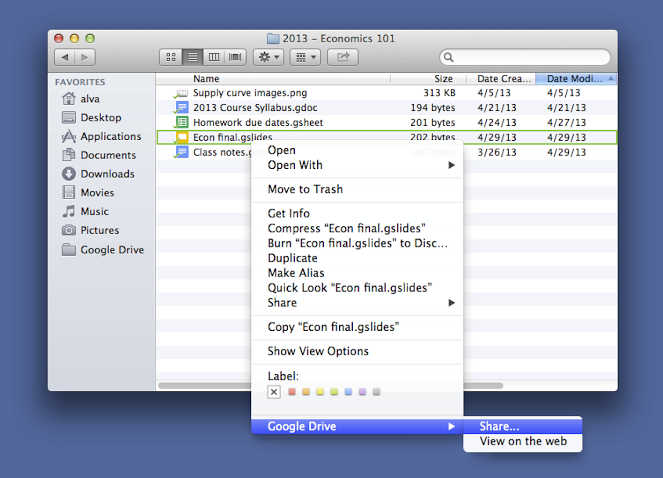
Mac: when “Save time with right-click sharing from your Google Drive folder” fails…

Posted by jpluimers on 2018/07/09

A few years ago, Google Drive introduced this:

For those looking to share files more quickly, listen up. You can now share with others directly from the Google Drive folder on your Mac or PC. To share a file while inside your Google Drive folder, simply right click the file, select “Google Drive” and then click “Share.” This new feature is rolling out over the next few days.

Source: [WayBackSave time with right-click sharing from your Google Drive folder…

However, sometimes it fails. And the menu has changed as well.

By now the menu looks like this:

  • “View with Google Drive”
  • “Share using Google Drive”

If those do not appear, then:

Try to stop, then start Google Drive.

If that fails:

Read the rest of this entry »

Posted in Google, GoogleDrive, LifeHacker, Power User | Leave a Comment »

Automated “take-down” algorithm simulation: thread by @AlecMuffett: “Regards Article13, I wrote up a little command-line false-positive emulator; it tests 10 million events with a test (for copyrighted material […]” #Article13

Posted by jpluimers on 2018/07/08

Via [WayBack] Artikel 13 (Uploadfilter) vs. Math – Math wins – Kristian Köhntopp – Google+:

Simulation of the proposed law effects are easy: [WayBackThread by @AlecMuffett: “Regards Article13, I wrote up a little command-line false-positive emulator; it tests 10 million events with a test (for copyrighted material) […]” #Article13

What it shows that an automated test for content-originality only succeeds when there are a truckload of copyrighted-material uploads than original-content uploads:

about 1 in 67 postings have to be “bad” in order to break even

So if you have less than 1% false uploads, even with a 98.5% accuracy (which is very very good for a take-down algorithm!), you will piss off far more good items wrongly marked as false positive, than bad items correctly marked bad.

When the accuracy gets less, you piss-off far more original-content uploads, but also catch less copyrighted-material uploads..

This is called the a far less “sexy” term False positive paradox – Wikipedia, which is a specialisation of the far mor dull sounding Base rate fallacy – Wikipedia

Source code: [WayBack] random-code-samples/falsepos.py at master · alecmuffett/random-code-samples · GitHub

Original thread:

[WayBack] Alec Muffett on Twitterさん: “Regards #Article13, I wrote up a little command-line false-positive emulator; it tests 10 million events with a test (for copyrighted material, abusive material, whatever) that is 99.5% accurate, with a rate of 1-in-10,000 items actually being bad.… https://t.co/CJvxdvkiom”

https://twitter.com/alecmuffett/status/1015594170424193024

and

[WayBack] next_ghost on Twitter: “And for the nerds who want to learn more, this is called a “False positive paradox”. https://t.co/CIvw2ni21q… “


–jeroen

Posted in Algorithms, Development, Software Development | 1 Comment »

Tail it: 4 new affordable GPS trackers with global range by Morten Sæthre — Kickstarter

Posted by jpluimers on 2018/07/08

A few more days: [Archive.is] Tail it GPS

Via:

–jeroen

Posted in LifeHacker, Power User | Leave a Comment »

Online markup conversion from markdown to mediawiki: pandoc

Posted by jpluimers on 2018/07/06

Since Mediawiki needs an extension to display Markdown, and many MediaWiki installations do not have that extension, I was looking for an online conversion from markdown to MediaWiki markup.

Luckily the Pandoc try has this conversion: [WayBack] Try pandoc! Markdown(pandoc) -> MediaWiki

These links helped me get there:

–jeroen

Posted in *nix, *nix-tools, Development, Lightweight markup language, MarkDown, MediaWiki, pandoc document converter, Power User, Software Development | Leave a Comment »