Posted by jpluimers on 2020/09/16
[WayBack] A thread written by @SwiftOnSecurity:
Corporate purchasing and policies make funding open source Literally Impossible.
Nothing’s going to change until you make them pay you.
Someone filed a bug?
Support contract.
Someone wants a feature?
Support contract.
It’s literally easier to pay you $1500/yr than $25 once.
Edit: since Threader/Threader_app died, I archived the Twitter thread at Archive.today.
And much more: worth a long read.
Via another interesting post: [WayBack] Idea for FOSS projects. Register your project/product name as a trademark and only use it for official, stable releases. Have a different name for your … – Jan Wildeboer – Google+
Idea for FOSS projects. Register your project/product name as a trademark and only use it for official, stable releases. Have a different name for your not-(yet)-stable Code.
Put trademark agreements in place. Everyone who uses your trademarked name for services based on your code has to pay. Everybody using the non-stable code is free to do so, but cannot use your trademarked name.
With lots of interesting comments:
- Jan Wildeboer
+Andreas Kahler because when you don’t allow use without pay you are violating the open source principles.
-
-
-
It’s how most distros work – it can be a problem though because you then control how the mark is used and without care it becomes a blocker. Eg it’s really hard to ship Unbuntu based stuff because you can’t modify Ubuntu and call it Ubuntu (which is fair enough) , but for cloud images – problem.
-
+Alan Cox That’s why it IMHO makes more sense for projects/products.
- Jan Wildeboer+1
+Torsten Kleinz … Setting up a new provider at any medium to big company is a big, lengthy and horrifyingly complex process.
–jeroen
Read the rest of this entry »
Posted in Development, Open Source, Software Development | Leave a Comment »
Posted by jpluimers on 2020/09/16
A while ago, I had an error like this when debugging plugins:
Project bds.exe raised exception class EOSError with message ‘System Error. Code: 183.
Cannot create a file when that file already exists’.
It got was raised when [WayBack] GetLastError returned ERROR_ALREADY_EXIST which according to [WayBack] System Error Codes (0-499) (Windows) has this description:
ERROR_ALREADY_EXISTS
- 183 (0xB7)
- Cannot create a file when that file already exists.
The last line is the same description that [WayBack] FormatMessage returns. And it put me on the wrong foot as it wasn’t a file, but a mutex that was created: indeed [WayBack] CreateMutex documents it:
If the mutex is a named mutex and the object existed before this function call, the return value is a handle to the existing object, GetLastError returns ERROR_ALREADY_EXISTS, bInitialOwner is ignored, and the calling thread is not granted ownership. However, if the caller has limited access rights, the function will fail with ERROR_ACCESS_DENIED and the caller should use the OpenMutex function.
In the mean time, the plugin doesn’t raise that as an exception any more.
–jeroen
Posted in Development, Software Development, Windows Development | Leave a Comment »
Posted by jpluimers on 2020/09/16
To prevent a screen-saver from kicking in [WayBack] jiggling the mouse – twm’s blog:
My solution then is this procedure:
procedure JiggleMouse;
var
  Inpt: TInput;
begin
  Inpt.Itype := INPUT_MOUSE;
  Inpt.mi.dx := 0;
  Inpt.mi.dy := 0;
  Inpt.mi.mouseData := 0;
  Inpt.mi.dwFlags := MOUSEEVENTF_MOVE;
  Inpt.mi.time := 0;
  Inpt.mi.dwExtraInfo := 0;
  SendInput(1, Inpt, SizeOf(Inpt));
end;
Call it in regular intervals and the screen saver will not start.
This is now (or soon will be) in the u_dzOsUtils unit which is part of my dzlib utility library.
–jeroen
Posted in Delphi, Development, Power User, Software Development, Windows | 1 Comment »
Posted by jpluimers on 2020/09/14
When you have the forrest and trees problem on Amazon Instances, then these will help a lot:
It is open source too: [WayBack] GitHub – powdahound/ec2instances.info: Amazon EC2 instance comparison site
Found this because I wanted to know instance difference because the 2018 addition of local NVMe storage to C5/M5 instances:
–jeroen
Posted in Azure Cloud, Cloud, Infrastructure, LifeHacker, Power User | Leave a Comment »
Posted by jpluimers on 2020/09/14
I needed to get myself an OOB license for the BIOS update over the IPMI console or SUM (Supermicro Update Manager). An IPMI update can be done without an OOB license from the IPMI console, but the BIOS requires a license.
Links that initially helped me with that to get a feel for what I needed:
I thought that likely I need to purchase a key for it:
Obtain the license code from your IPMI BMC MAC address
But then I found out the below links on reverse engineering.
From those links, I checked both the Perl and Linux OpenSSL versions. Only the Perl version works on MacOS.
Then I fiddled with the bash version: unlike the OpenSSL version above, this one printed output. It wrongly printed the last groups of hex digits instead of the first groups of hex digits that the Perl script prints.
Here is the corrected bash script printing the first groups of hex digits (on my systems, I have an alias supermicro_hash_IPMI_BMC_MAC_address_to_get_OOB_license_for_BIOS_update for it):
#!/bin/bash
function hash_mac {
  mac="$1"
  key="8544e3b47eca58f9583043f8"
  sub="\x"
  #convert mac to hex
  hexmac="\x${mac//:/$sub}"
  #create hash
  code=$(printf "$hexmac" | openssl dgst -sha1 -mac HMAC -macopt hexkey:"$key")
  #DEBUG
  echo "$mac"
  echo "$hexmac"
  echo "$code"

  echo "${code:0:4}-${code:4:4}-${code:8:4}-${code:12:4}-${code:16:4}-${code:20:4}"
}
Steps
Reverse engineering links
- [WayBack] The better way to update Supermicro BIOS is via IPMI – VirtualLifestyle.nl
Another way to update the BIOS via the Supermicro IPMI for free is simply calculating the license key yourself as described here: https://peterkleissner.com/2018/05/27/reverse-engineering-supermicro-ipmi/ [WayBack].
- [WayBack] Reverse Engineering Supermicro IPMI – peterkleissner.com
Algorithm:
MAC-SHA1-96(INPUT: MAC address of BMC, SECRET KEY: 85 44 E3 B4 7E CA 58 F9 58 30 43 F8)
Update 1/14/2019: The Twitter user @astraleureka posted this code perl code which is generating the license key:
#!/usr/bin/perl
use strict;
use Digest::HMAC_SHA1 'hmac_sha1';
my $key  = "\x85\x44\xe3\xb4\x7e\xca\x58\xf9\x58\x30\x43\xf8";
my $mac  = shift || die 'args: mac-addr (i.e. 00:25:90:cd:26:da)';
my $data = join '', map { chr hex $_ } split ':', $mac;
my $raw  = hmac_sha1($data, $key);
printf "%02lX%02lX-%02lX%02lX-%02lX%02lX-%02lX%02lX-%02lX%02lX-%02lX%02lX\n", (map { ord $_ } split '', $raw);
Update 3/27/2019: There is also Linux shell version that uses openssl:
echo -n 'bmc-mac' | xxd -r -p | openssl dgst -sha1 -mac HMAC -macopt hexkey:8544E3B47ECA58F9583043F8 | awk '{print $2}' | cut -c 1-24
- [WayBack] Modular conversion, encoding and encryption online — Cryptii
Web app offering modular conversion, encoding and encryption online. Translations are done in the browser without any server interaction. This is an Open Source project, code licensed MIT.
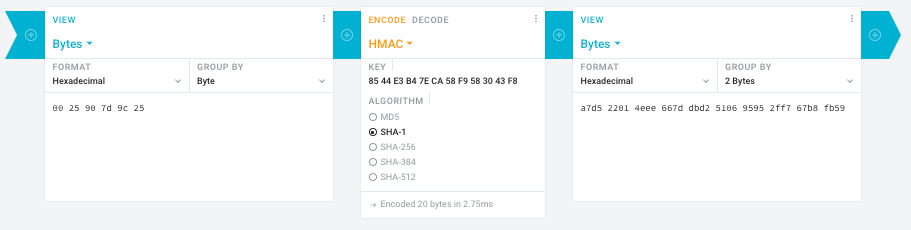
Steps:
- In the left pane, select the “View” drop-down to be “Bytes”, then paste the HEX bytes of your IPMI MAC address there (like
00 25 90 7d 9c 25)
- In the middle pane, select the drop-down to become “HMAC” followed by the radio-group to be “SHA1“, then paste these bytes into the “Key” field:
85 44 E3 B4 7E CA 58 F9 58 30 43 F8
- In the right pane, select the drop-down to become “Bytes”, then the “Group by” to become “2 bytes”, which will you give the output (where the bold part is the license key: 6 groups of 2 bytes):
a7d5 2201 4eee 667d dbd2 5106 9595 2ff7 67b8 fb59
Result:
- Michael Stapelberg’s private website, containing articles about computers and programming, mostly focused on Linux.[WayBack] Securing SuperMicro’s IPMI with OpenVPN
- [WayBack] GitHub – ReFirmLabs/binwalk: Firmware Analysis Tool
- [WayBack] The better way to update Supermicro BIOS is via IPMI – VirtualLifestyle.nl
Ahh…..a few corrections :-P
#!/bin/bash
function hash_mac {
  mac="$1"
  key="8544e3b47eca58f9583043f8"
  sub="\x"
  #convert mac to hex
  hexmac="\x${mac//:/$sub}"
  #create hash
  code=$(printf "$hexmac" | openssl dgst -sha1 -mac HMAC -macopt hexkey:"$key")
  #DEBUG
  echo "$mac"
  echo "$hexmac"
  echo "$code"
  echo "${code:9:4} ${code:13:4} ${code:17:4} ${code:21:4} ${code:25:4} ${code:29:4}"
}
#hex output with input
hash_mac "$1"

#Look out for the quotes, they might get changed by different encoding
- [WayBack] The better way to update Supermicro BIOS is via IPMI – VirtualLifestyle.nl
Thanks Peter. For anyone interested, here’s a bash script that takes the MAC as the only argument and outputs the activation key:
#!/bin/bash
function hash_mac {
  mac="$1"
  key="8544e3b47eca58f9583043f8"
  sub="\x"
  #convert mac to hex
  hexmac="\x${mac//:/$sub}"
  #create hash
  code=$(printf "$hexmac" | openssl dgst -sha1 -mac HMAC -macopt hexkey:"$key")
  ## DEBUG
  echo "$mac"
  echo "$hexmac"
  echo "$code"
  echo "${code:9:4} ${code:13:4} ${code:17:4} ${code:21:4} ${code:25:4} ${code:29:4}"
}
## hex output with input
hash_mac "$1"
–jeroen
Read the rest of this entry »
Posted in Development, Encoding, Hardware, Hashing, HMAC, Mainboards, OpenSSL, Power User, Security, SHA, SHA-1, Software Development, SuperMicro, X10SRH-CF | Leave a Comment »
Posted by jpluimers on 2020/09/14
Interesting, not just from a GDPR perspective:
EditThisCookie is a cookie manager. You can add, delete, edit, search, protect and block cookies!
[WayBack] EditThisCookie – Chrome Web Store
Via [WayBack] Error 400 on Google sites (YouTube, Maps, Search etc) · Issue #537 · deanoemcke/thegreatsuspender · GitHub
–jeroen
Posted in Chrome, Chrome, Google, LifeHacker, Power User, Web Browsers | Leave a Comment »




 The Wiert Corner - irregular stream of stuff