


[WayBack] Laat Je Niet Hack Maken: een goed wachtwoord
Laat Je Niet Hack Maken legt op een begrijpelijke manier uit hoe je jezelf beschermt tegen hackers.
–jeroen
via:
https://twitter.com/danielverlaan/status/1174262886472048640
Posted by jpluimers on 2021/09/13
[WayBack] Laat Je Niet Hack Maken: een goed wachtwoord
Laat Je Niet Hack Maken legt op een begrijpelijke manier uit hoe je jezelf beschermt tegen hackers.
–jeroen
via:
https://twitter.com/danielverlaan/status/1174262886472048640

Posted in LifeHacker, Power User, Security | Leave a Comment »
Posted by jpluimers on 2021/09/13
Voor mijn link archief:
In mijn vakgebied precies hetzelfde: het allermoeilijkste in software development is dingen de juiste naam te geven, zowel aan de techniek als aan de domein kant.
Klopt wat ik schreef over agile benadering in
Jeroen Pluimers@jpluimers<< Formatief beoordelen wordt vaak als een cyclisch proces weergegeven in de zogenoemde formatieve toetscyclus (Gulikers en Baartman, 2017). >>
Klinkt als een agile benadering van leren en doceren.
Daar kan ik denk ik wel wat mee.
3/3
?
1/2
Dan is iets met “feedback” in plaats van “toetsen” een betere keuze in de context “formatief”.2/2
- https://www.google.com/search?q=%27Dylan+Wiliam%27+%27tien+lessen%27+site%3Atoetsrevolutie.nl …
- [WayBack] Neem formatief niet te snel voor lief: tien lessen van Dylan Wiliam (1 t/m 4) | Toetsrevolutie
- [WayBack] Neem formatief niet te snel voor lief: tien lessen van Dylan Wiliam (5 t/m 7) | Toetsrevolutie
- [WayBack] Neem formatief niet te snel voor lief: Tien lessen van Dylan Wiliam (8 t/m 10) | Toetsrevolutie
Deze link vind ik het meest begrijpelijk: handreikingschoolexamen.slo.nl/technologie-en…
<<
Summatief evalueren gaat om een eindoordeel, vaak in de vorm van een cijfer.… >>
1/3<< Formatieve evaluatie houdt alle activiteiten in die leerlingen en docent uitvoeren om de leeractiviteiten van leerlingen in kaart te brengen, te interpreteren en te gebruiken om betere beslissingen te maken over vervolgstappen
… >>
2/3<< Formatief beoordelen wordt vaak als een cyclisch proces weergegeven in de zogenoemde formatieve toetscyclus (Gulikers en Baartman, 2017). >>
Klinkt als een agile benadering van leren en doceren.
Daar kan ik denk ik wel wat mee.
3/3
–jeroen

Posted in Learning/Teaching, LifeHacker, Power User | Leave a Comment »
Posted by jpluimers on 2021/09/13
Enjoy Day of the Programmer and [WayBack] Geek And Poke: The Art Of Programming – Part 2: KISS
–jeroen
Related: Happy Day of the Programmer! 2018
Posted in Development, Software Development | Leave a Comment »
Posted by jpluimers on 2021/09/10
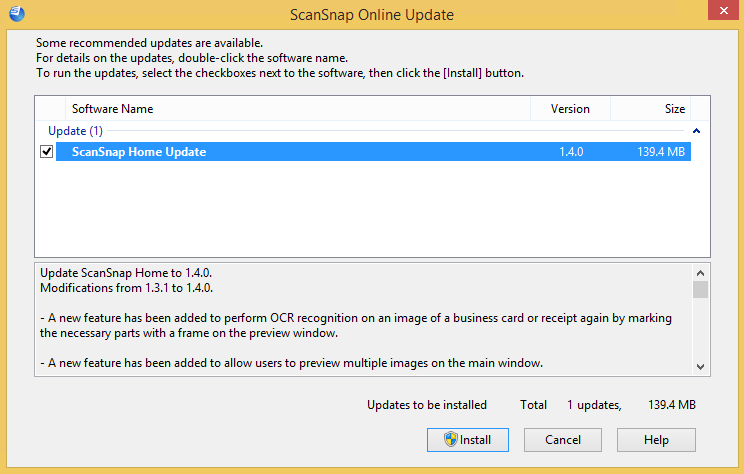 The first stupid thing is that when pressing the “Install” button: it will not ask for UAC elevation, despite the UAC elevation badge:
The second is the release notes from the installer indicate there is more information to be found when clicking, but after clicking it shows exactly the same information:
Update ScanSnap Home to 1.4.0.
Modifications from 1.3.1 to 1.4.0.– A new feature has been added to perform OCR recognition on an image of a business card or receipt again by marking the necessary parts with a frame on the preview window.
– A new feature has been added to allow users to preview multiple images on the main window.
– A new feature has been added to apply [ScanSnap Manager – Profile] to ScanSnap Home.
– Help menus and contents have been improved, allowing users to find information that they want quickly on the Help.
– Operability for linking with cloud services has been improved.
– Operability for adding and editing profiles on the taskbar has been improved.
– A modification has been made so that you can delete a content data record that is managed in ScanSnap Home even after you delete a file for the content data record in Explorer.
– The waiting time it takes after a scan has been reduced.
– A modification has been made which enables users to use the scan window as soon as it is displayed.
– Operability for contacting your support representative has been improved.
– Fixed the problem that occurs on ScanSnap iX500, preventing the Wi-Fi settings from being configured successfully with an SSID that includes double-byte characters.
– Fixed the problem where the Scan buttons for other users may not be disabled on the touch panel when users are switched.
– Fixed the problem where the scanner turns off even if [Automatic power off] is set to [Never].
– Fixed the problem that occurs when the title of a content data record is changed during text recognition, causing the changed title to return back to the original title.
– Fixed the problem that occurs when scanned images are not managed in ScanSnap Home and when they are linked with a certain application, preventing the scanned images from being saved in a specified folder.
– Fixed the problem that occurs when a connection is established with ScanSnap SDK via Wi-Fi, preventing a serial number from being obtained with the GetScannerInfo command.
– Other miscellaneous bug fixes and improvements have been done.
For details, double-click [ScanSnap Home Update].
–jeroen

Posted in Fujitsu ScanSnap, Hardware, ix100, ix1500, ix500, Power User, Scanners | Leave a Comment »
Posted by jpluimers on 2021/09/10
SwiftOnSecurity is a great account to follow.
One tweet was the base of my post [WayBack] On Windows, having an empty password can improve security.
Another tweet the base of this one.
Doug is great!
Swift has some great github resources too:
–jeroen
Posted in Power User, Security, Windows | Leave a Comment »
Posted by jpluimers on 2021/09/10
Reminder to self that this is an excellent part of a dashboard for someone with Alzheimer’s disease: [WayBack] Hoe laat het is: hoe laat is het? Zo laat is het.
–jeroen
Posted in Alzheimer's disease, LifeHacker, Power User | Leave a Comment »
Posted by jpluimers on 2021/09/09
For my link archive (most via [Wayback] sata very slow after ESXi 6.7 update – Google Search):
dd: [Wayback] datastore – How can I speed up file tranfers on local storage in vSphere 5? – Server Faultlspci | grep -E -i "SAS|SATA|SCSI|RAID|SSD" for this): [Wayback] Freenas on ESXI – AHCI Passthrough – Intel C220 Lynx Point Controller | TrueNAS Communityesxcli storage core adapter list to ist controllers together with drivers, then lspci -n (I tend to use lspci -v | less for this) to find which one to set to passthrough: [Wayback] Kaperschip: AHCI controller passthrough with a Supermicro Xeon-D motherboardvmw_ahci being slow,whereas the Patsburg driver isn’t (this is supposed to be fixed in ESXi 6.7): [Wayback/Archive.is] Incredibly slow disk performance – ESXi 6.5 : vmware
ESXi 6.5 includes a new native driver (vmw_ahci) for SATA AHCI controllers, but that introduces performance problems with a lot of controllers and/or disks.
Try to disable the native driver and revert to the older sata-ahci driver by running
esxcli system moduleset--enabled=false--module=vmw_ahciin an ESXi shell. Reboot the host to make the change effective.
Two takeaways already:
–jeroen
Posted in ESXi6, ESXi6.5, ESXi6.7, ESXi7, Power User, Virtualization, VMware, VMware ESXi | Leave a Comment »
Posted by jpluimers on 2021/09/09
When you do a choco upgrade all --yes on a system that – during upgrade – becomes low on disk space, you can end up with a lot of empty .nupkg files.
For those package, Chocolatey will not recognise they are installed any more.
The fix is this:
--force parameter before the --yes parameter like in
choco install --force --yes chocolatey
choco upgrade --all --yesI wrote a few PowerShell scripts assisting me in cleaning up the mess.
choco-list-installed.bat:: https://superuser.com/questions/890251/how-to-list-chocolatey-packages-already-installed-and-newer-version-available-fr choco list --localonly %*
choco-show-installed-package-names.bat:: `--limit-output` does not show Chocolatey version header and count footer. :: `--id-oonly` omits the version number, so you only get the package name choco list --local-only --limit-output --id-only
choco-show-installed-package-names-and-versions.bat:: `--limit-output` does not show Chocolatey version header and count footer. choco list --local-only --limit-output %*
choco-reinstall-empty-nupkg-by-names.ps1There is an environment variable set on installation,
ChocolateyInstall, which is set toC:\Chocolateyby default in versions of Chocolatey less than 0.9.8.27. After that, this defaults toC:\ProgramData\Chocolatey.NOTE: By default, the
C:\ProgramDatafolder on Windows is hidden. You will either need to enable hidden files and folders throughFolder Options | Viewor you can navigate directly to the path shown above by copy/pasting directly into the Windows Explorer address bar.In version 0.9.9 of Chocolatey, it actively moves from the old folder location to the new one.
A convenient way to obtain the string value rather than the dictionary entry (which is technically what
Get-ChildItemis accessing) is to just use the variable syntax:$Env:USERPROFILErather thanGet-ChildItem Env:USERPROFILE.$localpath = "$env:USERPROFILE\some\path"…
Also, the
Join-Pathcmdlet is a good way to combine two parts of a path.$localpath = Join-Path $env:USERPROFILE 'some\path'
<#
https://learningpcs.blogspot.com/2009/12/powershell-finding-0-byte-files.html

Zero length .nupkg files sorted by oldest first.

These are packages that choco will not show and likekly need a forced reinstall.

Choco does remember the version that was installed (so not all the choco config is hosed).

- https://stackoverflow.com/questions/28235388/where-is-the-chocolatey-installation-path/28239451#28239451
- https://stackoverflow.com/questions/41047123/powershell-concatenate-an-environment-variable-with-path/41047343#41047343

/#>
$LibPath = Join-Path $env:ChocolateyInstall 'lib'
$NuPkgExtension = 'nupkg'
$NupkgFilter = "*.$NuPkgExtension"

## Remove the empty .nupkg files for each argument
$args | ForEach-Object {
    $PackageName = $_
    Write-Output "Deleting any empty $PackageName.$NuPkgExtension under $LibPath :"

    Get-ChildItem -Path $LibPath -Recurse -Filter $NupkgFilter | Where-Object {
        ($_.Length -eq 0) -and ($_.BaseName -eq $PackageName)
    } | Sort-Object LastWriteTime | ForEach-Object {
        $PackageFullName = $_.FullName
        Write-Output "Deleting $PackageFullName"
        Remove-Item $PackageFullName
    }
}

## Force install the chocolatey package for each argument
$args | ForEach-Object {
    $PackageName = $_
    Write-Output "Installing $PackageName with Chocolatey:"
    choco install --force --yes $PackageName
}
Some more links that helped me solve this:
Some links on errors I encountered while recovering from this:
--ignorechecksum to choco --install (see [WayBack] CommandsInstall · chocolatey/choco Wiki · GitHub)--force parameterSysinternals Suite is going to be installed in ‘C:\ProgramData\chocolatey\lib\sysinternals\tools’
File appears to be downloaded already. Verifying with package checksum to determine if it needs to be redownloaded.
Error – hashes do not match. Actual value was ‘A510C31C2CC591A16F342E7CBA5DC8409EAF08C9B56729CF132C95C69E196787’.
Downloading sysinternals
from ‘https://download.sysinternals.com/files/SysinternalsSuite.zip’
Progress: 100% – Completed download of C:\Users\devCrPhoneDebug\AppData\Local\Temp\2\chocolatey\sysinternals\2018.12.27\SysinternalsSuite.zip (23.51 MB).
Download of SysinternalsSuite.zip (23.51 MB) completed.
Error – hashes do not match. Actual value was ‘A510C31C2CC591A16F342E7CBA5DC8409EAF08C9B56729CF132C95C69E196787’.
ERROR: Checksum for ‘C:\Users\devCrPhoneDebug\AppData\Local\Temp\2\chocolatey\sysinternals\2018.12.27\SysinternalsSuite.zip’ did not meet ‘b14466c6bf3be216ea71610a3f455030e791cd5ad1b42a283886194205d176b0’ for checksum type ‘sha256’. Consider passing the actual checksums through with –checksum –checksum64 once you validate the checksums are appropriate. A less secure option is to pass –ignore-checksums if necessary.
The install of sysinternals was NOT successful.
Error while running ‘C:\ProgramData\chocolatey\lib\sysinternals\tools\chocolateyInstall.ps1’.
See log for details.Chocolatey installed 0/1 packages. 1 packages failed.
See the log for details (C:\ProgramData\chocolatey\logs\chocolatey.log).
.nupkg files first, which will give you an idea on the potential missing dependencies. Retry by forcing reinstall each dependency..nupkg files. Example: [WayBack] Unable to resolve dependency · Issue #206 · chocolatey/choco · GitHub
choco-reinstall-empty-nupkg-by-names.ps1command, then retry.–jeroen
Posted in Chocolatey, COBOL, Development, Power User, PowerShell, PowerShell, Scripting, Software Development, Windows, Windows 10 | Leave a Comment »
Posted by jpluimers on 2021/09/09
I knew I could run shell:startup and similar shortcuts from the Explorer address bar or the Windows-R “run” prompt.
First I learned that via [WayBack] tablet – How to set Google Chrome to automatically open up and in full screen – Super User.
Then via [WayBack] “shell:startup” – Google Search, I found [WayBack] Location of the Startup folder in Windows 10.
It took a while before I realised you can also run them from the command-prompt, batch-files or PowerShell scripts prepending them with start:
start shell:startup
That one will open a new explorer window in the user startup folder from either the command-prompt, a batch file or PowerShell script..
The shell: shortcuts can contain spaces. So for instance there is shell:common startup that opens the common startup folder.
Starting it from the command prompt, batch file or PowerShell script is different: because of the spaces you will get the error on the right unless you add double quotes:
start "shell:common statartup"
All shell: commands that you can run in the same way: double quotes work for both the ones requiring spaces and the simple ones nor requiring spaces.
Virtually each new Windows version (even most Windows 10 major builds) gets new shell: commands.
A good source with an up-to-date and historically accurate of shell: commands list is at [WayBack] Shell Commands to Access the Special Folders in Windows 10/8/7/Vista/XP » Winhelponline,
You can get the current list by recursively enumerating the HKEY_LOCAL_MACHINE\SOFTWARE\Microsoft\Windows\CurrentVersion\Explorer\FolderDescriptions registry key, which consists of a list of Explorer folder GUIDs having Name, ParentFolder and RelativePath value names.
–jeroen
Posted in Batch-Files, Console (command prompt window), Development, Power User, Scripting, Software Development, Windows | Leave a Comment »
Posted by jpluimers on 2021/09/08
Not sure why, bit if you want to force install a package, answering yes to all prompts, the chocolaty parameter order needs to be --yes --force instead of --force --yes.
This works:
choco install --yes --force git.install --params "/GitAndUnixToolsOnPath /NoGitLfs /SChannel /NoAutoCrlf /WindowsTerminal"
This fails:
choco install --force --yes git.install --params "/GitAndUnixToolsOnPath /NoGitLfs /SChannel /NoAutoCrlf /WindowsTerminal"
–jeroen
Posted in Chocolatey, Development, DevOps, Power User, Scripting, Software Development, Windows | Leave a Comment »

 The Wiert Corner - irregular stream of stuff