Archive for the ‘base64’ Category
Posted by jpluimers on 2026/02/25
Often I need to generate passwords or uuids (on some systems called guids). I usually try to do that in a relatively platform agnostic way as I use MacOS, Windows and Linux in various mixes for many reasons (for instance that I have had developed quite hefty RSI in the early 1990s of the and the best keyboard/pointing-device combination for is the MacBook built in keyboard/touchpad combination so basically MacBooks are my window to all other operating systems).
Generating randomly with a good random number generator them makes sense as for most usage, it is important that both passwords and uuids are hard to guess which means having an entropy that is as high as possible.
A cool thing about OpenSSL is that:
- most of not all systems have it installed (it was no coincidence I published Installing OpenSSL on Windows a few days ago)
- it has a very good pseudo-random number generator and as of [Wayback/Archive] OpenSSL version 1.1.1 first released in 2018 has solved the problem around [Wayback/Archive] Random fork-safety – OpenSSLWiki, see [Wayback/Archive] Our Review of the OpenSSL 1.1.1 Random Number Generation Update – OSTIF.org.
- it supports various useful output formats
hex (hexadecimal) and base64 (next to the default of octet – or by today’s naming convention byte – output)
The easiest to generate are passwords. Yes I know that password managers can do this too, but there are some systems I cannot use them on or sync between them (don’t you love the corporate world) so my aim is to use a random password generator in a platform agnostic way which usage is easy to remember. Read the rest of this entry »
Posted in *nix, *nix-tools, Apple, base64, bash, bash, Batch-Files, Conference Topics, Conferences, Development, Encoding, Event, HEX encoding, Mac, Mac OS X / OS X / MacOS, MacBook, OpenSSL, Power User, Python, Scripting, Software Development, Windows | Leave a Comment »
Posted by jpluimers on 2026/02/17
Yesterday, an important question appeared at almost the same time on Tweakers.net and Security.nl. It is about 2D barcodes on some packages delivered by PostNL. Some of these – I call them Data Matrix, as that is what they are – seem to include the e-mail address of the recipient.
The posts caused some uproar, and in order for myself to understand what is going on and what questions should be asked to PostNL, I wrote this blog post.
In any case: always remove parcel labels before disposing of the parcels, then destroy the labels. This has always been good privacy practice and will stay that way forever.
Regrettably, Tweakers.net blocks both the Wayback Machine and Archive Today, which makes their information ephemeral. Therefore I archived some of the Tweakers.net information in the gist [Wayback/Archive] “E-mailadres van ontvanger kan in PostNL barcode staan” archived from https://gathering.tweakers.net/forum/list_messages/2327530/0 · GitHub
Read the rest of this entry »
Posted in base64, Development, Encoding, Font, KIX Font PostNL, Power User, Python, Scripting, Software Development | Leave a Comment »
Posted by jpluimers on 2021/06/24
Usually when I see this error [Wayback] “No mapping for the Unicode character exists in the target multi-byte code page” – Google Search, it is in legacy code that uses string buffers where decoding or decompressing data into.
This is almost always wrong no matter what kind of data you use, as it will depend in your string encoding.
I have seen it happen especially in these cases:
- base64 decoding from string to string (solution: decode from a string stream into a binary stream, then post-process from there)
- zip or zlib decompress from binary stream to string stream, then reading the string stream (solution: decompress from binary stream to binary stream, then post-process from there)
Most cases I encountered were in Delphi and C code, but surprisingly I also bumped into C# exhibiting this behaviour.
I’m not alone, just see these examples from the above Google search:
–jeroen
Posted in .NET, base64, C, C#, C++, Delphi, Development, Encoding, Software Development, Unicode | Leave a Comment »
Posted by jpluimers on 2021/02/19
As a follow-up on Still looking for base64url decoding tools, both on-line and for MacOS homebrew: this is in Python, works on MacOS, Linux and Windows, and can be integrated in a web page.
It is based on the ideas in [WayBack] Python-Twitter-Hacks/websiteScreenshot.py at master · edent/Python-Twitter-Hacks · GitHub, which was more like a code snippet with hard coded literals.
It downloads a jpeg web-site screenshot using the Google PageSpeed API V1, which generates the screenshot as a base64url encoded blob inside a JSON structure.
Python does not have native Python base64url support, but the concept of it is fairly straightforward: [WayBack] RFC 4648 – The Base16, Base32, and Base64 Data Encodings: Base 64 Encoding with URL and Filename Safe Alphabet, which allows data to be passed inside URLs without reverting to [WayBack] Percent-encoding – Wikipedia.
My changes work, but are by no means in canonical form or Idiomatic Python. I have a long way to go to reach that level of Python.
So I forked the repository, and fixed the script basing it on Python 3.
I might make it V2 compatible in the future. More information on V2 in [WayBack] Google APIs Explorer: Services > PageSpeed Insights API v2 > pagespeedonline.pagespeedapi.runpagespeed
Content is in the below gist.
–jeroen
Read the rest of this entry »
Posted in base64, base64url, Development, Encoding, Python, Scripting, Software Development | Leave a Comment »
Posted by jpluimers on 2020/04/08
After a 2018 discussion with a “zorgkantoor” (Dutch for office that arranges for special long term health care needs, successor of AWBZ) about their very low (10 megabyte) SMTP message size limit – even though they expect scanned PDF documents.
Their web-care team posed this limit as normal, so I made a list of limits in their peer group, common world-wide and well-ranked Dutch internet providers.
My plan is to check the progression of these limits over time.
Note these are the bruto message sizes including encoded attachments. Since encoding in [WayBack] MIME Base64 – Wikipedia has a overhead of at least 37% (encoded size is at least 1.37 the original size), the unencoded maximum size is less than 73% of what is listed below.
References:
2018
Read the rest of this entry »
Posted in base64, Communications Development, Development, eMail, Encoding, Internet protocol suite, MIME, Power User, Python, Scripting, SMTP, SocialMedia, Software Development, TCP | Leave a Comment »
Posted by jpluimers on 2018/11/12
For a very long time, gMail did nothing with Outlook Calendar entires.
So I had to view at the message source, then translate them to Google Calendar entries myself.
--_000_430b30b9ffd74d959b74ab7ba778b487ultrawarenl_
Content-Type: text/calendar; charset="utf-8"; method=REQUEST
Content-Transfer-Encoding: base64

...
As of late, they seem to be processed into Google Calendar compatible entries. Nice!
–jeroen
Posted in base64, Development, Encoding, GMail, Google, GoogleCalendar, MIME, Office, Outlook, Power User, Software Development, UTF-8, UTF8 | Leave a Comment »
Posted by jpluimers on 2015/02/27
OpenSSL is really nice, but remembering all these command-line switches is difficult, especially when you do not use them often enough.
I don’t, and when I do there are a few common tasks I perform, and I was glad to find a few links with great information:
- Tips : Using openssl to extract private key ( .pem file) from .pfx (Personal Information Exchange) | Cycure.
- SSL Converter – Convert SSL Certificates to different formats.
- The Most Common OpenSSL Commands.
- OpenSSL Command-Line HOWTO.
- Powerpoint presentation: http://web.cs.dal.ca/~tt/ECMM6010/presentations/OpenSSL.ppt.
- How to Convert certificates between PEM, DER, P7B/PKCS#7, PFX/PKCS#12 | My Online Storage of Knowledge.
- Convert a CERT/PEM certificate to a PFX certificate – Stack Overflow.
- DER vs. CRT vs. CER vs. PEM Certificates and How To Convert Them.
- Knowledge Sharing…: Extracting Public Certificate and Private Key From PFX File.
- Verifying that a Private Key Matches a Certificate.
- Verifying that a Certificate is issued by a CA / encryption – How do you test a public/private keypair? – Stack Overflow.
- Tech Talk @ N3TLab.com: OpenSSL Windows – How to install, use and generate a SSL certificate.
(which also fixes the “WARNING: can’t open config file: /usr/local/ssl/openssl.cnf”).
- ssl – What kind of private key is located in a PKC12 pfx file? – Stack Overflow.
( I’ve included this one because it explains the concept of X509, CA’s and private keys well).
- Sending S/MIME email using OpenSSL.
- OpenSSL: Documents, openssl(1), as I always forget this nice list of commands:
openssl [ list-standard-commands | list-message-digest-commands | list-cipher-commands | list-cipher-algorithms | list-message-digest-algorithms | list-public-key-algorithms]
- Secure E-Mail: Problems, Standards, and Prospects – The Internet Protocol Journal – Volume 2, No. 1 – Cisco Systems:
The OpenSSL documentation does not explain clear versus opaque signing. I prefer the latter as the whole email gets encapsulated in a base64 blob, so intermediate gateways have a much harder job messing around with the content.
- Certificate Installation with OpenSSL – Other People’s Certificates.
I’ve converted them to batch files that run fine when copied to the directory where you put the x86 or x64 Windows version of OpenSSL (they assume %~dp0openssl.exe for the location of the OpenSSL.exe binary, just in case it is not on the path, or you have various tools that scattered around incompatible copies of OpenSSL binaries).
OpenSSL defaults to PEM format (that has text base64 strings), so if you get DER format (binary) you need to convert them.
A few errors I got and what they mean
Error decrypting PKCS#7 structure
Error decrypting PKCS#7 structure

5216:error:21070073:PKCS7 routines:PKCS7_dataDecode:no recipient matches certificate:.\crypto\pkcs7\pk7_doit.c:538:

5216:error:21072077:PKCS7 routines:PKCS7_decrypt:decrypt error:.\crypto\pkcs7\pk7_smime.c:557:
This error means that the recipient of the email does not match the certificate you pass in. What happens is that OpenSSL tries to decrypt the mail, it cannot match the certificate to the mail, and barfs. It usually happens when you have From/To reversed by accident.
Error decrypting PKCS#7 structure
Error decrypting PKCS#7 structure

4948:error:0B080074:x509 certificate routines:X509_check_private_key:key values mismatch:.\crypto\x509\x509_cmp.c:330:

4948:error:2107207F:PKCS7 routines:PKCS7_decrypt:private key does not match certificate:.\crypto\pkcs7\pk7_smime.c:552:
This means somewhere you mixed up a private and public key in the certificate files.
Use something like the OpenSSL wrapper verify-private-key-matches-certificate-x509-pem-cer.bat to verify them.
Error reading S/MIME message
Error reading S/MIME message

6900:error:0D06B08E:asn1 encoding routines:ASN1_D2I_READ_BIO:not enough data:.\crypto\asn1\a_d2i_fp.c:251:

6900:error:0D0D106E:asn1 encoding routines:B64_READ_ASN1:decode error:.\crypto\asn1\asn_mime.c:193:

6900:error:0D0D40CB:asn1 encoding routines:SMIME_read_ASN1:asn1 parse error:.\crypto\asn1\asn_mime.c:528:
OpenSSL does not like .EML files to end with a period (. which SMTP needs to process when sending an .EML file).
See https://gist.github.com/anonymous/7233372 and https://gist.github.com/anonymous/7233329
The former throws this error, the latter not. This is not caused the width of the base64 encoding (not yet archived at the WayBack machine), which I initially thought, but the terminating period.
Verification failure
Verification failure

8228:error:21075075:PKCS7 routines:PKCS7_verify:certificate verify error:.\crypto\pkcs7\pk7_smime.c:342:Verify error:self signed certificate in certificate chai

n
–jeroen
Posted in base64, Development, Encoding, MIME, OpenSSL, Power User, Security, Software Development, Windows, Windows 7, Windows 8, Windows Server 2000, Windows Server 2003, Windows Server 2003 R2, Windows Server 2008, Windows Server 2008 R2, Windows Vista, Windows XP | Leave a Comment »
Posted by jpluimers on 2014/04/16
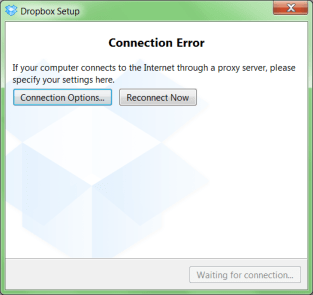
A while ago, I was working with a not so cooperative corporate firewall. All web browsers would work fine, but most other applications would not go through the proxy in a nice way.
For instance, DropBox would show the dreadfull “Connection Error” dialog shown on the right.
That dialog basically means “Dropbox has no clue what happens, try fiddling with your proxy or account settings, then press Reconnect Now” to retry.
Many other applications had issues (for instance Visual Studio connecting to Team Foundation System was very unreliable and the workarounds clumsy).
CNTLM: not the solution
I got inspired by the [WayBack] I code and code: Tutorial: How to use Dropbox behind a corporate proxy server using CNTLM, even though I was pretty sure the corporate firewall was not NTLM based.
And indeed, CNTLM -v -M http://google.com -c CNTLM.INI would give errors like this:
cntlm: Proxy returning invalid challenge!

headers_send: fd 4 warning -999 (connection closed)

Connection closed
HTTP Fiddler: looks promising
So I fired up my old buddy [WayBack] Fiddler 2 HTTP debugging proxy.
Further on, you will learn that Fiddler2 is much more, but right now it is enough to know that it basically sits as a local proxy between your applications and the outside world. Read the rest of this entry »
Posted in .NET, .NET 2.0, .NET 3.0, .NET 3.5, .NET 4.0, .NET 4.5, base64, Cntlm, Development, DropBox, Encoding, Fiddler, JavaScript/ECMAScript, NTLM, Power User, Scripting, SocialMedia, Software Development, Web Development, Windows, Windows 7, Windows 8, Windows Server 2000, Windows Server 2003, Windows Server 2003 R2, Windows Server 2008, Windows Server 2008 R2, Windows Vista, Windows XP, Windows-Http-Proxy | Leave a Comment »


 The Wiert Corner - irregular stream of stuff