The Wiert Corner – irregular stream of stuff

Jeroen W. Pluimers on .NET, C#, Delphi, databases, and personal interests

  • My badges

  • Twitter Updates

  • My Flickr Stream

  • Pages

  • All categories

  • Enter your email address to subscribe to this blog and receive notifications of new posts by email.

    Join 1,860 other subscribers

Archive for the ‘LINQ’ Category

LINQ Debugging and Visualization – Simple Talk

Posted by jpluimers on 2017/12/12

LINQ is certainly extraordinarily useful. It brings the power of query expressions to C#, allowing an easy way of getting the data you need from a variety of data sources. Up to now, there hasn’t been a VS debugger for LINQ that gives you the means to visualise the data at every point in the chain. Michael Sorens, a keen LINQ user, describes a third-party tool that now promises to make using LINQ something we can all participate in.…

Great read. [WayBackLINQ Debugging and Visualization – Simple Talk

Via: [WayBackLINQ Debugging and Visualisation – Jeroen Wiert Pluimers – Google+

–jeroen

Posted in .NET, Development, LINQ, Software Development | Leave a Comment »

.NET/C#: Igor Ostrovsky wrote a few great MSDN magazine articles helping you write better threading code

Posted by jpluimers on 2013/09/17

Igor Ostrovsky wrote a few very nice MSDN magazine articles. Not all of them have ended up in the list at MSDN magazine, so here is a more complete list:

Though the articles show the majority of sample code in C#, the actual topics are of great interest to any developer writing .NET code or interfacing to it.

Some keywords in his articles: Read the rest of this entry »

Posted in .NET, .NET 1.x, .NET 2.0, .NET 3.0, .NET 3.5, .NET 4.0, .NET 4.5, .NET CF, C, C#, C# 1.0, C# 2.0, C# 3.0, C# 4.0, C# 5.0, C++, Delphi, Development, F#, LINQ, PLINQ, Prism, Software Development, VB.NET, VB.NET 10.0, VB.NET 11.0, VB.NET 7.0, VB.NET 7.1, VB.NET 8.0, VB.NET 9.0 | Leave a Comment »

c# – What’s the hardest or most misunderstood aspect of LINQ? – Stack Overflow

Posted by jpluimers on 2013/05/07

It is such a pity that StackOverflow is not the place any more for questions like these:

c# – What’s the hardest or most misunderstood aspect of LINQ? – Stack Overflow.

These questions and answers historically got me most of the insight from SO.

Alas, no more.

–jeroen

Posted in .NET, Development, LINQ, Opinions, Pingback, Software Development, Stackoverflow | Leave a Comment »

.NET/C# – Some notes in IGrouping (via: Grouping in LINQ is weird (IGrouping is your friend) – Mike Taulty’s Blog)

Posted by jpluimers on 2013/04/02

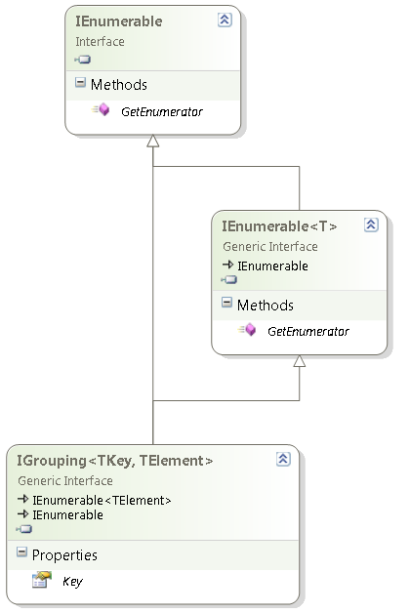
IGrouping interface diagram (click to enlarge)

IGrouping interface diagram (click to enlarge)

One of the things most people find hard to use in LINQ is GroupBy or the LINQ expression group … by (they are mostly equivalent).

When starting to use that, I was also confused, mainly because of two reasons:

  1. GroupBy returns a IGrouping<TKey, TElement> generic interface, but the classes that implement it are internal and not visble from outside the BCL (although you could artificially create your own).
    This interface extends the IEnumerable<TElement> in a full “is a” fashion adding a Key member.
    This has two consequences:

    1. Because it is a “is a” extension of the IEnumerable<TElement>, you can use foreach to enumerate the TElement members for the current group inside the grouping.
      No need to search for a Value that has the Elements, as the Group is the Elements.
    2. The Key member is indeed the current instance of what you are grouping over. Which means that Count<TElement>, are for the current group in the grouping.
  2. The LINQ expression syntax for grouping on multiple columns is not straightforward:
    1. Grouping on multiple columns uses a bit different syntax than you are used from SQL.
      (Another difference is that SQL returns a set, but groups are IEnumerable)
    2. You also need to be a bit careful to make sure the group keys are indeed distinct.

Most people don’t see the IGrouping<TKey, TElement> because they use the var keyword to implicitly the LINQ result.
Often – when using any anonymous type – var is the only way of using that result.
That is fine, but has the consequence that it hides the actual type, which – when not anonymous – is a good way of seeing what happens behind the scenes.

David Klein gave an example for the multi column grouping and also shows that if you use LINQPad, you can actually see the IGrouping<TKey, TElement> in action.

Mike Taulty skipped the Group By Syntax for Grouping on Multiple Columns in his Grouping in LINQ is weird (IGrouping is your friend). So my examples include that.

Note that I don’t cover all the LINQ group by stuff, here, for instance, I skipped the into part.
There are some nice examples on MSDN covering exactly that both using Method based and Expression based LINQ.

The examples are based on these two classes, similar to what Mike did. Read the rest of this entry »

Posted in .NET, .NET 3.5, .NET 4.0, .NET 4.5, C#, C# 3.0, C# 4.0, C# 5.0, Development, LINQ, Software Development | Leave a Comment »

.NET/C# LINQ gem: How to check if a char in a list of characters (via Stack Overflow)

Posted by jpluimers on 2012/11/21

Often when comparing characters with a list of characters, that list does not consist of consts.

It if were, you could make a switch statement:

                    switch (item)
                    {
                        case '/':
                        case '\\':
                        case ';':
                            addSeparator(separatorsUsed, item);
                            break;
                    }

But reality is that you cannot do things like this:

                    switch (item)
                    {
                        case Path.AltDirectorySeparatorChar: // Error: A constant value is expected
                        case Path.DirectorySeparatorChar:
                        case Path.PathSeparator:
                            addSeparator(separatorsUsed, item);
                            break;
                    }

However, you can perform a small trick and use LINQ to write some pretty elegant code based on Contains.

                    char[] pathSeparators = { Path.AltDirectorySeparatorChar, Path.DirectorySeparatorChar, Path.PathSeparator };
                    // LINQ: http://stackoverflow.com/questions/1818611/how-to-check-if-a-char-in-a-char-array/1818635#1818635
                    if (pathSeparators.Contains(item))
                        addSeparator(separatorsUsed, item);

The LINQ logic has the logic backwards (you can think of it like “item in pathSeparators”, but it is far easier to read than this:

                    if ((item == Path.AltDirectorySeparatorChar) || (item == Path.DirectorySeparatorChar) || (item == Path.PathSeparator))
                        addSeparator(separatoseparatorsUsedrsInUse, item);

Full source of a demo application: Read the rest of this entry »

Posted in .NET, .NET 3.5, .NET 4.5, C#, C# 3.0, C# 4.0, C# 5.0, Development, LINQ, Software Development, Visual Studio 11, Visual Studio 2008, Visual Studio 2010, Visual Studio and tools | 2 Comments »

.NET/C#: SqlClient ConnectionString keys and their equivalences

Posted by jpluimers on 2012/11/07

A while ago I needed to shorten SqlClient ConnectionStrings. One way to do that is to use the shortest Key for each property (and not use the default key names that are much longer).

I beefed up the code to show you both the shortest and all equivalent keys (a few of the Microsoft exams want you to memorize most of these).

The HTML table below (similar to the huge and therefore hard to read table on MSDN) comes directly from the C# code at the bottom of the post. The only post-editing I did was making the header row bold.

Key ShortesEquivalentKey EquivalentKeys
Application Name app Application Name,app
ApplicationIntent ApplicationIntent ApplicationIntent
Asynchronous Processing async Asynchronous Processing,async
AttachDbFilename AttachDbFilename AttachDbFilename,extended properties,initial file name
Connect Timeout timeout Connect Timeout,connection timeout,timeout
Connection Reset Connection Reset Connection Reset
Context Connection Context Connection Context Connection
Current Language language Current Language,language
Data Source addr Data Source,addr,address,network address,server
Encrypt Encrypt Encrypt
Enlist Enlist Enlist
Failover Partner Failover Partner Failover Partner
Initial Catalog database Initial Catalog,database
Integrated Security trusted_connection Integrated Security,trusted_connection
Load Balance Timeout connection lifetime Load Balance Timeout,connection lifetime
Max Pool Size Max Pool Size Max Pool Size
Min Pool Size Min Pool Size Min Pool Size
MultipleActiveResultSets MultipleActiveResultSets MultipleActiveResultSets
MultiSubnetFailover MultiSubnetFailover MultiSubnetFailover
Network Library net Network Library,net,network
Packet Size Packet Size Packet Size
Password pwd Password,pwd
Persist Security Info persistsecurityinfo Persist Security Info,persistsecurityinfo
Pooling Pooling Pooling
Replication Replication Replication
Transaction Binding Transaction Binding Transaction Binding
TrustServerCertificate TrustServerCertificate TrustServerCertificate
Type System Version Type System Version Type System Version
User ID uid User ID,uid,user
User Instance User Instance User Instance
Workstation ID wsid Workstation ID,wsid

The code below uses a few techniques referenced as StackOverflow links:

  1. Sorting enumerable strings using LINQ.
  2. Generating CSV from an enumerable strings using LINQ and string.Join.
  3. Converting a DataTable to an HTML Table using an ASP.NET DataGrid and HtmlTextWriter to do the rendering.
  4. Getting a private static field by name using reflection.

Both the main program and the SqlConnectionStringBuilderHelper class are less than 70 lines of code (each about 50 when excluding comments and empty lines).

The SqlConnectionStringBuilderHelper uses the internals of the SqlConnectionStringBuilder class (all DbConnectionStringBuilder descendants I have seen work in a similar way):

  • each DbConnectionStringBuilder instance has a public Keys property that exposes the static _validKeywords field of the descendant. It contains all possible keys that can appear in a generated ConnectionString.
  • the SqlConnectionStringBuilder class (and other DbConnectionStringBuilder descendants) has a static private property _keywords that maps all possible keyword strings (including equivalents) to an enumerator (which indexes into the Keys property).
    Mono uses the same mechanism.
  • The trick is to walk the _keywords property and search for equivalent keywords.
  • For a list of equivalent keywords, you find the shortest one.

Related:

Enjoy the code: Read the rest of this entry »

Posted in .NET, ASP.NET, C#, C# 3.0, C# 4.0, C# 5.0, CSV, Development, LINQ, Software Development | Leave a Comment »

.NET/C#: Generating a WordPress posting categories page – part 2

Posted by jpluimers on 2012/08/22

In Generating a WordPress posting categories page – part 1, you learned how to

  1. get the HTML with all the category information from your WordPress.com blog,
  2. convert that to XHTML,
  3. generate an XSD for the XHTML,
  4. generate C# classes from that XSD

This episode, you will learn how the data read from the XHTML can be transformed to a simple tree in HTML suited for a posting categories page like mine.

In the final post, the same data will be transferred into a real category cloud with font sizes indicating the frequency of the category usage.

From there, you can go into other directions (for instance generating squarified treemaps from the data).

That’s the cool thing about data: there are many ways to visualize, and this series was meant – next to some groundwork on how to get the data – as inspiration into some forms of visualization.
Hope you had fun reading it!

Getting a HTML tree from the optionType items

                StringBuilder outputHtml = new StringBuilder();
                string rootUrl = args[1];
                foreach (optionType item in select.option)
                {
                    if (item.Level == optionType.RootLevel)
                        continue;

                    // <a style="font-size: 100.3986332574%; padding: 1px; margin: 1px;" title="XML/XSD (23)" href="https://wiert.me/category/development/xmlxsd/">XML/XSD</a>
                    string url = String.Format("{0}/category{1}", rootUrl, item.HtmlPath);
                    string prefix = new string('.', item.Level * 5);// optionType.NbspEscaped.Repeat(item.Level);
                    outputHtml.AppendFormat("{0}<a title="{2}" href="{1}">{2} ({3})</a>", prefix, url, item.Category, item.Count);
                    outputHtml.AppendLine();
                }

One way of generating an HTML tree, is to prefix every node with a series of dots corresponding with the level of that node. Not the most pretty sight, but it will suffice for this episode.

Inside each node, I want to show the Category and Count.

Since the optionType as generated from the XSD only contains the below properties, a major portion on this posting is how to decode the Value so we can generate HTML like this:

...............<a href='https://wiert.me/category/development/software-development/net/c-' title='C#'>C#&nbsp;(118)</a>
....................<a href='https://wiert.me/category/development/software-development/net/c-/c--2-0' title='C# 2.0'>C# 2.0&nbsp;(46)</a>
....................<a href='https://wiert.me/category/development/software-development/net/c-/c--3-0' title='C# 3.0'>C# 3.0&nbsp;(33)</a>
....................<a href='https://wiert.me/category/development/software-development/net/c-/c--4-0' title='C# 4.0'>C# 4.0&nbsp;(31)</a>
....................<a href='https://wiert.me/category/development/software-development/net/c-/c--5-0' title='C# 5.0'>C# 5.0&nbsp;(2)</a>

Decoding the optionType Value property

optionType only contains the these properties:

  1. class
    • the class used to reference the style in the stylesheet
    • example value: “level-4”
  2. value
    • internal unique WordPress ID for the category (this allows you to alter the Slug and Value without breaking the links between posts and categories
    • example value: “45149061”
  3. Value
    • string that WordPress uses to make the category combobox look like a tree structure
    • example value: “&nbsp;&nbsp;&nbsp;&nbsp;&nbsp;&nbsp;&nbsp;&nbsp;&nbsp;&nbsp;&nbsp;&nbsp;C# 5.0&nbsp;&nbsp;(2)”

The extra properties needed for the HTML generation logic above are these:

  1. Category
    • the Value undone from leading non breaking space character escapes, and the trailing count information
    • example value: C# 5.0
  2. Count
    • the Value undone from leading non breaking space character escapes, Caption information, separator non breaking space character escapes, and surrounding parenthesis
    • example value: 2
  3. Level
    • the class undone from the level- prefix
    • example value: 4
  4. Slug
    • the category slug is the unique value for a category that WordPress uses to form category urls. It is auto-generated from the Category, but you can also edit it. I don’t, as it is not in the combobox HTML, so I derive it from the Category. Note there are also posting slugs used in the permalink of each post.
    • example value: c--5-0 (it consists of lowercase letters and hyphens derived from the Category)
  5. HtmlPath
  6. parent (used internally for making the HtmlPath code much easier

The really cool thing about XSD2Code is that it generated the optionType C# code as a partial class.
Which means we can extend the generated partial classes in a seperate C# file like the code fragments below (you can download it from the WordPressCategoriesDropDown.cs file at BeSharp.CodePlex.com)

    partial class optionType
    {
        public const int RootLevel = -1;

        private const string slash = "/";
        private const char hyphen = '-';
        public const string NbspEscaped = "&nbsp;";
        private const string emptyCountInParenthesis = "(-1)";

        public optionType parent { get; set; }

        public string Category
        {
            get
            {
                string result;
                string countInParenthesis;
                splitValue(out result, out countInParenthesis);
                return result;
            }
        }

        public int Count
        {
            get
            {
                string category;
                string countInParenthesis;
                splitValue(out category, out countInParenthesis);
                string count = countInParenthesis.Substring(1, countInParenthesis.Length - 2);
                int result = int.Parse(count);
                return result;
            }
        }

        public int Level
        {
            get
            {
                if (string.IsNullOrWhiteSpace(@class))
                    return RootLevel;
                string[] split = @class.Split(hyphen);
                string number = split[1];
                int result = int.Parse(number);
                return result;
            }
        }

        /// <summary>
        /// This is the HTML part that WordPress uses to reference a Category
        /// </summary>
        public string Slug
        {
            get
            {
                StringBuilder result = new StringBuilder();
                foreach (char item in Category)
                {
                    if (char.IsLetterOrDigit(item))
                        result.Append(item.ToString().ToLower());
                    else
                        if (result.Length > 0)
                            result.Append(hyphen);
                }
                return result.ToString();
            }
        }

        public string HtmlPath
        {
            get
            {
                if (RootLevel == Level)
                    return string.Empty;

                string result = Slug;
                if (null != parent)
                    result = parent.HtmlPath + slash + result;
                return result;
            }
        }

        private void splitValue(out string category, out string countInParenthesis)
        {
            // might want to do this using RegEx, but that is a write-only language https://wiert.me/category/development/software-development/regex/
            string result = Value;
            int nbspCountToStripFromLeftOfValue = Level * 3; // strip 3 &nbsp; for each Level
            for (int i = 0; i < nbspCountToStripFromLeftOfValue; i++)
            {
                int nbspEscapedLength = NbspEscaped.Length;
                if (result.StartsWith(NbspEscaped))
                    result = result.Substring(nbspEscapedLength, result.Length - nbspEscapedLength);
            }
            string doubleNbspEscaped = NbspEscaped + NbspEscaped;
            if (result.Contains(doubleNbspEscaped))
            {
                string[] separators = new string[] { doubleNbspEscaped };
                string[] split = result.Split(separators, StringSplitOptions.None);
                category = split[0];
                countInParenthesis = split[1];
            }
            else
            {
                category = result;
                countInParenthesis = emptyCountInParenthesis;
            }
        }

        public override string ToString()
        {
            string result = string.Format("Level {0}, Count {1}, Slug {2}, HtmlPath {3}, Category '{4}'", Level, Count, Slug, HtmlPath, Category);
            return result;
        }
    }

The bulk of the above code is in the splitValue method (that could have used RegEx, but I try to avoid RegEx when I can do without it).
Note that the HtmlPath propererty uses the parent property. Without it, the HtmlPath code would have been very complex. The value of the parent properties for all optionType instances is generated in the selectType.FixParents method below since the selectType instance contains all the optionType instances in its’ option property.

    partial class selectType
    {
        public void FixParents()
        {
            Stack<optionType> itemStack = new Stack<optionType>();
            optionType parent = null;
            int previousLevel = optionType.RootLevel;

            foreach (optionType item in option)
            {
                int itemLevel = item.Level;
                if (itemLevel == previousLevel)
                {
                    if (optionType.RootLevel != itemLevel)
                    {
                        itemStack.Pop();
                        item.parent = parent;
                    }
                    itemStack.Push(item);
                }
                else
                {
                    if (itemLevel > previousLevel)
                    {
                        parent = itemStack.Peek();
                    }
                    else
                    {
                        do
                        {
                            itemStack.Pop();
                            parent = itemStack.Peek();
                            previousLevel = parent.Level;
                        }
                        while (previousLevel >= itemLevel);
                    }
                    itemStack.Push(item);
                    item.parent = parent;
                    previousLevel = itemLevel;
                }
            }
        }
    }

–jeroen

Posted in .NET, C#, C# 4.0, C# 5.0, Development, LINQ, Software Development, Usability, User Experience (ux), Web Development, WordPress, WordPress, XML, XML escapes, XML/XSD, XSD | 4 Comments »

Great session on how to prevent SQL Injection Myths and Fallacies

Posted by jpluimers on 2012/08/15

A few weeks ago, Bill Karwin did a must watch webinar on the prevention SQL Injection titled  “SQL Injection Myths and Fallacies“.

Bill Karwin (twitter, new blog, old blog, Amazon) is famous for much work in the SQL database community, including InterBase/Firebird, mySQL, Oracle and many more.

He also:

Anyway, his webinar is awesome. Be sure to get the slides, watch the replay, and read the questions follow up.

Watching it you’ll get a better understanding of defending against SQL injection.

A few very valuable points he made: Read the rest of this entry »

Posted in .NET, .NET 3.5, .NET 4.5, .NET ORM, ASP.NET, Batch-Files, C#, C# 1.0, C# 2.0, C# 3.0, C# 4.0, C# 5.0, C++, Cloud Development, COBOL, CommandLine, Database Development, Delphi, Delphi for PHP, Delphi x64, Delphi XE2, Development, EF Entity Framework, F#, Firebird, FireMonkey, History, InterBase, iSeries, Java, JavaScript/ECMAScript, Jet OLE DB, LINQ, LLBLGen, MEF, Microsoft Surface, Mobile Development, PHP, PowerShell, Prism, Scripting, SharePoint, SilverLight, Software Development, SQL, SQL Server, SQL Server 2000, SQL Server 2005, SQL Server 2008, SQL Server 2008 R2, SQL Server 2012, SQL Server 7, VB.NET, VBS, Visual Studio 11, Visual Studio 2002, Visual Studio 2003, Visual Studio 2005, Visual Studio 2008, Visual Studio 2010, Visual Studio and tools, Web Development, Windows Azure, WinForms, WPF, XAML, xCode/Mac/iPad/iPhone/iOS/cocoa | 1 Comment »

Convert linq query to string array/list – C# – Stack Overflow

Posted by jpluimers on 2011/04/19

Sometimes little snippets of code help you big time.

Note the below ones are not performant (they will load all the data), but can make your code a lot more readable.

Use with care!

return list.Select(x => x.ToString()).ToArray();

return list.Select(x => x.ToString()).ToList();

–jeroen

via: Convert linq query to string array – C# – Stack Overflow.

Posted in .NET, C#, C# 3.0, C# 4.0, Development, LINQ, Software Development | Leave a Comment »