


Any geeks that already have this one?
If so, please let me know what you think of it.
Pebble: E-Paper Watch for iPhone and Android
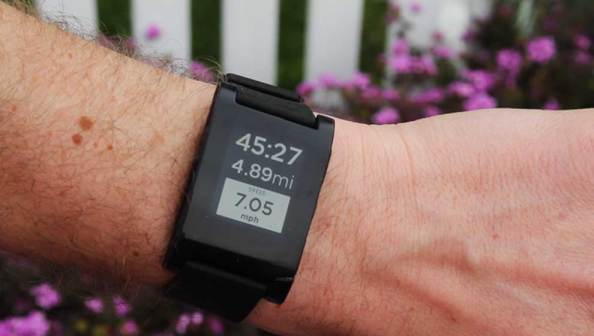
–jeroen
via: Pebble.
Posted by jpluimers on 2013/01/20
Any geeks that already have this one?
If so, please let me know what you think of it.
Pebble: E-Paper Watch for iPhone and Android
–jeroen
via: Pebble.

Posted in Android Devices, Apple, iOS, iPhone, Power User | Tagged: android, gadgets, geeks, iphone, technology | Leave a Comment »
Posted by jpluimers on 2012/12/31
Boy, this free AirDroid App makes managing your Android so much more productive as you can do everything from the web-browser on your desktop.
The web-browser makes a secure connection to a small web-server on your Android device.
Highly recommended!
–jeroen
via: AirDroid-Enjoy your Android Experience over the air.

Posted in Android Devices, Power User | Leave a Comment »
Posted by jpluimers on 2012/12/14
A few links to Linux/Unix like commands available on Android devices:
Too bad the Android AVD is limited in that it does not allow you to use the Play Store. Without the Play Store, it is hard to install software, lucikly there is a downloadable version of this decent Android shell Terminal Emulator.
Not sure if you want to root the AVD in the way mentioned here.
–jeroen
via:
Posted in *nix, Android Devices, Power User | Leave a Comment »
Posted by jpluimers on 2012/10/22
It was a lot of pain, and somehow my Android 4 device now doesn’t sync contacts any more.
–jeroen
Posted in Android Devices, Chrome, GMail, Google, Google Apps, GoogleCalendar, GoogleMaps, GoogleSearch, HTC, HTC Sensation, Power User | 1 Comment »
Posted by jpluimers on 2012/09/29
If I read Inappropriate Use of Adobe Code Signing Certificate my conclusion is that anything signed by the Adobe Code Signing Certificate since 2012-07-10 potentially can be malware.
As a precaution, I will manually revoke the certificate on all my systems (that’ll take a while!). If anyone knows how to automate that process, please post a comment showing how to.
Hitching on a trusted certificate of a big software company comes close to the ultimate hack: trojaning signed malware in the distribution of an OS vendor.
–jeroen
Posted in *nix, Adobe, Android Devices, Apple, HTC, HTC Sensation, iOS, iPad, iPhone, iPod, iPod touch, Linux, Mac, Mac OS X / OS X / MacOS, Mac OS X 10.4 Tiger, Mac OS X 10.5 Leopard, Mac OS X 10.6 Snow Leopard, Mac OS X 10.7 Lion, Opinions, OS X 10.8 Mountain Lion, Power User, Windows, Windows 7, Windows 8, Windows Server 2000, Windows Server 2003, Windows Server 2003 R2, Windows Server 2008, Windows Server 2008 R2, Windows Vista, Windows XP | Tagged: adobe software, conclusion, engineering team, precaution, secure software, software, software company, software engineering, technology, ultimate hack | Leave a Comment »
Posted by jpluimers on 2012/09/05
After all my address-contacts trouble I was hoping my phone would behave for at least a while.
Not so, like in the past it often:
What kept me using it was the usefulness of many apps.
But now I won’t any more: the last 4 days, the gMail app managed to use almost 1 gigabyte of data (my monthly plan) for no reason at all.
That was the limit.
Bye bye Android.
Now I just need to decide:
Given the update track-record of Apple, this is a no brainer.
–jeroen
Posted in Android Devices, Opinions, Power User | Tagged: gadgets, gigabyte, gmail, iphone, iphone 5, mobile, power button, ring tone, technology, windows phone | 4 Comments »
Posted by jpluimers on 2012/07/26
Again a status update (:
Basically the phone is now in an unusable state, as there is no memory left since the Contacts DB is growing itself (it is now close to 600 megabyte), see this quote on my StackExchange question:
Trying to solve Problem: Huge Contacts Database Read the rest of this entry »
Posted in Android Devices, Power User | 2 Comments »
Posted by jpluimers on 2012/07/24
a quick follow up:
Boy I wish I had shell access to this device.
Being able to do simple things like “du / -s | less” or “df” would be soo nice.
Will follow up with more results when I have them.
–jeroen
Posted in About, Android Devices, Personal, Power User | 1 Comment »
Posted by jpluimers on 2012/07/23
It seems LinkedIn doesn’t react to my tweet for help, so maybe you can provide me (paid) with a custom build of Contact Remover Plus.
This is my problem: https://twitter.com/jpluimers/status/225625536976793600
The LinkedIn Android app has created dozens of LinkedIn links and photo links to many of my contacts.
This renders many functions on my phone unusable:
I tried to count this for one particular contact with the “Contact Remover” App: His contact has so many pages of photos and LinkedIn links that I cannot count them any more. They are at least dozens, probably more than 100 of each.
I’m using an HTC Sensation phone with a regular Android 4 firmware.
With Android development, I haven’t don’t anything yet with the Contacts API yet, and don’t have the time to do so in short term.
I’m willing to pay for an App that:
Anyone?
–jeroen
Posted in About, Android Devices, Development, LinkedIn, Personal, Power User, SocialMedia, Software Development | 6 Comments »
Posted by jpluimers on 2012/06/01
Since the auto-update nor manual update feature of Philips devices over the internet never seems to work:
Today is Philips firmware using USB stick and app update time (:
One bummer is that the “firmware installation instructions” do not mention that you have to start with a cold boot one time before updating the devices. If you don’t, then the devices (especially the TV’s) do not recognize there is an update available.
So: always start with cutting the power (either by switch or by plugging the cable) then enabling power again. You only need to do this once before plugging in a USB stick with the update.
Another bummer there is that Philips does not publish direct links on their site either, so you have to browse through pages, select languages, then download the stuff. But the actual files are still static.
So below are the URLs of the pages and download links I used.
Note the links have been static, even over firmware versions.
Some tips on the links of the Philips site above:
Posted in Android Devices, HTC, HTC Sensation, iOS, iPad, iPhone, iPod touch, LifeHacker, Power User | 1 Comment »
 The Wiert Corner - irregular stream of stuff