Archive for the ‘OS X 10.10 Yosemite’ Category
Posted by jpluimers on 2016/09/23
I was looking for some PDF files that I knew for sure were on my SSD but Spotlight would not find them. Looking for more obvious files I noticed Spotlight was returning hardly any files at all: somehow the index was messed up.
Years ago I also had Spotlight issues; then it would find nothing (now it did find some files) which was solved by a reboot: Spotlight refuses to be enabled on Lion: reboot helped.
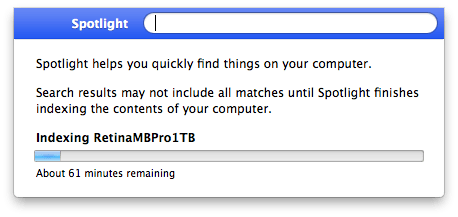
Screenshot 2016-06-29 12.57.34
Now this was right after a reboot, and because Spotlight did find some files I know Spotlight was turned on (no need for mdutil tricks mentioned in After restoring fresh HDD from Time Machine Backup: No results from Spotlight).
So I dug a bit deeper and decided to try [WayBack] Rebuild the Spotlight index on your Mac – Apple Support with these steps:
- Search for something that returns few results (in my case Xyzzy)
- Click
Spotlight Preferences...
- Go to the
Privacy tab
- From the
Finder, drag your disk(s) to the Prevent Spotlight from searching these locations list.
- Remove your disk(s) from that lists using the minus (-) button.
- Wait for re-indexing to complete
That worked like a charm to refresh the index: it started indexing again which took about one hour.
After a few minutes though, I found back the 32pfl7404h_12_dfu_nld.pdf I was looking for.
A second time, it had lost the index to iTunes, and found it back in about 2 hours (as the SSD was much more full).
A third time, this trick from [WayBack/Archive.is] Re-Index Spotlight from the Terminal, Re-Gain Valuable Time for Life [OS X Tips] | Cult of Mac worked:
sudo mdutil -E /
This basically re-indexes from the root (/) folder.
I find it easier than the above 6 steps (which are also on [WayBack/Archive.is] Make Spotlight Work Again [OS X Tips] | Cult of Mac).
–jeroen
Posted in Apple, Mac, Mac OS X / OS X / MacOS, MacBook, MacBook Retina, MacBook-Pro, OS X 10.10 Yosemite, OS X 10.11 El Capitan, OS X 10.9 Mavericks, Power User, SpotLight | Leave a Comment »
Posted by jpluimers on 2016/08/17
A while ago, testssl.sh [WayBack] needed Darwin binaries (for OS X): Supply Darwin binaries + install documentation · Issue #127 · drwetter/testssl.sh [WayBack]
So I created the small Bourne shell (sh) script below to deliver them.
It allows me to update these gists:
The build script itself is in a gist as well: https://gist.github.com/f4de3937630b87753133.git [WayBack]
It helped me to contribute to these testssl.sh issues:
Not all of these binaries are in https://github.com/drwetter/testssl.sh/tree/master/bin [WayBack] as it makes the testssl.sh repository too bloated. Some (including non-OSX builds made by others) are here:
Eventually the script might get merged into https://github.com/drwetter/testssl.sh/blob/master/utils/make-openssl.sh [WayBack] as there is a Darwin switch in this commit: https://github.com/drwetter/testssl.sh/commit/6efc3e90f52e5926b0853d3b2fb221b631dcf452 [WayBack]
Read the rest of this entry »
Posted in Apple, Development, Mac, Mac OS X / OS X / MacOS, Mac OS X 10.4 Tiger, Mac OS X 10.5 Leopard, Mac OS X 10.6 Snow Leopard, Mac OS X 10.7 Lion, MacBook, MacBook Retina, MacBook-Air, MacBook-Pro, MacMini, OpenSSL, OS X 10.10 Yosemite, OS X 10.8 Mountain Lion, OS X 10.9 Mavericks, Power User, Security, Software Development, xCode/Mac/iPad/iPhone/iOS/cocoa | Leave a Comment »
Posted by jpluimers on 2016/08/15
The culprit is usually the mds [WayBack] process (metadata server).
Simple command-line solution:
sudo killall mds
A more convoluted way with the Activity Monitor is in the link below.
–jeroen
via: Fix the OS X Finder not displaying the contents of specific folders | MacIssues [WayBack]
Posted in Apple, Mac, Mac OS X / OS X / MacOS, Mac OS X 10.4 Tiger, Mac OS X 10.6 Snow Leopard, MacBook, MacBook Retina, MacBook-Air, MacBook-Pro, MacMini, OS X 10.10 Yosemite, OS X 10.8 Mountain Lion, Power User | Leave a Comment »
Posted by jpluimers on 2016/07/29
One day I’m going to need this: Make A Bootable Windows 10 USB Install Stick On Linux With WinUSB Fork ~ Web Upd8: Ubuntu / Linux blog
So I’m glad WinUSB (which hadn’t been maintained for a long time) got forked on github by slaka.
Since my day-to-day unix-like system is OS X, I’d love a good working solution there too which means I probably need to investigate a bit along these lines:
- Using diskpart in a Windows VM (which is kind of backwards):
- Using Disk Utility and UEFI (only works for Windows 8 and up):
- Using Boot Camp Assistant and a modified Info.plist (which for El Capitan needs some extra work):
–jeroen
via: Make A Bootable Windows 10 USB Install Stick On Linux With WinUSB Fork WebUpd8 – Google+ / DoorToDoorGeek “Stephen McLaughlin” – Google+
Posted in *nix, Apple, BIOS, Boot, BSD, Linux, Mac OS X / OS X / MacOS, OS X 10.10 Yosemite, OS X 10.11 El Capitan, OS X 10.9 Mavericks, Power User, Ubuntu, UEFI, Windows, Windows 10, Windows 7, Windows 8, Windows 8.1, Windows 9, Windows Server 2000, Windows Server 2003, Windows Server 2003 R2, Windows Server 2008, Windows Server 2008 R2, Windows Server 2012, Windows Server 2012 R2, Windows Vista, Windows XP | Leave a Comment »
Posted by jpluimers on 2016/07/01
DNS and Mac OS X are a bit of a tricky situation as OS X can use more than the default DNS servers: its resolve can do a multi-client DNS search.
The default DNS servers can be listed like this:
scutil --dns | grep 'nameserver\[[0-9]*\]' | sort | uniq
The effective DNS server like this:
dig whoami.akamai.net | grep "^;; SERVER" | cut -c 12-
Sometimes you want to know if you have manually configured DNS servers, or only DHCP assigned ones. This statement shows that for my Wi-Fi network-service:
networksetup -getdnsservers Wi-Fi
Because of the multi-client setup, you need to run this for all network-services configured on your OS X installation. You can get the list like this:
networksetup -listallnetworkservices
I’ve not yet found a way to list only active services, as the networksetup documentation indicates the -listnetworkserviceorder option will mark inactive ones with (*), but it reality does so only for disabled ones. So this does not work:
networksetup -listnetworkserviceorder
I might one day dig into combining the output of ifconfig with networksetup to figure out a shell based solution to this question.
–jeroen
Posted in Apple, Mac OS X / OS X / MacOS, Mac OS X 10.7 Lion, OS X 10.10 Yosemite, OS X 10.8 Mountain Lion, Power User | Leave a Comment »
Posted by jpluimers on 2016/06/07
Via the answer below I created the renew alias. I already had the first two aliases.
alias route-and-ipaddresses="netstat -nr | grep 'Internet\|Gateway\|default' && echo && ifconfig | grep '\: flags\|inet\|inet6' && echo more detailed info through ifconfig and netstat -nr"

alias whatismyip="curl http://whatismyip.akamai.com && echo"

alias renew_dhcp="sudo ipconfig set en0 DHCP && echo waiting 10 seconds for DHCP lease to be obtained && sleep 10 && route-and-ipaddresses && whatismyip"
–jeroen
via: network – How can I release and renew my DHCP lease from Terminal? – Ask Different.
Posted in Apple, bash, Development, Mac, Mac OS X / OS X / MacOS, Mac OS X 10.6 Snow Leopard, MacBook, MacBook Retina, MacBook-Air, MacBook-Pro, MacMini, OS X 10.10 Yosemite, OS X 10.8 Mountain Lion, OS X 10.9 Mavericks, Power User, Scripting, Software Development | Leave a Comment »
Posted by jpluimers on 2016/05/26
Thanks Adrian W for providing the below example in your answer about obtaining GLUE record information for a domain.
It is an excellent showcase for the $IFS Internal Field Separator available in any nx shell.
In this case it is used to get the TLD (top-level domain) from the domain name specified at the command-line.
After that, it obtains the name servers for that TLD, and queries the glue records there, both using dig.
Here is a little shell script which implements Alnitak’s answer:
#!/bin/sh
S=${IFS}
IFS=.
for P in $1; do
  TLD=${P}
done
IFS=${S}

echo "TLD: ${TLD}"
DNSLIST=$(dig +short ${TLD}. NS)
for DNS in ${DNSLIST}; do
  echo "Checking ${DNS}"
  dig +norec +nocomments +noquestion +nostats +nocmd @${DNS} $1 NS
done
Pass the name of the domain as parameter:
./checkgluerecords.sh example.org
–jeroen
via domain name system – How to test DNS glue record? – Server Fault.
Posted in *nix, Apple, bash, Development, DNS, Linux, Mac, Mac OS X / OS X / MacOS, Mac OS X 10.4 Tiger, Mac OS X 10.5 Leopard, Mac OS X 10.6 Snow Leopard, Mac OS X 10.7 Lion, openSuSE, OS X 10.10 Yosemite, OS X 10.8 Mountain Lion, OS X 10.9 Mavericks, Power User, Scripting, Software Development, SuSE Linux | Leave a Comment »
Posted by jpluimers on 2016/04/01
IRC so: »i> Isotopp: Ich habe jetzt nen Mac als Arbeitsplatzrechner… Was will man als UNIX Hacker zuerst an Tools installieren?«
Source: IRC so: »i> Isotopp: Ich habe jetzt nen Mac als Arbeitsplatzrechner… Was will… by Kristian Köhntopp.
Since G+ is very bad at searching, I created this summary of the tools; read the full G+ post (Google Translate is quite OK), including comments on why.
Edit: 20160402 – I’m posting regular updates based on the comments for that G+ post. I’ve changed or added German iTunes store links to US-English ones.
Read the rest of this entry »
Posted in Apple, Audacity, Audio, Fusion, Hardware, Keybase, Keyboards and Keyboard Shortcuts, KVM keyboard/video/mouse, Mac, Mac OS X / OS X / MacOS, MacBook, MacBook Retina, MacBook-Pro, Media, OS X 10.10 Yosemite, OS X 10.11 El Capitan, Power User, Security, VirtualBox, Virtualization, VMware | Leave a Comment »
Posted by jpluimers on 2016/03/07
Last friday I updated the examples at *nix networking – lsof: How to tell what process has a specific port open on Linux (via: Server Fault) as I needed to document some of the machines around here (so it becomes easier replacing them).
I also added some links to background information and (when I get to using it: OS X still goes without) a good iproute2 starter page.
–jeroen
Posted in *nix, *nix-tools, Apple, Communications Development, Cygwin, Development, Internet protocol suite, Linux, Mac, Mac OS X / OS X / MacOS, Mac OS X 10.6 Snow Leopard, MacBook, MacBook Retina, MacBook-Air, MacBook-Pro, MacMini, OS X 10.10 Yosemite, OS X 10.8 Mountain Lion, OS X 10.9 Mavericks, Power User, TCP | Leave a Comment »
Posted by jpluimers on 2016/02/29
Reloop has posted the below for DJ controlers (like Contour IE, Jockey 3 ME and Digital Jockey 2 ME), but it also applies to their mixers, for instance my Reloop RMX-40 USB – Reloop (but not limited to Reloop audio equipment) in combination with either of my:
- MacBook Air (13-inch, Mid 2011)
- MacBook Pro (Retina, 15-inch, Late 2013)
All these machines have USB 3.0 ports. But the workarounds below work:
Read the rest of this entry »
Posted in Apple, LifeHacker, Mac OS X / OS X / MacOS, MacBook Retina, MacBook-Air, MacBook-Pro, OS X 10.10 Yosemite, OS X 10.8 Mountain Lion, OS X 10.9 Mavericks, Power User | Leave a Comment »


 The Wiert Corner - irregular stream of stuff