Archive for the ‘*nix’ Category
Posted by jpluimers on 2017/09/07
Interesting reads:
Need to research how I can fit noatime ino.
–jeroen
Posted in *nix, *nix-tools, btrfs, File-Systems, Power User | Leave a Comment »
Posted by jpluimers on 2017/08/28
This is so cool, but will take some time for lot’s of tooling to become compatible:
Starting with v197 systemd/udev will automatically assign predictable, stable network interface names for all local Ethernet, WLAN and WWAN interfaces. This is a departure from the traditional interface naming scheme (“eth0”, “eth1”, “wlan0”, …), but should fix real problems.
–jeroen
Posted in *nix, *nix-tools, Linux, Power User, systemd | Leave a Comment »
Posted by jpluimers on 2017/08/21
I didn’t notice this bind change for a while, but some time ago after doing an rcnamed restart it would split out this error message:
the working directory is not writable
It seems harmless as BIND still starts:
Starting name server BIND ..done
Anyway, some links that helped me solve it:
The last entry provides the solution:
rcnamed stop

chown named:named /var/lib/named/ -R

rcnamed start

rcnamed status
The latter didn’t show any error message.
–jeroen
Posted in *nix, bind-named, Linux, openSuSE, Power User, SuSE Linux | Leave a Comment »
Posted by jpluimers on 2017/08/17
Reproduction of A start job is running for dev-disk-by... – Google Photos / Oops. Let’s see if I can reproduce it, as I think this is related: https://…
Reproducible steps below.
Related:
Tried tips from last link: fails as well
These are the modifications of the steps further on based on the last link above.
- After first boot, verify the WiFi drivers are there:
# rpm -qa | grep bcm43xx

bcm43xx-firmware-20170410-2.1.noarch
- After editing
/etc/dracut.conf.d/raspberrypi_modules.conf, perform sudo mkinitrd without any -f
- After reboot, same error
Error result
At boot time:
 A start job is running for dev-disk-by\…
After waiting:
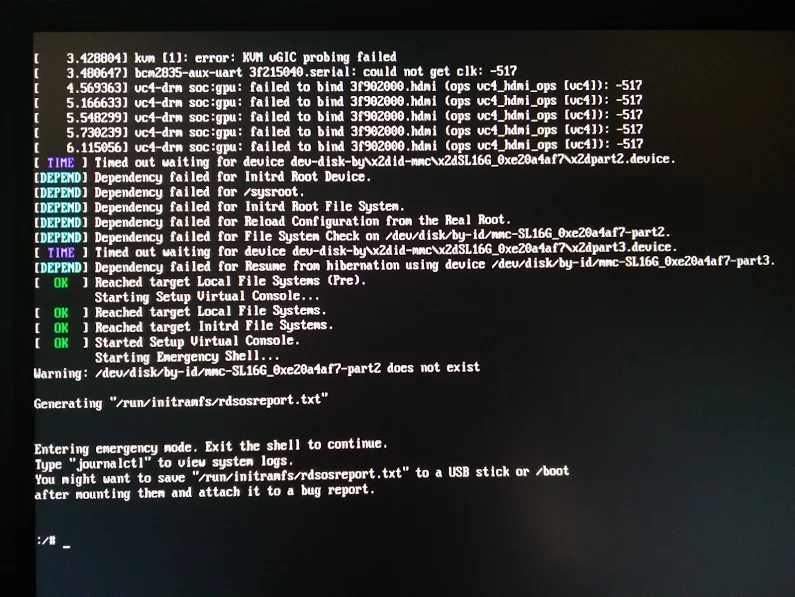
Reproducible steps
- download (or a more recent one) from http://download.opensuse.org/repositories/devel:/ARM:/Factory:/Contrib:/RaspberryPi3/images/ :
- Install them on a MicroSD card
- Put in Raspberry Pi 3 and boot
- Get the IP address of the machine, then SSH into it (
ssh root@ip-address, password linux)
- Follow the steps from [WayBack] openSUSE on Raspberry Pi 3: From Zero to Functional System in a Few Easy Steps – SUSE Blog | SUSE Communities to get WiFi working:
- Edit
/etc/dracut.conf.d/raspberrypi_modules.conf and remove the sdhci-iproc from the first and # on the last line:From :
add_drivers+=" sdhci-iproc bcm2835-sdhost bcm2835_dma mmc_block dwc2 "
# Workaround for Wifi
#omit_drivers+=" sdhci-iproc"
To :
add_drivers+=" bcm2835-sdhost bcm2835_dma mmc_block dwc2 "
# Workaround for Wifi
omit_drivers+=" sdhci-iproc"
- Run these commands:
mkinitrd -f
reboot
- Check in
Yast if wlan0 exists in System -> Network Settings, then assign an SSIS plus credentials to it
- Verify the list contains
BCM43430 WLAN card
- Select it
- Click the
Edit button
- Put the check mark next to
Dynamic Address then select DHCP and the kind of DHCP (in my caseboth version 4 and 6)
- Click the
Next button
- Keep
Operating Mode as Managed
- Click the
Scan Network button
- Select
Network Name (ESSID) from the list
- Select
Authentication Mode from the list
- Put the check mark for
Key Input Type as Passphrase
- Enter the
Encryption Key
- Click the
Next button
- Click the
OK button
- Quit
Yast
- Wait a few moments, then very with
ip a that wlan0 got an IP address
- Update the system:
zypper refresh
zypper dist-upgrade
- Reboot
- Wait for the error to occur on the HDMI screen (USB keyboard does not work there, so I cannot copy logs)
Gist log until 7. is below.
IRC chat transcript opensuse-factory
[10:40am] <wiert> TL;DR: Tumbleweed on Rpi3; enable WiFi according to site and forum instructions; zypper dist-upgrade; boot failure.
[10:41am] <wiert> without enabling WiFi everything is fine.
[10:41am] <wiert> spare RPi3s get in next week, so I’ll configure this one for my brother without WiFi for now.
[10:43am] <fvogt> Hm, that guide can’t actually work that way (unless something changed significantly)
[10:43am] <wiert> it worked in the sense that it got WiFi working. it failed in the sense that you cannot upgrade any more (:
[10:43am] <fvogt> The omit_drivers line removed the driver for the sd card controller, so it’s no surprise that it doesn’t boot anymore. It needs a different device tree
[10:44am] <fvogt> I guess you upgraded the kernel + DT? You must not do that
[10:44am] <wiert> funny as after the mkinitrd, a reboot went fine.
[10:44am] <wiert> it’s only that after a zypper dup it fails.
[10:44am] <mnowak__> DimStar, I wan’t $$ only on Windows, I should not have to re-define $prompt_sign. I guess I need to move the second $prompt_sign to the if-clause below
[10:45am] <fvogt> wiert: Ah, so it ships with a WiFi enabled DT + Kernel with the TW image
[10:45am] <fvogt> If you zypper dup then, it’ll switch to the DT + Kernel from plain TW, breaking everything
[10:46am] <wiert> What’s DT?
[10:46am] <wiert> driver-tree?
[10:46am] <fvogt> Close, device-tree
[10:46am] <wiert> (that gist has all the steps I performed)
[10:46am] <fvogt> It contains the assignment of memory and other HW resources to each other and drivers
[10:47am] <fvogt> That’s most likely the issue
[10:48am] <fvogt> You can recover from that by downloading the right .dtb file and putting it on the sd card manually
[10:48am] <fvogt> Alternatively, the u-boot embedded one should still work, so you can delete the DT on the SD and it should boot again (with some missing peripherals though)
[10:51am] <wiert> I’ve already put a fresh disk image on it and I’m in the midst of configuring it for my brother (he’s mentally retarded and I’m putting it behind his TV so he can view his agenda electronically to see if that gives him more stability in organising his life; I need to be at his place in 2 hours)
[11:27am] <wiert> @fvogt: I will add this part of the IRC chat to that blog post and try to get your suggestions done when the spare RPI3s get in.
–jeroen
Read the rest of this entry »
Posted in *nix, Development, Hardware Development, Linux, openSuSE, Power User, Raspberry Pi, SuSE Linux, Tumbleweed | Leave a Comment »
Posted by jpluimers on 2017/08/07
sslh accepts connections on specified ports, and forwards them further based on tests performed on the first data packet sent by the remote client.
Probes for HTTP, SSL, SSH, OpenVPN, tinc, XMPP are implemented, and any other protocol that can be tested using a regular expression, can be recognised. A typical use case is to allow serving several services on port 443 (e.g. to connect to ssh from inside a corporate firewall, which almost never block port 443) while still serving HTTPS on that port.
Hence sslh acts as a protocol demultiplexer, or a switchboard. Its name comes from its original function to serve SSH and HTTPS on the same port.
sslh supports IPv6, privilege dropping, transparent proxying, and more.
Interesting…
–jeroen
Posted in *nix, https, Linux, OpenSSL, OpenVPN, Power User, Security | Leave a Comment »
Posted by jpluimers on 2017/08/01
Uptime robot (free for 50 monitors every 5 minutes) is cool:
 [Archive.is]
 [Archive.is]
These are xs4all fiber connections in Amsterdam and Sassenheim. Despite not mentioned on the xs4all status page [WayBack] XS4ALL | Storingen en werkzaamheden, apparently there was some fiber down time in both places.
The HeldenVanNu fiber connection in Amsterdam was doing fine at that time; those downtimes below were planned on my side:
 [Archive.is]
–jeroen
Posted in Monitoring, Power User | Leave a Comment »
Posted by jpluimers on 2017/07/31
I could not find many potential anti-virus and -malware tools for OpenSuSE Tumbleweed despite they would be useful not only for non-Linux clients like Windows and Mac OS X.
These I found:
–jeroen
Posted in *nix, Linux, openSuSE, Power User, SuSE Linux, Tumbleweed | Leave a Comment »
Posted by jpluimers on 2017/07/27
Not sure why without the -z compression switch this succeeds:
# rsync -avloz /var/lib/named/master/ /etc/named/master/
sending incremental file list
pluimers.com
Segmentation fault (core dumped)
# rsync -avlo /var/lib/named/master/ /etc/named/master/
sending incremental file list
pluimers.com
pluimers.com.20161231
pluimers.com~

sent 10,495 bytes  received 74 bytes  21,138.00 bytes/sec
total size is 132,231  speedup is 12.51
# rsync -avloz /var/lib/named/master/ /etc/named/master/
sending incremental file list

sent 1,547 bytes  received 13 bytes  3,120.00 bytes/sec
total size is 132,231  speedup is 84.76
–jeroen
via: [WayBack] rsync(1) – Linux man page
Posted in *nix, *nix-tools, Power User, rsync | Leave a Comment »
Posted by jpluimers on 2017/07/25
I’ve been using cURL but always had a feeling not to its potential basically because the cURL man page [WayBack] is both massive and lacks concrete useful practical examples.
For instance, I knew about the --header and --verbose options (I always use verbose names even though shorter -H and -v exist) to pass a specific header and get verbose output, but the man page basic examples like this by Tader:
curl --header --verbose "X-MyHeader: 123" www.google.com
source: How to send a header using a HTTP request through a curl call? – Stack Overflow [WayBack]
There are some more examples at bropages.org/curl but they’re hardly organised or documented.
So I was really glad I found the below answer [WayBack] by Amith Koujalgi to web services – HTTP POST and GET using cURL in Linux – Stack Overflow.
But first note that recent versions (around 7.22 or higher) of cURL now need to combine the --silent and --show-error (or in short -sS) parameters to suppress progress but show errors: linux – How do I get cURL to not show the progress bar? – Stack Overflow [WayBack]
Back to the examples
Read the rest of this entry »
Posted in *nix, Communications Development, cURL, Delphi, Development, HTTP, https, Internet protocol suite, JavaScript/ECMAScript, JSON, Power User, REST, Scripting, Security, Software Development, TCP, TLS, XML, XML/XSD | 1 Comment »


