Archive for the ‘Windows 10’ Category
Posted by jpluimers on 2016/10/27
Slightly updated the answer the /D Y part will recursively accept taking ownership when directory listing is denied in the permissions:
To fix really broken permissions, the best is to run these two commands one after the other:
takeown /F /D Y "C:\path\to\folder" /R
icacls "C:\path\to\folder" /reset /T
The first one will give you ownership of all the files, however that might not be enough, for example if all the files have the read/write/exec permissions set to “deny”. You own the files but still cannot do anything with them.
In that case, run the second command, which will fix the broken permissions.
via: permissions – recursively change owner windows 7 – Super User
–jeroen
Posted in Batch-Files, Development, Power User, Scripting, Software Development, Windows, Windows 10, Windows 7, Windows 8, Windows 8.1, Windows 9, Windows Development, Windows Server 2000, Windows Server 2003, Windows Server 2003 R2, Windows Server 2008, Windows Server 2008 R2, Windows Server 2012, Windows Server 2012 R2, Windows Vista, Windows XP | Leave a Comment »
Posted by jpluimers on 2016/08/29

Sometimes RDP limits you to 2048 pixels vertical (or 4096 pixels horizontal)
Just found out why on some Windows versions, the RDP sessions form my 4K monitor has some small black bands on top/bottom: older versions of Windows limit their RDP server to 4096 x 2048.
A 4K monitor will not hit the width limit (as 4K cheats: it is usually “just” 3840 pixels wide), but it does hit the height limitation (2160 is slightly more than 2048: you miss 112 pixels that show as two small black bands).
A 5K monitor is worse: it will hit both limits (5K does not cheat: at 5120 × 2880 it is exactly 5*1024 pixels wide) so you miss 124 pixels horizontally and a whopping 832 pixels vertically.
Don’t buy a 5K monitor yet if you do a lot of RDP work to older Windows versions.
The link below has a table listing various Windows versions, but it omits end-of-life versions so I’ve done some testing: Windows XP, Windows Vista, Windows Server 2003 and Windows Server 2003 R2 share the same limitations as Windows Server 2008 most likely because their latest service packs share the same RDP 6.1 version.
I updated this in the table:
Read the rest of this entry »
Posted in 4K Monitor, 5K monitor, Displays, Hardware, Microsoft Surface on Windows 7, Power User, Windows, Windows 10, Windows 7, Windows 8, Windows 8.1, Windows 9, Windows Server 2003, Windows Server 2003 R2, Windows Server 2008, Windows Server 2008 R2, Windows Server 2012, Windows Server 2012 R2, Windows Vista, Windows XP | Leave a Comment »
Posted by jpluimers on 2016/08/22
I’ve had a SUA3000XLI for years using the USB cable and default Windows support as PowerChute Personal Edition would fail to recognise it and abort installation (so I could not use APC drivers as described on youtube).
A while ago, Liander – the energy distribution company – wanted to replace both the gas and electricity meters to become “smart” during day time. The server configuration load was heavy enough for Windows to indicate the UPS would last about 30 minutes. At night that’s not much of a problem but during 1 hour replacement day-time it would be a problem.
So I bought a SUA48XLBP battery pack (and a SUA039 cable as the cable wasn’t long enough to keep an inch or so air space between UPS and battery pack) so the battery would last about 3 times as long.
Windows would still show it would last about 30 minutes. Strange. So I started looking around and it appeared the SUA3000XLI needed calibration which requires PowerChute. Since PowerChute won’t work, I was almost back at square 1. Almost, as I know knew it required calibration.
In the past I had come across apcupcd but that was a long time ago when it supported a limited set of operating systems and a limited set of features so I never installed it.
But when searching how to calibrate the without using PowerChute, it quickly appeared that the apctest part of apcupsd can do just that: soft calibrate the UPS/battery combo. There are some steps and prerequisites (the most important ones are to turn off the apcupsd and provide enough load and 100% battery charge at start).
Spoiler: the combined UPS/battery-pack now lasts for almost 2 hours which is long enough.
Installing apcupsd
I’m describing this from a Windows perspective and it’s dead easy:
- download the latest release
- run the installer
- allow the driver to be installed
- indicate it’s OK to install an unsigned driver
- now Windows won’t recognise the UPS any more, but in a few steps the apcupsd and helper program will
- update the configuration file (no changes needed when it’s a USB connected one)
- wait for the service to start
- wait for the apctray helper program to start
- look in the “system tray” for apctray helper program icon

- optionally configure your system to auto-start apctray after logon
The USB connection to the UPS delivers slightly less options than using a serial cable
Using a serial cable instead of a USB one
Read the rest of this entry »
Posted in APC Smart-UPS, apcupsd, ESXi5, ESXi5.1, ESXi5.5, ESXi6, Liander, Power User, UPS, Virtualization, VMware, VMware ESXi, Windows, Windows 10, Windows 7, Windows 8, Windows 8.1, Windows 9, Windows Server 2003, Windows Server 2003 R2, Windows XP | 1 Comment »
Posted by jpluimers on 2016/08/15

Solitaire Collection display issues on older ATI/AMD Radeon graphics cards
If you’ve installed Windows 10 and the Solitaire Collection looks like the picture on the right, then there is a good chance your machine has an older ATI/AMD Radeon graphics adapter (or mobile one).
At least these categories are affected:
Despite Microsoft knowing this (heck it fails on some Windows 8 systems as well), it keeps luring people into upgrading their working systems with Windows 10 resulting in non-working systems.
Not a smart move…
–jeroen
via: solitaire collection display problems radeon – Google Search
Posted in Power User, Windows, Windows 10 | Leave a Comment »
Posted by jpluimers on 2016/08/12
I can imagine why some people hate the HP Solution Center software: it’s a dork on the language front and not even Unicode-aware.
You cannot set the language form inside it. The language is fixed at install time. You’d think it would take the users language settings for that. But it doesn’t: it takes the users non-Unicode language setting for it. Which – of course – you cannot find when searching in the control panel for Language (or Dutch Taal) you get there by searching for Region (or Dutch Regio).
This succeeds:

Nederlands (Nederland)
It fails when it is set to:

Engels (Verenigde Staten)
–jeroen
Posted in HP Printer Drivers, Power User, Printer drivers, Windows, Windows 10 | 2 Comments »
Posted by jpluimers on 2016/08/09
Obwohl das Angebot eigentlich am 29. Juli endete, stellt Microsoft selbst das Werkzeug zum Download bereit, das man zum Umwandeln einer Windows-7/8.1-Installation in Windows 10 braucht.
Sources:
Via:
Posted in Power User, Windows, Windows 10, Windows 7, Windows 8, Windows 8.1, Windows 9 | Leave a Comment »
Posted by jpluimers on 2016/08/08
Attack from the ’90s resurfaces more deadly than before
Source: Windows Flaw Reveals Microsoft Account Passwords, VPN Credentials
TL;DR: block LAN->WAN port 445
Note this won’t affect web-dav shares like \live.sysinternals.com\DavWWWRoot as that uses ports 443 and 80.
–jeroen
via:
Posted in Communications Development, Development, https, Internet protocol suite, Microsoft Surface on Windows 7, NTLM, Power User, Security, SMB, TCP, WebDAV, Windows, Windows 10, Windows 7, Windows 8, Windows 8.1, Windows 9, Windows Server 2008, Windows Server 2008 R2, Windows Server 2012, Windows Server 2012 R2, Windows Vista, Windows XP | Leave a Comment »
Posted by jpluimers on 2016/08/05
The Windows 10 installation does not warn you about it but the Fast Startup in Windows 10 will fail with many video cards and display drivers. This happens a lot on older hardware which somehow Microsoft thinks deserves to be auto-upgraded to Windows 10.
Usually you will see this when – after a previous shutdown – you boot and you get a black screen with a mouse cursor.
If you wait long enough, the machine will go to sleep and if you un-sleep it by pressing the spacebar most of the times everything will be fine.
The actual solution that works most of the time is to disable Fast Startup as described in Fast Startup – Turn On or Off in Windows 10 – Windows 10 Forums.
Sometimes there are other solutions which you can see in the below video.
–jeroen
Read the rest of this entry »
Posted in Power User, Windows, Windows 10 | Leave a Comment »
Posted by jpluimers on 2016/07/29
One day I’m going to need this: Make A Bootable Windows 10 USB Install Stick On Linux With WinUSB Fork ~ Web Upd8: Ubuntu / Linux blog
So I’m glad WinUSB (which hadn’t been maintained for a long time) got forked on github by slaka.
Since my day-to-day unix-like system is OS X, I’d love a good working solution there too which means I probably need to investigate a bit along these lines:
- Using diskpart in a Windows VM (which is kind of backwards):
- Using Disk Utility and UEFI (only works for Windows 8 and up):
- Using Boot Camp Assistant and a modified Info.plist (which for El Capitan needs some extra work):
–jeroen
via: Make A Bootable Windows 10 USB Install Stick On Linux With WinUSB Fork WebUpd8 – Google+ / DoorToDoorGeek “Stephen McLaughlin” – Google+
Posted in *nix, Apple, BIOS, Boot, BSD, Linux, Mac OS X / OS X / MacOS, OS X 10.10 Yosemite, OS X 10.11 El Capitan, OS X 10.9 Mavericks, Power User, Ubuntu, UEFI, Windows, Windows 10, Windows 7, Windows 8, Windows 8.1, Windows 9, Windows Server 2000, Windows Server 2003, Windows Server 2003 R2, Windows Server 2008, Windows Server 2008 R2, Windows Server 2012, Windows Server 2012 R2, Windows Vista, Windows XP | Leave a Comment »
Posted by jpluimers on 2016/07/25
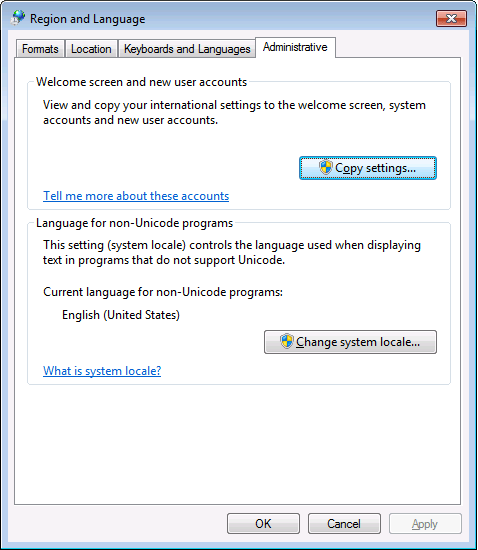
PowerShell 4.0 is madly in love with “English (United States)”
A long time ago I started writing up my blog post like this in March 2015 when I bumped into this the first time when upgrading from PowerShell 2 to PowerShell 4:
It seems there is no real workaround:
Good and not so good news: after reading the below linked posts, this is what works:
- PowerShell 4 and up works fine with any [Wayback] Lucida Console size (including 12) and boldness
- only when the “Language for non-Unicode programs” is set to “English (United States)”.
- PowerShell 4 works fine with [Wayback] Consolas on any size and boldness
- for any “Language for non-Unicode programs”
So if you’re like me and switch between “Dutch (Netherlands)” and “English (Ireland)” a lot (both use the EURO as currency, but have distinct enough other locale settings to cover a lot of European stuff) then you need to get used to the Consolas font.
Source:
Edit 20210930: a possible solution
I need to fire up some old systems having PowerShell v3 or v4 on them to test the below possible solution.
Read the rest of this entry »
Posted in CommandLine, Development, Font, Lucida Console, Power User, PowerShell, PowerShell, Scripting, Software Development, Windows, Windows 10, Windows 7, Windows 8, Windows 8.1, Windows 9 | Leave a Comment »


 The Wiert Corner - irregular stream of stuff