Posted by jpluimers on 2021/05/06
Deprecating all types in a unit besides deprecating the unit itself will cause a hint and warning storm. Especially in projects having a lot of hints and warnings (taking over maintenance of a legacy project comes to mind) this can be very helpful to spot these locations inside many files where some obscure unmaintained unit like GIFImage.pas is still used.
[WayBack] TGIFImage for Delphi | MelanderBlog got donated to (then CodeGear, now Embarcadero) for inclusion in Delphi 2007. It was, as GifImg unit, but only documented since the [WayBack] Delphi 2009 GIFImg Namespace). For more information: delphi 2007 gifimg unit – Google Search
Delphi allows you to deprecate a lot of types, but you cannot deprecate these forms:
array [...] of TSomeType^TSomeTypeclass of TSomeTypeprocedure(...) ...function(...): TSomeType ...reference to procedure(...) ...reference to function(...): TSomeType ...
Putting a deprecated 'use SomeUnit.TSomeOtherType' will fail with:
- either a compiler error pair
- “
E2029 ';' expected but identifier 'deprecated' found“.
- “
E2029 '=' expected but string constant found“
- a compiler error
E1030 Invalid compiler directive: 'DEPRECATED'
You can enumerate these kinds of types:
- enumerations
- records
- classes, but only a full class declaration, so
- not the class forward declaration like
TMyClass = class
- not a shortened class declaration like
TMyException = class(Exception), this has to be the full TMyException = class(Exception) end deprecated 'reason';
- methods only after the last separating
; of the method (so the virtual form is like procedure Name(...); virtual; deprecated 'use another method';)
- named constants
- global variables
The last few are not technically types, but included for completeness.
–jeroen
Posted in Conference Topics, Conferences, Delphi, Development, Event, Software Development | Leave a Comment »
Posted by jpluimers on 2021/05/05
A summary of the full gist at [Wayback/Archive.is] ESXi-where-are-my-log-files-stored.txt:
# ls -al / /var/ /var/log/ /var/run/ /scratch/ /scratch/log/ | grep "/\|log\|-\>"
/:
...
lrwxrwxrwx    1 root     root            57 Apr  4 18:16 scratch -> /vmfs/volumes/5ce2d440-72311161-75c5-0025907d9d5c/.locker
...
/scratch/:
drwxr-xr-x    1 root     root        106496 Apr 10 08:40 log
/scratch/log/:
-rw-------    1 root     root           411 Apr  4 18:20 Xorg.log
...
-rw-------    1 root     root         78835 Apr  4 10:30 syslog.0.gz
-rw-------    1 root     root         61136 Mar 18 15:05 syslog.1.gz
-rw-------    1 root     root         60589 Feb 24 00:30 syslog.2.gz
-rw-------    1 root     root         60373 Feb  1 08:01 syslog.3.gz
-rw-------    1 root     root         60203 Jan  9 15:50 syslog.4.gz
-rw-------    1 root     root         59889 Dec 17 23:20 syslog.5.gz
-rw-------    1 root     root         60398 Nov 25 06:50 syslog.6.gz
-rw-------    1 root     root         60563 Nov  2 14:25 syslog.7.gz
-rw-------    1 root     root        531794 Apr 10 09:35 syslog.log
...
-rw-------    1 root     root        157255 Apr  4 18:17 vvold.log
/var/:
...
drwxr-xr-x    1 root     root           512 Apr  5 19:19 log
...
/var/log/:
-rw-r--r--    1 root     root           416 Apr  4 18:16 .vmsyslogd.err
...
-rw-r--r--    1 root     root         38069 Apr  4 18:20 configRP.log
-rw-r--r--    1 root     root             0 Apr  4 18:16 cryptoloader.log
...
-rw-r--r--    1 root     root            87 Apr  5 21:57 esxcli.log
...
-rw-------    1 root     root          3350 Apr  4 18:16 init.log
-rw-r--r--    1 root     root           966 Apr  4 18:16 iofilter-init.log
...
-rw-r--r--    1 root     root         21769 Apr  4 18:16 jumpstart-esxcli-stdout.log
-rw-r--r--    1 root     root         18857 Apr  4 18:16 jumpstart-native-stdout.log
-rw-r--r--    1 root     root         10837 Apr  4 18:16 jumpstart-stdout.log
-rw-r--r--    1 root     root             0 Apr  4 18:16 kickstart.log
...
-rw-------    1 root     root         10916 Apr  4 18:16 sysboot.log
...
-rw-------    1 root     root            64 Apr 10 09:13 tallylog
...
/var/run/:
lrwxrwxrwx    1 root     root            12 Apr  4 18:16 log -> /scratch/log
- Almost all log files (most from
/var/log and all from /var/run/log) are actually persistently stored in /scratch/log and survive reboots. Just a few are non-persistent.
/var/log/syslog is being archived as .gz files (compressed by gzip).syslog is special: the location can be configured, and even be external: [Wayback] Configuring syslog on ESXi (2003322)
VMware vSphere ESXi 5.0 and higher hosts run a Syslog service (vmsyslogd) that provides a standard mechanism for logging messages from the VMkernel and other system components. By default in ESXi, these logs are placed on a local scratch volume or a ramdisk. To preserve the logs further, ESXi can be configured to place these logs to an alternate storage location on disk and to send the logs across the network to a Syslog server.
- A summary of some of the above log files is at [Wayback] ESXi Log File Locations
–jeroen
Posted in *nix, *nix-tools, ash/dash, ash/dash development, BusyBox, Development, ESXi6, ESXi6.5, ESXi6.7, ESXi7, gzip, Power User, Scripting, Software Development, Virtualization, VMware, VMware ESXi | Leave a Comment »
Posted by jpluimers on 2021/05/05
A while ago I wrote about Helping the WayBack ArchiveTeam team: running their Warrior virtual appliance on ESXi.
Since it was scheduled before my cancer treatment started and got posted when still recovering from it, I missed that version 3.2 of the [Wayback] ArchiveTeam Warrior appliance appeared in the [Wayback] Releases · ArchiveTeam/Ubuntu-Warrior at [Wayback] Release v3.2 · ArchiveTeam/Ubuntu-Warrior. You can download it form these places:
These two sites have not yet been updated, so they contain the older versions:
The source code now has been moved three times:
Read the rest of this entry »
Posted in *nix, *nix-tools, ArchiveTeamWarrior, Cloud, Containers, diff, Docker, ESXi5, ESXi5.1, ESXi5.5, ESXi6, ESXi6.5, ESXi6.7, ESXi7, Infrastructure, Internet, InternetArchive, Kubernetes (k8n), KVM Kernel-based Virtual Machine, patch, Power User, VirtualBox, Virtualization, VMware, VMware ESXi, VMware Workstation, WayBack machine | Leave a Comment »
Posted by jpluimers on 2021/05/05
A cool feature introduced in Delphi 10.2 Tokyo: often [RSP-17326] with statements generate W1048 unsafe typecast warning – Embarcadero Technologies.
Only 2 upvotes, so I assume the “anti with camp” people are finally winning (:
Notes:
- that not all with statements generate a
W1048 warning. It looks like the ones using local variables don’t, but parameters, properties and fields to.
- when generated, they are always of this form:
W1048 Unsafe typecast of '%s' to 'Pointer'
- I only found one other public report searching for “w1048” “to ‘Pointer'” – Google Search:
Quoted from the bug-report (as they cannot be archived in the wayback machine)
Details
-
Build No: 25.0.25948.9960
-
Platform: All
-
Language Version: English
-
Edition: Enterprise
-
InternalID: RS-82298
-
InternalStatus: Validation
All with statements generate this warning. I am on board with the theory that all with statements are inherently somewhat unsafe, but with 1.5 million lines of legacy code (and over 500 new warnings), I would significantly prefer to have a separate warning for with statements.
As it happens I would like to go through and do this work, especially if we can have refactoring to restore non-with code – see RSP-13978. BUT, Godzilla is generating new extra warnings (including unsafe typecasts) in this legacy code and I would prefer to be able to attack these first and attend to with statements later.
–jeroen
Posted in Delphi, Delphi 10.2 Tokyo (Godzilla), Development, Software Development | 1 Comment »
Posted by jpluimers on 2021/05/04
On my list to experiment with are [Wayback] about_Preference_Variables – PowerShell | Microsoft Docs, especially
$ConfirmPreference
Determines whether PowerShell automatically prompts you for confirmation before running a cmdlet or function.
The $ConfirmPreference variable’s valid values are High, Medium, or Low. Cmdlets and functions are assigned a risk of High, Medium, or Low. When the value of the $ConfirmPreference variable is less than or equal to the risk assigned to a cmdlet or function, PowerShell automatically prompts you for confirmation before running the cmdlet or function.
If the value of the $ConfirmPreference variable is None, PowerShell never automatically prompts you before running a cmdlet or function.
To change the confirming behavior for all cmdlets and functions in the session, change $ConfirmPreference variable’s value.
To override the $ConfirmPreference for a single command, use a cmdlet’s or function’s Confirm parameter. To request confirmation, use -Confirm. To suppress confirmation, use -Confirm:$false.
Valid values of $ConfirmPreference:
- None: PowerShell doesn’t prompt automatically. To request confirmation of a particular command, use the Confirm parameter of the cmdlet or function.
- Low: PowerShell prompts for confirmation before running cmdlets or functions with a low, medium, or high risk.
- Medium: PowerShell prompts for confirmation before running cmdlets or functions with a medium, or high risk.
- High: PowerShell prompts for confirmation before running cmdlets or functions with a high risk.
–jeroen
Posted in .NET, CommandLine, Development, PowerShell, PowerShell, Scripting, Software Development | Leave a Comment »
Posted by jpluimers on 2021/05/04
The discussion on Yahoo closing Answers tonight quickly went from alternative text based question/answer sites to long YouTube videos having hardly any content but ads, to blocking these ads: [Wayback] Yahoo sluit Answers-dienst na vijftien jaar en verwijdert inhoud – IT Pro – Nieuws – Tweakers
So here are some links where I can learn a bit of browser plugin and Android development technology as well:
(What I dislike most about ads is that they start at unnatural positions in the stream and cover topics I’m totally not interested in).
–jeroen
Posted in Android, Android Devices, Development, Mobile Development, Power User, SocialMedia, Software Development, Web Development, YouTube | Leave a Comment »
Posted by jpluimers on 2021/05/04
Recently I needed a plain TDBGrid without a horizontal scrollbar. I based it on the below solutions, but using an interposer class (type TDBGrid = class(TDBGrid) ... end;).
Another solution is to redirect the WinProc for a single grid component to a different method (you can apply it to the similar TDBCtrlGrid class as well):
unit DBGridFormUnit;
uses
  Winapi.Messages,
  Vcl.DBGrids,
  Vcl.Forms;

type
  TDBGridForm = class(TForm)
    DBGrid: TDBGrid;
    procedure FormCreate(Sender: TObject);
    procedure FormDestroy(Sender: TObject);
  strict private
    OriginalDBGridWindowProc : TWndMethod;
    procedure DBGridWindowProc(var Message: TMessage);
  end;

implementation

uses
  Winapi.Windows;
procedure TDBGridForm.FormCreate(Sender: TObject);
begin
  OriginalDBGridWindowProc := DBGrid.WindowProc;
  DBGrid.WindowProc := DBGridWindowProc;
end;

procedure TDBGridForm.FormDestroy(Sender: TObject);
begin
  DBGrid.WindowProc := OriginalDBGridWindowProc;
end;

procedure TDBGridForm.DBGridWindowProc(var Message: TMessage);
const
  ScrollStylesToExclude = WS_VSCROLL or WS_HSCROLL;
var
  Style: Integer;
begin
  if Message.Msg = WM_NCCALCSIZE then
  begin
    Style := GetWindowLong(Handle, GWL_STYLE);
    if (Style and ScrollStylesToExclude) <> 0 then // any scroll style to exclude present?
      SetWindowLong(Handle, GWL_STYLE, Style and not ScrollStylesToExclude);
  end
  else
    OrigWndProc(Message);
end;
end.
I think the SwissDelphiCenter solution in [WayBack] …hide the scrollbars of a DBGrid? originally has been copied from the 2003 post by Peter Below at [WayBack] how to hide DBCtrlGrid scrollbars – delphi.
(*
Q:
I want to hide the vertical scrollbar on a dbgrid when the record count
exceed a number. How can I do that?

A:
Make a descendent of the TDBGrid class. Add a handler for the
WM_NCCALCSIZE message.

Title: ...hide the scrollbars of a DBGrid?

Author: P. Below

Category: VCL
*)
type
  TNoScrollDBGrid = class(TDBGrid)
  private
    procedure WMNCCalcSize(var Msg: TMessage);
    message WM_NCCALCSIZE;
  end;

procedure TNoScrollDBGrid.WMNCCalcSize(var Msg: TMessage);
const
  Scrollstyles = WS_VSCROLL or WS_HSCROLL;
var
  Style: Integer;
begin
  Style := GetWindowLong(Handle, GWL_STYLE);
  if (Style and Scrollstyles) <> 0 then
    SetWindowLong(Handle, GWL_STYLE, Style and not Scrollstyles);
  inherited;
end;

//This removes both scrollbars. If you want to remove only the vertical one
//change the scrollstyles constant accordingly.
I like this derived class from [WayBack] Delphi VCL Component • View topic • Hiding Scrollbars in DBGRID by Chris Luck based on the code from Peter Below more (I slightly condensed it from non-relevant code):
unit NoScrollDBGrid;

interface

uses
  Windows, Messages, DBGrids;

type
  TNoScrollDBGrid = class(TDBGrid)
  private
    FVertScroll: Boolean;
    FHorzScroll: Boolean;
    procedure WMNCCalcSize(var msg: TMessage); message WM_NCCALCSIZE;
    procedure SetVertScroll(Value: Boolean);
    procedure SetHorzScroll(Value: Boolean);
  published
    property VertScroll: Boolean read FVertScroll write SetVertScroll;
    property HorzScroll: Boolean read FHorzScroll write SetHorzScroll;
  end;

procedure Register;

implementation

uses
  Classes;
procedure TNoScrollDBGrid.SetVertScroll(Value: Boolean);
begin
  if FVertScroll <> Value then
  begin
    FVertScroll := Value;
    RecreateWnd;
  end;
end;

procedure TNoScrollDBGrid.SetHorzScroll(Value: Boolean);
begin
  if FHorzScroll <> Value then
  begin
    FHorzScroll := Value;
    RecreateWnd;
  end;
end;

procedure TNoScrollDBGrid.WMNCCalcSize(var msg: TMessage);
var
  style: Integer;
begin
  style := getWindowLong( handle, GWL_STYLE );

  if (NOT(FHorzScroll)) AND ((style and WS_HSCROLL) <> 0) then
    SetWindowLong( handle, GWL_STYLE, style and not WS_HSCROLL );

  if (NOT(FVertScroll)) AND ((style and WS_VSCROLL) <> 0) then
    SetWindowLong( handle, GWL_STYLE, style and not WS_VSCROLL );

  inherited;
end;

procedure Register;
begin
  RegisterComponents('Samples', [TNoScrollDBGrid]);
end;

end.
–jeroen
Posted in Delphi, Development, Software Development | Leave a Comment »
Posted by jpluimers on 2021/05/03
It is debatable if these tricks are vulnerabilities or not: [WayBack] authentication – Bypassing Windows 10 password with Utilman.exe trick – fixed? – Information Security Stack Exchange.
There are arguments that leaving a system open to physical access or allow operating system manipulation, it means it is busted.
On the other hand, making systems more resilient to modification, helps alleviate these problems.
So it pays for developers to harden operating systems against modification.
From the question:
Of the sethc.exe, Utilman.exe, and osk.exe ones in Windows, Utilman.exe seems to have been fixed.
Related:
–jeroen
Posted in Power User, Windows, Windows 10, Windows 7, Windows 8, Windows 8.1 | Leave a Comment »
Posted by jpluimers on 2021/05/03
A while ago, I got a second hand Supermicro workstation and wondered why the IPMI KVM would not show anything.
The video card in it worked fine, so I used it as a desktop machine setup for a while, happily running VMS.
I finally decided to move into a closet, so I removed the video card, and rebooted.
Then it beeped 5 times, which was odd: I expected it to switch from the video card to the internal video. It didn’t.
Older BIOS codes: [WayBack] AMI BIOS Beep Codes – Thomas-Krenn-Wiki
From PDF [WayBack] BIOS POST Codes for C7/X9/X10/X11/B9/B10/B1/A1 Motherboards
PEI Beep Codes
| # of Beeps |
Description |
| 1 |
Memory not Installed |
| 1 |
Memory was installed twice (InstallPeiMemory routine in PEI Core called twice) |
| 2 |
Recovery started |
| 3 |
DXEIPL was not found |
| 3 |
DXE Core Firmware Volume was not found |
| 4 |
Recovery failed |
| 4 |
S3 Resume failed |
| 7 |
Reset PPI is not available |
DXE Beep Codes
| # of Beeps |
Description |
| 1 |
Invalid password |
| 4 |
Some of the Architectural Protocols are not available |
| 5 |
No Console Output Devices are found |
| 5 |
No Console Input Devices are found |
| 6 |
Flash update is failed |
| 7 |
Reset protocol is not available |
| 8 |
Platform PCI resource requirements cannot be met |
So I did a bit of reading in the manual, then found about a jumper which had happily been living out of view, under the video card:
VGA Enable (JPG1)
JPG1 allows you to enable or disable the onboard VGA connector. The default position is on pins 1 and 2 to enable VGA.
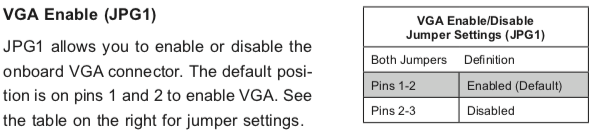
Setting the jumper to pins 1&2 made internal VGA available again, it happily booted and showed in the IPMI KVM.
Later I understood why the jumper was set to VGA disabled: when having two video cards, by default Windows will extend your desktop to an invisible monitor.
The easiest workaround for that is just to disable VGA. However, you can also change Windows
Older versus newer boards
It appears that most older SuperMicro systems have a hardware switch, but for newer chipsets supporting Intel Quick Sync Video a there is a BIOS setting: [WayBack] Enable internal graphics in SUPERMICRO servers | Any IT here? Help Me!
Windows 10 fixing video cards and ACPI_BIOS_ERROR
The reboot did not work fine: Windows 10 would not initialise properly, but hung when detecting video cards.
Read the rest of this entry »
Posted in Hardware, IPMI, Mainboards, Power User, SuperMicro, X10SRH-CF, X9SRi-3F, X9SRi-F | Leave a Comment »
Posted by jpluimers on 2021/05/03
Somehow, many Windows 10 systems, when I try on an Administrative command prompt wmic path SoftwareLicensingService get OA3xOriginalProductKey, the result is empty:
Microsoft Windows [Version 10.0.17763.475]
(c) 2018 Microsoft Corporation. All rights reserved.

C:\WINDOWS\system32>wmic path SoftwareLicensingService get OA3xOriginalProductKey
OA3xOriginalProductKey


C:\WINDOWS\system32>
On those systems, [Wayback] NirSoft ProduKey always works.
Having a product key at hand is a great help when re-installing Windows 10: often it does not automatically obtain a digital license on the same hardware.
Most of those systems have been upgrades from previous Windows versions, but not all of them: even some new systems have this behaviour.
Related:
–jeroen
Read the rest of this entry »
Posted in Power User, Windows, Windows 10 | Leave a Comment »


 Bug
Bug Reported
 Major
Major


 The Wiert Corner - irregular stream of stuff
Jason Sprenger requested more info in order to validate the issue and commented: Not any code involving “with” statements produces an unsafe typecast warning.
For instance,
What sort of source involving “with” statements is generating these warnings for you?
With this information our development team can consider addressing your particular circumstance.