Archive for July, 2016
Posted by jpluimers on 2016/07/29
One day I’m going to need this: Make A Bootable Windows 10 USB Install Stick On Linux With WinUSB Fork ~ Web Upd8: Ubuntu / Linux blog
So I’m glad WinUSB (which hadn’t been maintained for a long time) got forked on github by slaka.
Since my day-to-day unix-like system is OS X, I’d love a good working solution there too which means I probably need to investigate a bit along these lines:
- Using diskpart in a Windows VM (which is kind of backwards):
- Using Disk Utility and UEFI (only works for Windows 8 and up):
- Using Boot Camp Assistant and a modified Info.plist (which for El Capitan needs some extra work):
–jeroen
via: Make A Bootable Windows 10 USB Install Stick On Linux With WinUSB Fork WebUpd8 – Google+ / DoorToDoorGeek “Stephen McLaughlin” – Google+
Posted in *nix, Apple, BIOS, Boot, BSD, Linux, Mac OS X / OS X / MacOS, OS X 10.10 Yosemite, OS X 10.11 El Capitan, OS X 10.9 Mavericks, Power User, Ubuntu, UEFI, Windows, Windows 10, Windows 7, Windows 8, Windows 8.1, Windows 9, Windows Server 2000, Windows Server 2003, Windows Server 2003 R2, Windows Server 2008, Windows Server 2008 R2, Windows Server 2012, Windows Server 2012 R2, Windows Vista, Windows XP | Leave a Comment »
Posted by jpluimers on 2016/07/29
sponge, a great *nix tool part of moreutils:
sponge: soak up standard input and write to a file
Now need to figure out how to get it on Tumbleweed; maybe http://rpm.pbone.net/index.php3/stat/4/idpl/23781842/dir/opensuse/com/moreutils-0.48-1.1.i586.rpm.html
–jeroen
via: moreutils.
Posted in *nix, *nix-tools, Linux, openSuSE, Power User, SuSE Linux | Leave a Comment »
Posted by jpluimers on 2016/07/28
I’ve quotes two of the G+ comments as they perfectly reflect my point of view: the non-modal search and IDE Insight – introduced somewhere after XE3 – are a dork to use.
I’m doing more Delphi work lately and these being non-modal seriously hinder my work (and it gets progressively worse on a 3K or 4K monitor).
In my book: why implement a feature to emulate the competition when you do it so badly?
So: are there any experts around that bring back the old search and IDE Insight behaviour back?
Asbjørn Heid, Oct 5, 2015:
+Marco Cantù I’m pretty sure I’ve mentioned it before, but hey:
- The new edit field cannot be placed in a position which does not require significant eye-focus change to read. This means it is significantly more cumbersome to use, as focus must be transferred to some “out of sight” area. In addition one does not get the same instant feedback that the IDE did register your F6 keypress. The old one was “in your face” instantly when you pressed F6, so no need to take your eyes off the form you’re designing, and it left no doubt about F6 being registered or not.
- The dropdown list with suggestions that pops up when you type is much more difficult to read than the list in the old one, both due to positioning (thanks to the above) and due to length until it’s heavily constrained by input.
- From what I recall, the new edit field does not behave the same when invoked repeatedly, requiring more keystrokes to get the same effect compared to the old. I haven’t used XE3 in ages though so I don’t recall the specifics anymore, just that the new feels more clunky to use.
That’s just off the top of my head. Yes I still use it, but not nearly as much as I did, and when I do it’s one to two orders of magnitude slower to use compared to the old one. Not because it searches slower, but because of the issues described above.
Similarly for the non-modal search, although somehow I’m more used to the modern version now. When compared with VS though the Delphi search is very lacking. The great thing about the VS search is that it gives live feedback on which text in the edit window match the text in the search window. If Delphi would do that it would make an immense difference. It’s definitely worth spending some time in VS using their search facility. And indeed in other IDEs / editors.
There was a lot of negative feedback on both of these changes when they were released. Surely Embarcadero noticed that.
–jeroen
via: F6 or [Ctrl] + . does not open IDE Insight on DX. What am I missing?…
Posted in Delphi, Delphi 10 Seattle, Delphi 10.1 Berlin (BigBen), Delphi XE3, Delphi XE4, Delphi XE5, Delphi XE6, Delphi XE7, Delphi XE8, Development, Power User, Software Development | 2 Comments »
Posted by jpluimers on 2016/07/28
In hindsight, what they should have done when ZEROBASEDSTRINGS were introduced (yes, Delphi XE4):
 Matlab and zerobasedstrings
–jeroen
via: At the MathWorks headquarters Source: http://redd.it/3bl5m1 #matlab….
Posted in Delphi, Delphi 10 Seattle, Delphi XE4, Delphi XE5, Delphi XE6, Delphi XE7, Delphi XE8, Development, Software Development | 1 Comment »
Posted by jpluimers on 2016/07/27
Just what I needed: Push a new local branch to a remote Git repository and track it too – Stack Overflow But watch the comments to this answer:
Answer:
In recent versions of Git (1.7.0 and later), you can checkout a new branch:
git checkout -b <branch>
Edit files, add and commit. Then push with the -u option:
git push -u origin <branch>
Git will set up the tracking information during the push.
Daniel Ruoso / Dan
Comments:
–jeroen
Posted in Development, DVCS - Distributed Version Control, git, Software Development, Source Code Management, Visual Studio 2013, Visual Studio 2014, Visual Studio 2015, Visual Studio and tools | Leave a Comment »
Posted by jpluimers on 2016/07/27
It comes down to these cases for XML elements having maxOccurs="1" (which the default for maxOccurs):
- adding
nillable="true" will convert from a regular type to a nullable type.
- adding
minOccurs="0" will add boolean …Specified properties in the generated C# for each element.
- you can have both
nillable="true" and minOccurs="0" in an element which gets you a nullable type and a …Specified property.
Note I’m not considering fixed or default here, nor attributes (that have use instead of minOccurs/maxOccurs, but do not allow for nillable) nor larger values of maxOccurs (which both xsd.exe and xsd2code regard as unbounded).
From the above, XML has a richer type system than C#, so in XML there are subtle a differences between:
- an explicit
nil in the XML element
- the XML element being absent
- the XML element being empty.
Hopefully later more text and examples to show how to actually work with this.
Delphi related to minOccurs:
Note that xsd2code.codeplex.com (unlike XmlGen#) has at least two forks at github:
From the specs:
–jeroen
Posted in .NET, .NET 2.0, .NET 3.0, .NET 3.5, .NET 4.0, .NET 4.5, C#, C# 2.0, C# 3.0, C# 4.0, C# 5.0, C# 6 (Roslyn), Conference Topics, Conferences, Development, Event, Software Development, XML, XML/XSD, XSD | Leave a Comment »
Posted by jpluimers on 2016/07/26
A while ago, StackOverflow user Kobus Smit did some brilliant editorial work that – due to current state of StackOverflow – sort of fired backwards: his question got marked as duplicate before he could post his excellent answer. After that answer was posted, the oh-so pride SO-demi gods never took any energy to revisit to see which answers were best.
His simple question:
How can my Delphi app easily write to the Windows Event Log?What is the difference between TEventLogger and ReportEvent? How do I use the ReportEvent function?
Which somehow should be encompassed by this Delphi 5 question (apparently that 15+ year old Delphi version is still considered current by the SO demi-gods).
The answer summarises and extends existing answers spread out over StackOverflow and adds an EventLog git repository wrapping the ReportEvent and RegisterEventSource (which somehow is always a pain: Delphi services for instance often forget that).
Lesson learned when doing editorial work:
- prepare both the answer and question in markdown off-line
- ensure you mention in the question that the answer is meant as collection of “best of” answers found elsewhere
- post the question and answer in rapid succession
- cross your fingers for the StackOverflow demi-gods being in a good mood
–jeroen
via: Writing to the Windows Event Log using Delphi – Stack Overflow
Posted in Delphi, Delphi 10 Seattle, Delphi 10.1 Berlin (BigBen), Delphi 2005, Delphi 2006, Delphi 2007, Delphi 2009, Delphi 2010, Delphi 5, Delphi 6, Delphi 7, Delphi 8, Delphi XE, Delphi XE2, Delphi XE3, Delphi XE4, Delphi XE5, Delphi XE6, Delphi XE7, Delphi XE8, Development, Software Development | 1 Comment »
Posted by jpluimers on 2016/07/26
Every methodology has their own. I like the ones in the picture, of which the teacher obviously didn’t get them at all. Maybe because COP 3331 is about Object Oriented Design?
- Denial
- Bargaining
- Anger
- Depression
- Acceptance
Sounds familiar?
–jeroen
via: Name and describe the five key phases of software development….

COP 3331
Posted in Development, Software Development | Leave a Comment »
Posted by jpluimers on 2016/07/25
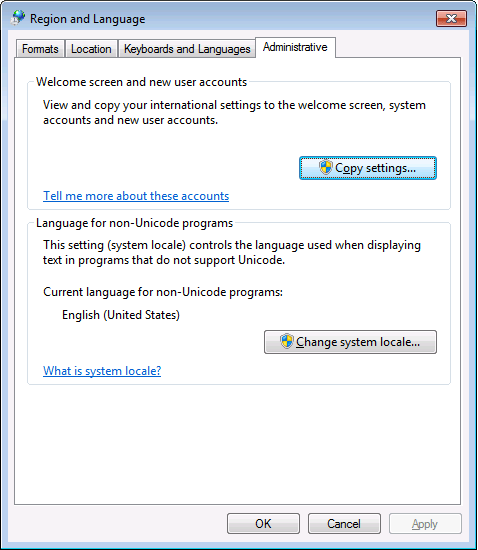
PowerShell 4.0 is madly in love with “English (United States)”
A long time ago I started writing up my blog post like this in March 2015 when I bumped into this the first time when upgrading from PowerShell 2 to PowerShell 4:
It seems there is no real workaround:
Good and not so good news: after reading the below linked posts, this is what works:
- PowerShell 4 and up works fine with any [Wayback] Lucida Console size (including 12) and boldness
- only when the “Language for non-Unicode programs” is set to “English (United States)”.
- PowerShell 4 works fine with [Wayback] Consolas on any size and boldness
- for any “Language for non-Unicode programs”
So if you’re like me and switch between “Dutch (Netherlands)” and “English (Ireland)” a lot (both use the EURO as currency, but have distinct enough other locale settings to cover a lot of European stuff) then you need to get used to the Consolas font.
Source:
Edit 20210930: a possible solution
I need to fire up some old systems having PowerShell v3 or v4 on them to test the below possible solution.
Read the rest of this entry »
Posted in CommandLine, Development, Font, Lucida Console, Power User, PowerShell, PowerShell, Scripting, Software Development, Windows, Windows 10, Windows 7, Windows 8, Windows 8.1, Windows 9 | Leave a Comment »


 The Wiert Corner - irregular stream of stuff
git push -uwas introduced in Git 1.7.0 (2010-02-12). – Chris Johnsen Jun 4 ’11 at 4:16-uis short for--set-upstream—for what it does and why it’s needed I wouldn’t mind some explanation, too. :) – Anton Strogonoff Mar 9 ’14 at 6:07push.defaultis set toupstream, this will not do what you think it will do. It will try to push over the existing tracking branch. Use:git push -u origin mynewfeature:mynewfeatureor dogit branch --unset-upstreamfirst. – void.pointer May 19 ’14 at 18:07