The Wiert Corner – irregular stream of stuff

Jeroen W. Pluimers on .NET, C#, Delphi, databases, and personal interests

  • My badges

  • Twitter Updates

  • My Flickr Stream

  • Pages

  • All categories

  • Enter your email address to subscribe to this blog and receive notifications of new posts by email.

    Join 1,860 other subscribers

Archive for November, 2016

xyzzy, Relay Conferencing before IRC even existed

Posted by jpluimers on 2016/11/28

A while ago, I remembered xyzzy by David Bolen: a VAX/VMS program for the BITNET Relay conference system on BITNET/EARN. Yes, relay chat before IRC. Even ELIZA did operate as a chatbot on BITNET Relay.

I was part of it from the late 80s until the early 90s and vividly remember the chat rooms where at one time you could have smart people from all around the world participating: Asia, Middle East, Europe, North America and other regions.

All people had one thing in common: an enthusiastic vibe as they had immediately recognised what the benefits of near instant feedback were. World Wide before you had the WWW. It was addictive too (:

The most important Dutch relay node was HEARN which was named unlike the HNYKUN patterns at the University in Nijmegen (now Radboud Universiteit, but previously known as Katholieke Universiteit Nijmegen hence the KUN in the HNYKUN pattern).

I had an account at HLERUL52 (chemistry department) at first, then later at HLERUL5 as well (computer technology department). Only later I got an SMTP email address [Wayback/Archive] jeroenp@rulfc1.leidenuniv.nl.

Anyway: based on the list of Bitnet/Earn links and connections below, you’d think you could plot a route. The example is between me and a cyber friends who – in 1992 – I finally met in real life:

  1. Jeroen Pluimers <PCHPAPL@HLERUL52> /  <PLUIMERS@HLERUL5> ([Wayback/Archive]  and [Wayback/Archive])
  2. Peter Sawatzki <FE617@DHAFEU11> / <IN307@DHAFEU11> ([Wayback/Archive] and [Wayback/Archive])

But that table is not the only one, the actual routing tables were generated from [Wayback/Archive/Google] LINKSWT files (see below), which means that HEARN and DEARN had a direct connection collapsing the (expensive) transatlantic steps 3..5 into one.

Read the rest of this entry »

Posted in BITNET Relay, Chat, History, IRC, SocialMedia | Leave a Comment »

Amazon 2FA Account Recovery HOWTO I had enabled 2FA on my amazon.de account,…

Posted by jpluimers on 2016/11/25

[WayBackAmazon 2FA Account Recovery HOWTO I had enabled 2FA on my amazon.de account,… – Kristian Köhntopp – Google+

Quoted in full as it is too important to forget where I put this:

Amazon 2FA Account Recovery HOWTO

I had enabled 2FA on my amazon.de account, and the device running the only copy of the TOTP seed has been destroyed. I wanted to disable 2FA on my account in order to be able to access the account until a replacement phone was available.

To enable 2FA on an amazon.de account, you have to login to amazon.com using your amazon.de credentials and then go through the 2FA procedure.

Calling the german hotline for help did not work. They did not know about 2FA disablement and were unable to help me. They did know about 2FA in general, have been able to verify and validate my identity and were generally friendly. They have been calling me back repeatedly.

I later remembered how I enabled the 2FA and did try to login to amazon.com, giving my german credentials and ended up on the “Enter 2FA code” screen. There is a link at the bottom, “Did not receive code”.

Clicking that link takes you to a screen where you can choose between Google Authenticator and SMS identification.

I chose SMS auth, did receive a 6 digit code, entered that and was able to auth. I then was able to temporarily disable 2FA and regain control of my US account. This also disabled 2FA for my german account, and I now have my German account back.

–jeroen


Posted in Amazon.com/.de/.fr/.uk/..., Cloud, Infrastructure, Power User | Leave a Comment »

zypper installing from a non-standard repository

Posted by jpluimers on 2016/11/25

I got a bit lost in the woods of implicit URLs between various places.

All I wanted is to install software.opensuse.org: Install package server:monitoring / lnav preferably from the link http://software.opensuse.org/ymp/server:monitoring/openSUSE_Tumbleweed/lnav.ymp

It’s the OpenSuSE package for The Log File Navigator which I found based on the recommendation “The Log File Navigator – Joe C. Hecht – Google+“.

The package was in a non-standard repository “server:monitoring”, but shortening the package link doesn’t get you there:

These do however (thanks tacit):

From both, it’s just a couple of clicks away to the lnav packages:

Zypper doesn’t allow you to install one-click install ymp links like http://software.opensuse.org/ymp/server:monitoring/openSUSE_Tumbleweed/lnav.ymp

But OCICLI (one-click install CLI) does. And yes, unlike most console commands IT’S IN UPPERCASE. You can use it like this (note the warning):

OCICLI http://software.opensuse.org/ymp/server:monitoring/openSUSE_Tumbleweed/lnav.ymp

OCICLI is fully compatible with zypper as OCICLI uses YaST and libzypp as underlying technology and zypper uses libzypp.

The yml files are metadata offering to add one or more repositories and install one or more packets or patterns. OCICLI automates that process.

Another option is to manually add the repository using zypper, then install lnav from zypper. There is no URL to this (again; are these the virtues of Web 2.0?) you have to click a few times:

  1. Go to https://software.opensuse.org/download.html?project=server:monitoring&package=lnav
  2. Click on openSUSE
  3. Click on Add repository and install manually
  4. Under openSUSE Tumbleweed, look for this code

zypper addrepo http://download.opensuse.org/repositories/server:monitoring/openSUSE_Tumbleweed/server:monitoring.repo
zypper refresh
zypper install lnav

Installing using OCICLI

As currently there is a bug in OCICLI, it will show a warning: Warning: unable to close filehandle properly: Bad file descriptor, &lt;STDIN&gt; line 7 during global destruction (#1) which I reported:

Read the rest of this entry »

Posted in *nix, Linux, openSuSE, Power User, SuSE Linux, Tumbleweed | Leave a Comment »

The Typeface Mechanics series by Frere Jones is genius!

Posted by jpluimers on 2016/11/25

Awesome Typeface Mechanics series.

Below are just the first two episodes; search the above link for more.

I bumped into this via

In which we / I learn where the ‘x’ in ‘x-height’ comes from – Kirill Grouchnikov – Google+

–jeroen

Posted in Font, Power User | Leave a Comment »

Internet Archive Wayback machine – New Beta Release Allows Users to Keyword Search

Posted by jpluimers on 2016/11/24

I totally missed this because most of my WayBack activity is through the JavaScript buttons on my Chrome toolbar, so here it is:

A month ago, the WayBack machine introduced a new beta that allows for searching inside the archives.

Some links:

There actually seem to be two betas going on at the same time:

–jeroen

Posted in InternetArchive, Power User, WayBack machine | Leave a Comment »

Single Malt Fiber…

Posted by jpluimers on 2016/11/24

Via [WayBack] Office so, am Nebentisch: “Mumble, mumble, single mode, mumble, single mode fiber, mumble””Ich höre die Hälfte der Zeit Single Malt. – Kristian Köhntopp – Google+

While you’re waiting for the packet exchange anyway, enjoy 45 minutes of uninterrupted Lagavulin™ Single Malt Scotch Whisky-drinking bliss with Nick Offerman by the Yule Log Fireplace… and you don’t even need to exchange words… (thanks René Riech).

Or as a close friend would describe it: genitaal…

— more —


Posted in About, Fun, Personal | Leave a Comment »

The Delphi Vcl.Forms.TApplication.ActionUpdateDelay unit is … milliseconds

Posted by jpluimers on 2016/11/24

Don’t you love relevant documentation…

There is no unit defined for the Vcl.Forms.TApplication.ActionUpdateDelay – RAD Studio API Documentation.

It is used inside the TAppliation.Idle to fire the (undocumented) TApplication.DoActionIdle method. When the value is zero or less, then each Idle call will result in an DoActionIdle call in turn calling TCustomForm.UpdateActions for any visible form.

UpdateActions in turn will call (for the form itself, all the form’s menu items and all the form’s controls) the TControl.InitiateAction which – if there is an associated ActionLink – will call the TBasicActionLink.Update which in turn will call the TBasicAction.Suspended and TBasicAction.Update methods of which the latter will call the TBasicAction.OnUpdate event if it is assigned.

In theory, the OnUpdate method for each action can even be called multiple times (because multiple controls on visible forms can point to it), but the real culprit is that TApplication.Idle as it can be called from these places:

  • TApplication.DoApplicationIdle
  • TApplication.HandleMessage (in a loop from TApplication.Run)
  • TCustomActionMenuBar.ProcessMenuLoop (in a loop)
  • TCustomRibbon.DisplayKeyTips (in a loop)

The last three (especially HandleMessage) can be disastrous as they can be called a lot (for instance when moving the mouse), and more often than not, the OnUpdate event handlers aren’t exactly CPU friendly.

A while ago I bumped into an application where the OnUpdate event handler for one action was called half a million time in under 5 minutes.

This clearly indicated a huge problem (besides using a full CPU core slowing down the application) as apparently something was broadcasting Windows Messages like crazy.

Investigating and Solving the message flood is on the back-log with a reasonably high priority, but the highest priority issue was fixing the high CPU usage in the first place.

Apparently more users suffer from this, as there is a Vcl.Forms.TApplication.ActionUpdateDelay property which TApplication.Idle uses to call the Windows API function SetTimer to rate-limit the TApplication.DoActionIdle call tree. Luckily SetTimer does have documentation on the unit of ActionUpdateDelay: it’s milliseconds.

I’ve set it to 10 as that updating the actions ~100 times a second is fast enough for this application.

–jeroen

via:

Posted in Delphi, Delphi 10 Seattle, Delphi 10.1 Berlin (BigBen), Delphi 2007, Delphi 2009, Delphi 2010, Delphi XE, Delphi XE2, Delphi XE3, Delphi XE4, Delphi XE5, Delphi XE6, Delphi XE7, Delphi XE8, Development, Software Development | Leave a Comment »

Delphi: function IsRunningFromNetwork – via Lars Fosdal. I will need this one day

Posted by jpluimers on 2016/11/24

If I ever need it: function IsRunningFromNetwork that is based on WNetGetConnection.


function IsRunningFromNetwork(const ServerName:String = 'BetYouCantFindThisServer'): Boolean;
const
pMax = 2047;
var
dt: UINT;
volpath: Array[0..pMax] of Char;
sVol: String;
sz: Cardinal;
begin
Result := False;
dt := GetDriveType(PChar(ExtractFilePath(ParamStr(0))));
if dt = 4
then begin
GetVolumePathNameW(PChar(LowerCase(ParamStr(0))), volpath, pMax);
sVol := StrPas(volpath);
if not ((pos(LowerCase(ServerName), sVol) <> 0) or (pos('\\', sVol) = 1))
then begin
if pos(':', sVol) <> 0
then begin
sz := pMax;
if WNetGetConnection(pChar(Copy(sVol, 1, 2)), volPath, sz) = NO_ERROR
then Result := (pos(LowerCase(ServerName), LowerCase(StrPas(volPath))) <> 0) or (pos('\\', StrPas(volPath)) = 1);
end;
end
else Result := True;
end;
end;

Thanks Lars; I copied it to a gist for easier WordPress handling.

–jeroen

via:

Posted in Delphi, Development, Software Development | Leave a Comment »

Meet PoisonTap, the $5 tool that ransacks password-protected computers | Ars Technica

Posted by jpluimers on 2016/11/23

Too bad Ars Technica redirects https to http while preaching anyone should use https.

Anyway: OS device driver install and network configuration should probably be less automatic than it is now.

All the more reason to go fully https (hello LetsEncrypt, goodbye Embarcadero).

A video showing how it works is below.

The clever device emulates a USB ethernet adapter (that virtually every operating system has default drivers for) then fakes being 1.0.0.1 handing out DHCP address 1.0.0.10 with a netmask of 128.0.0.1 thereby routing almost all network traffic over it.

It makes a tiny peace of the internet unreachable (like 1.0.0.1 itself in Brisbane Australia).

More details on how it works at [WayBackSamy Kamkar: PoisonTap – exploiting locked computers over USB.

Lets not leave this out:

Securing Against PoisonTap

Server-Side Security

If you are running a web server, securing against PoisonTap is simple:

  • Use HTTPS exclusively, at the very least for authentication and authenticated content
    • Honestly, you should use HTTPS exclusively and always redirect HTTP content to HTTPS, preventing a user being tricked into providing credentials or other PII over HTTP
  • Ensure Secure flag is enabled on cookies, preventing HTTPS cookies from leaking over HTTP
  • When loading remote Javascript resources, use the Subresource Integrity script tag attribute
  • Use HSTS to prevent HTTPS downgrade attacks

Desktop Security

  • Adding cement to your USB and Thunderbolt ports can be effective
  • Closing your browser every time you walk away from your machine can work, but is entirely impractical
  • Disabling USB ports is also effective, though also impractical
  • Locking your computer has no effect as the network and USB stacks operate while the machine is locked, however, going into an encrypted sleep mode where a key is required to decrypt memory (e.g., FileVault2 + deep sleep) solves most of the issues as your browser will no longer make requests, even if woken up

–jeroen

via Joe C. Hecht – Google+

Read the rest of this entry »

Posted in Development, Hardware Development, Raspberry Pi | Leave a Comment »

Recursion

Posted by jpluimers on 2016/11/23

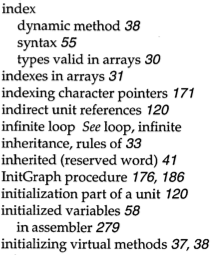
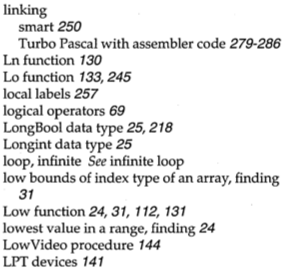
Apple fanboys all know about 1 Infinite Loop. Turbo Pascal adepts about the index entries “infinite loop See loop, infinite” and “loop, infinite See infinite loop”.

Google as a more direct approach: www.google.com/search?q=recursion

Read the rest of this entry »

Posted in Algorithms, Apple, Borland Pascal, Design Patterns, Development, Google, Pascal, Power User, Software Development, Turbo Pascal | Leave a Comment »