The Wiert Corner – irregular stream of stuff

Jeroen W. Pluimers on .NET, C#, Delphi, databases, and personal interests

  • My badges

  • Twitter Updates

  • My Flickr Stream

  • Pages

  • All categories

  • Enter your email address to subscribe to this blog and receive notifications of new posts by email.

    Join 1,835 other subscribers

Archive for the ‘Development’ Category

Google Maps Hacks by Simon Weckert – YouTube

Posted by jpluimers on 2021/10/05

This is from almost 2 years back, so I wonder if the physical and virtual Google Maps spoofing still works.

Via:

–jeroen

Read the rest of this entry »

Posted in Android, Development, Google, GoogleMaps, Mobile Development, Power User, Software Development | Leave a Comment »

Naughty naughty no alt: CSS style to clearly show which images lack an alt-text

Posted by jpluimers on 2021/10/05

The CSS from [WayBack/Archive.is] Naughty naughty no alt that shows the below red moving rendering of images that do not have an alt-text is simple:

Read the rest of this entry »

Posted in Bookmarklet, CSS, Development, HTML, HTML5, Power User, Software Development, Web Browsers, Web Development | Leave a Comment »

Solved: ‘Answering Yes to “You have an older version of PackageManagement known to cause issues with the PowerShell extension. Would you like to update PackageManagement (You will need to restart the PowerShell extension after)?” hung my Visual Studio Code.…’

Posted by jpluimers on 2021/10/04

From a while back: [Archive.is] Jeroen Wiert Pluimers on Twitter: ‘Answering Yes to “You have an older version of PackageManagement known to cause issues with the PowerShell extension. Would you like to update PackageManagement (You will need to restart the PowerShell extension after)?” hung my Visual Studio Code.… ‘

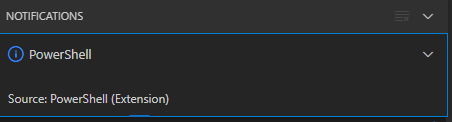
After clicking “Yes”, the the only thing visible was this notification that had an ever running “progress bar”:

Notifications - Powershell - Source: Powershell (Extension)

Notifications – Powershell – Source: Powershell (Extension)

The first part of the solution was relatively simple: restart Visual Studio code, then the original notification showed, and after clicking “Yes”, the “Panel” (you can toggle it with Ctrl+J) showed the “Terminal” output (yes, I was working on [Wayback/Archive.is] PowerShell script for sending Wake-on-LAN magic packets to given machine hardware MAC address, more about that later):

Read the rest of this entry »

Posted in .NET, Communications Development, Development, Encryption, HTTP, HTTPS/TLS security, Internet protocol suite, Power User, Security, Software Development, TCP, Visual Studio and tools, vscode Visual Studio Code, Windows, Windows 10 | Leave a Comment »

Use the System File Checker tool to repair missing or corrupted system files

Posted by jpluimers on 2021/09/30

[WayBack] Use the System File Checker tool to repair missing or corrupted system files:

Read the rest of this entry »

Posted in Development, Power User, Software Development, Windows, Windows 10, Windows 7, Windows 8, Windows 8.1, Windows Development | Leave a Comment »

One of the Let’s Encrypt’s Root Certificates expired today (and their corresponding intermediate yesterday); how is your infrastructure doing?

Posted by jpluimers on 2021/09/30

Last weekend I published 5 days before the Let’s Encrypt’s Root Certificate is expiring!

It basically was a post trying to amplify the [Wayback/Archive.isLet’s Encrypt’s Root Certificate is expiring! message by [WaybackScott Helme .

Yesterday and today, he is maintaining a Twitter thread on things that have broken.

Quite a few things have, including some versions of curl, on which a lot of infrastructure relies (the certificate for it got fixed later on 20120930), see:

Two important starting points in his thread:

  1. [Archive.is] Scott Helme on Twitter: “🚨🚨🚨 5 minutes until the Let’s Encrypt R3 intermediate expires 🚨🚨🚨 29 September 2021 19:21:40 UTC”
  2. [Archive.is] Scott Helme on Twitter: “🚨🚨🚨 30 minute warning 🚨🚨🚨 IdentTrust DST Root CA X3 Expires: Sep 30 14:01:15 2021 UTC… “

If you want to check from one of your own clients, try [Archive.is] Scott Helme on Twitter: “I’ve created a test site to help identify issues with clients. If you can connect to https://t.co/bXHsnlRk8D then your client can handle being served the expired R3 Intermediate in the server chain!… “

[Wayback/Archive.is] https://expired-r3-test.scotthelme.co.uk/

Note that neither SSLabs, nor Cencys, nor CertCheckkerApp do show the expired certificate, only the new one:

Yes, I know the pluimers.com web server is rated B from a TLS perspective. Will be working on it, but I’m still recovering from rectum cancer treatments, and have an almost 1.5 year backlog to get through.

–jeroen

Posted in Communications Development, Development, Encryption, HTTP, https, HTTPS/TLS security, Internet protocol suite, Let's Encrypt (letsencrypt/certbot), Power User, Security, Software Development, TCP, TLS, Uncategorized, Web Development | Leave a Comment »

Ian Colwater: Here are some terms to mute on Twitter to clean your timeline up a bit. · GitHub

Posted by jpluimers on 2021/09/30

[WayBack/Archive.is] Here are some terms to mute on Twitter to clean your timeline up a bit. · GitHub

Here are some terms to mute on Twitter to clean your timeline up a bit. – twittermute.txt

Via:

Related:

More details in [WayBack/Archive.is] List of Twitter mute words for your timeline | Hacker News curated comments:

Read the rest of this entry »

Posted in Development, LifeHacker, Power User, SocialMedia, Software Development, Twitter, Web Development | Leave a Comment »

JetBrains Mono: A free and open source typeface for developers | JetBrains: Developer Tools for Professionals and Teams

Posted by jpluimers on 2021/09/30

Font I want to try out: [Archive.is] JetBrains Mono: A free and open source typeface for developers | JetBrains: Developer Tools for Professionals and Teams.

It has a large X-height and is sans serif, just like the lovely [WayBack] Lucida Console font, which I have been using for almost 3 decades.

So I wonder if JetBrains Mono can convince me to switch away from Lucida Console: no other monospaced font has convinced me yet (:

Via: [Archive.is] Matt Ellis on Twitter: “JetBrains Mono. A really nice, open source, ligature friendly, developer typeface. I’ve been using this for a while now, it’s my default font. And a really cool landing page! “

Edit 202109301T1300

JetBrains is discussing on how to update the Chocolaty support, see the twitter posts below:

Referred repositories in that thread:

–jeroen

Read the rest of this entry »

Posted in Development, Font, JetBrains Mono, Lucida Console, Power User, Programmers Font, Software Development | Leave a Comment »

Windows Sandbox: a feature I forgot about

Posted by jpluimers on 2021/09/29

The Windows Sandbox can be useful, but since it was never there in the first decades of my Windows usage, I forgot it was added.

I wonder how it is implemented, as it is really useful to test out new stuff, but I wonder what it protects against.

A few years back, I bumped into this because the [WayBack] Desktop Goose by samperson got viral (it can be downloaded from [WayBack/Archive.is] Desktop Goose v0.2.zip)

via [Archive.is] Samperson on Twitter: “I made a goose that destroys your computer Download it free here: samperson.itch.io/desktop-goose” / Twitter

So here are some links (you need at least build 1903 ([WayBack] Windows 10 May 2019 or 19H1) or Insider Preview Build 18305):

You can install it even if your Windows machine itself is a VM. For a physical machine, hardware virtualisation needs to be enabled (usually in the BIOS); for a VM, nested virtualisation enabled (check that in your virtualisation environment: Hyper-V, ESXi and others vary slightly on how to enable this).

Installation inside the Windows machine can be done via PowerShell (or the UI):

Note that starting the SandBox from an x86 process might require you to run a different WindowsSandBox.exe; see [WayBack] Launching Wsb (Windows Sandbox Config file) gives error – Total Commander:

you can use C:\WINDOWS\Sysnative\WindowsSandbox.exe in stead of C:\WINDOWS\System32\WindowsSandbox.exe in TC 32bit.

Also see:
[WayBack] On 64-bit Windows versions, some files and folders shown by Windows Explorer are not shown by Total Commander!

[WayBack] Windows x64: Explorer vs TC: Content of System32 different

–jeroen

Read the rest of this entry »

Posted in Development, Power User, Software Development, Windows, Windows Development | Leave a Comment »

Moore’s law has almost ended: back to the future

Posted by jpluimers on 2021/09/29

[WayBack] We’re approaching the limits of computer power – we need new programmers now | John Naughton | Opinion | The Guardian

Ever-faster processors led to bloated software, but physical limits may force a return to the concise code of the past

So back to optimisation and maybe even assembly language.

Which brings back the days gone by.

–jeroen

Read the rest of this entry »

Posted in Algorithms, Assembly Language, Development, Software Development | Leave a Comment »

PowerShell error in a script but not on the console: The string is missing the terminator: “.

Posted by jpluimers on 2021/09/29

The below one will fail in a script, both both work from the PowerShell prompt:

Success

Get-NetFirewallRule -DisplayGroup "File and Printer Sharing" | ForEach-Object { Write-Host $_.DisplayName ; Get-NetFirewallAddressFilter -AssociatedNetFirewallRule $_ }

Failure

Get-NetFirewallRule –DisplayGroup "File and Printer Sharing" | ForEach-Object { Write-Host $_.DisplayName ; Get-NetFirewallAddressFilter -AssociatedNetFirewallRule $_ }

The error you get this this:

At C:\bin\Show-File-and-Printer-Sharing-firewall-rules.ps1:5 char:52
+ ... -TCP-NoScope" | ForEach-Object { Write-Host $_.DisplayName ; Get-NetF ...
+                 ~~~~~~~~~~~~~~~~~~~~~~~~~~~~~~~~~~~~~~~~~~~~~~~~~~~~~~~~~
The string is missing the terminator: ".
    + CategoryInfo          : ParserError: (:) [], ParentContainsErrorRecordException
    + FullyQualifiedErrorId : TerminatorExpectedAtEndOfString

Via [WayBack] script file ‘The string is missing the terminator: “.’ – Google Search, I quickly found these that stood out:

Cause and solution

Before DisplayGroup, the first line has a minus sign and the second an en-dash. You can see this via [WayBack] What Unicode character is this ?.

Apparently, when using Unicode on the console, it does not matter if you have a minus sign (-), en-dash (–), em-dash (—) or horizontal bar (―) as dash character. You can see this in [WayBack] tokenizer.cs at function [WayBack] NextToken and [WayBack] CharTraits.cs at function [WayBack] IsChar).

When saving to a non-Unicode file, it does matter, even though it does not display as garbage in the error message.

Similarly, PowerShell has support for these special characters:

    internal static class SpecialChars
    {
        // Uncommon whitespace
        internal const char NoBreakSpace = (char)0x00a0;
        internal const char NextLine = (char)0x0085;

        // Special dashes
        internal const char EnDash = (char)0x2013;
        internal const char EmDash = (char)0x2014;
        internal const char HorizontalBar = (char)0x2015;

        // Special quotes
        internal const char QuoteSingleLeft = (char)0x2018; // left single quotation mark
        internal const char QuoteSingleRight = (char)0x2019; // right single quotation mark
        internal const char QuoteSingleBase = (char)0x201a; // single low-9 quotation mark
        internal const char QuoteReversed = (char)0x201b; // single high-reversed-9 quotation mark
        internal const char QuoteDoubleLeft = (char)0x201c; // left double quotation mark
        internal const char QuoteDoubleRight = (char)0x201d; // right double quotation mark
        internal const char QuoteLowDoubleLeft = (char)0x201E; // low double left quote used in german.
    }

The easiest solution is to use minus signs everywhere.

Another solution is to save files as Unicode UTF-8 encoding (preferred) or UTF-16 encoding (which I dislike).

–jeroen

Posted in .NET, CommandLine, Development, Encoding, PowerShell, PowerShell, Scripting, Software Development, Unicode, UTF-16, UTF-8, UTF16, UTF8 | Leave a Comment »