Archive for the ‘Windows’ Category
Posted by jpluimers on 2017/03/27
Nice html report of your battery state in Windows 8 and 10 where 14 is the number of days:
powercfg /batteryreport /output "%temp%\battery_report.html" /Duration 14

start "View Report" "%temp%\battery_report.html"
Source: Battery history on Windows 10 (and maybe older versions?) I was wondering if I…
–jeroen
Posted in Power User, Windows, Windows 10, Windows 8, Windows 8.1 | Leave a Comment »
Posted by jpluimers on 2017/03/17
If you use everything search from VoidTools, then don’t be surprised that pressing Ctrl-T makes it “Always On Top”:
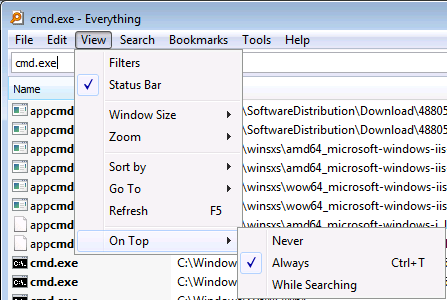
Ctrl-T sets “Always On Top”
Of course this is not defined in “Tools” -> “Options”.
I forgot in which version this was introduced, as in the past I never stumbled over it on keyboards that have Ctrl and Alt reversed.
–jeroen
via: www.voidtools.com • View topic – Everything window is ‘Always On Top’
Posted in Everything by VoidTools, Keyboards and Keyboard Shortcuts, Power User, Windows | Leave a Comment »
Posted by jpluimers on 2017/03/15
One day I write some scripts based on:
Some starting materials are at:
A thing I learned is that the Microsoft Remote Desktop 8 is basically a rebranded iTap RDP (it looks like Microsoft bought iTap RDP for Mac, as iTap RDP for Mac is now discontinued)
–jeroen
Posted in Apple, Development, Mac OS X / OS X / MacOS, OS X 10.10 Yosemite, OS X 10.11 El Capitan, OS X 10.8 Mountain Lion, OS X 10.9 Mavericks, Power User, Remote Desktop Protocol/MSTSC/Terminal Services, Scripting, Software Development, Windows, XML, XML/XSD | Leave a Comment »
Posted by jpluimers on 2017/03/13
[WayBack] Microsoft Is Spamming Windows 10 File Explorer With Ads For OneDrive Storage – Slashdot… – Joe C. Hecht – Google+ has steps to find and remove the packages you do not want to:
Powershell

Get-AppxPackage > List.txt

...

Get-AppxPackage Advertising | Remove-AppxPackage

Get-AppxPackage bingfinance | Remove-AppxPackage

Get-AppxPackage bingnews | Remove-AppxPackage

Get-AppxPackage bingsports | Remove-AppxPackage

Get-AppxPackage bingweather | Remove-AppxPackage
Background info at [WayBack] Microsoft Is Spamming Windows 10 File Explorer With Ads For OneDrive Storage – Slashdot
–jeroen
Posted in Power User, Windows, Windows 10 | 2 Comments »
Posted by jpluimers on 2017/03/09
Lets start with the second problem: There are various ways to redirect PowerShell output to a file.
- Shell redirect with a greater than sign (
>) to create/overwrite output or two greater than signs (>>) to append output.
- Use Out-File [WayBack] with a filename and either
-FilePath (default, similar to >) or -Append (similar >>).
I write “similar” as they are not fully equivalent. That’s where Format-Table [WayBack] with the -AutoSize parameter comes in (with or without a -Wrap parameter).
Apart from Format-Table displaying only 10 columns by default (see below), the -AutoSize will change columns presentation depending not just on the -Wrap parameter but also to the total width it thinks it has available.
Useful Format-Table parameters
First the representation:
Read the rest of this entry »
Posted in CommandLine, Development, Power User, PowerShell, PowerShell, Scripting, Software Development, Windows | 3 Comments »
Posted by jpluimers on 2017/02/22
A while ago, I bitched that Microsoft moved away the Windows Update out of the Control panel into a language depended place (in Windows 10 1511 update broke the Hyper-V networking – Fix network connection issues).
Since then I had to maintain too many locales running Windows 10. So here is the batch file:
for /f "delims=" %%A in ('PowerShell -Command "(Get-Culture).Name"') do explorer "%LocalAppData%\Packages\windows.immersivecontrolpanel_cw5n1h2txyewy\LocalState\Indexed\Settings\%%A\AAA_SystemSettings_MusUpdate_UpdateActionButton.settingcontent-ms"
It uses these tricks:
- Set output of a command as a variable (in this case a for loop variable)
- Execute PowerShell script in a .bat file
- PowerShell Get-Culture (which gets a .NET CultureInfo instance)
- CultureInfo.Name property (which has the nl-NL, en-US, etc codes in it)
It replaced this simple batch-file which has worked for like 10 years:
%windir%\System32\rundll32.exe url.dll,FileProtocolHandler wuapp.exe
–jeroen
via: Windows Update Shortcut – Create in Windows 10 – Windows 10 Forums
Posted in .NET, .NET 1.x, .NET 2.0, .NET 3.0, .NET 3.5, .NET 4.0, .NET 4.5, Batch-Files, CommandLine, Development, Power User, PowerShell, Scripting, Software Development, Windows, Windows 10 | Leave a Comment »
Posted by jpluimers on 2017/02/21
… there’s no need to use WaitForMultipleObjects in Step 2. It’s fairly easy to keep a counter of active threads in the pool (interlocked-incremented when a thread starts, interlocked-decremented when a thread is finished). When the counter reaches zero (no more active threads), signal an event. With only one event to wait for, you can use WaitForSingleObject…
So no more 64-thread (MAXIMUM_WAIT_OBJECTS) limits for pools…
Source: Delphi and stuff: The strange limitation of 64 threads
–jeroen
Posted in .NET, Delphi, Development, Power User, Software Development, Windows | Leave a Comment »
Posted by jpluimers on 2017/01/30
Windows Search: Windows.edb
If you use Windows Search (I don’t: I use Everything by VoidTools), your Windows.edb can grow ridiculously large. It is a single file, though it appears to be in two places because there is a symbolic link from C:\Users\All Users to C:\ProgramData :
C:\ProgramData\Microsoft\Search\Data\Applications\Windows\Windows.edb

C:\Users\All Users\Microsoft\Search\Data\Applications\Windows\Windows.edb
This is how to reduce its size:
How to offline defrag the index
- Change the Windows Search service so that it does not automatically start. To do this, run the following command in cmd.exe:
sc config wsearch start= disabled
- Run the following command to stop the Windows Search service:
- Run the following command to perform offline compaction of the Windows.edb file:
esentutl.exe /d %AllUsersProfile%\Microsoft\Search\Data\Applications\Windows\Windows.edb
- Run the following command to change the Windows Search service to delayed start:
sc config wsearch start= delayed-auto
- Run the following command to start the service:
Notes:
- I did not perform the last 2 steps as I’ve kept Windows Search disabled.
- If you want to reduce the size of the
C:\ProgramData\Microsoft\Search\Data\Applications\Windows\Projects\SystemIndex\Indexer\CiFiles\ directory:
- Before step 1, choose what kind of Windows Search indexing options you want
- Between step 3 and 4, delete the directory
Windows Update: DataStore.edb
Windows Update uses the same database structure and is a single file:
C:\Windows\SoftwareDistribution\DataStore\DataStore.edb
This is how I reduced its size:
net stop wuauserv
net stop bits
esentutl.exe /d C:\Windows\SoftwareDistribution\DataStore\DataStore.edb
net start bits
net start wuauserv
Talking about Windows Update: you might also want to Clean Up the WinSxS Folder
–jeroen
Read the rest of this entry »
Posted in Everything by VoidTools, Power User, Windows, Windows 10, Windows 7, Windows 8, Windows 8.1, Windows 9, Windows Server 2008, Windows Server 2008 R2, Windows Server 2012, Windows Server 2012 R2, Windows Vista | Leave a Comment »
Posted by jpluimers on 2017/01/02
Via:
Windows 7 Disk Images – Is it just me I have noticed that my Windows 7 backup disk images fail when Windows update applies security updates, if the images are more than 2 “Monthly RollUps” old. When I click the update webpage for help, Microsoft the server returnes a “page not found”. Is Microsoft trying to tell me something?
I noticed this as well for VMs that I hardly use (and can be dormant for months): updating them takes forever and I could not find the cause.
The cause seems Microsoft changing the locations for updates, but not having the updater update in the old location any more: [WayBack] Changes to Security Update Links – MSRC.
Solution: manually download the update MSU files for your Windows + architecture combination in a directory, copying a batch file there, then run the batch file.
More details at “Solution to the long search for Windows Updates on a newly installed Windows 8.1, 7 SP1 or Vista SP2”:
Yes, you have to fiddle a bit with the WUAUSERV service, but then everything should work out well.
–jeroen
via: [WayBack] Windows 7 Disk Images – Is it just me I have noticed that my Windows 7 backup…
Posted in Power User, Windows, Windows 7, Windows 8.1 | Leave a Comment »
Posted by jpluimers on 2017/01/01
The difference in changing your primary email of an Apple ID and a Microsoft ID:
- Microsoft Account still requires you to sign in with your (now defunct) old e-mail address as that *is* your primary ID but sends email to your new e-mail addres.
- Apple ID forgets about your old-email address and requires you to use the new e-mail address to sign in.
Small but important difference…
–jeroen
Posted in Apple, Power User, Windows | Leave a Comment »


 The Wiert Corner - irregular stream of stuff