Posted by jpluimers on 2021/08/09
After finding out that Windows 8.1 only uses 2 of of 3 CPU cores, I found [WayBack] How many physical processors does Windows 8 Support? – Super User.
This especially matters when doing virtualisation: here you can choose over how many CPU sockets the cores are divided.
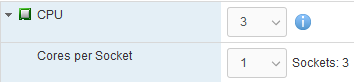
So this limits Windows 8.x to 2 CPU cores, because they 3 cores are spread over 3 sockets:
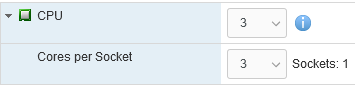
And this allows Windows 8.x to use 3 CPU cores as it is in one socket:
Note this still applies to more recent non-Server Microsoft products ([Wayback] Windows 10 Home/Pro: 1/2 CPU sockets 64/128 cores; [Wayback] SQL Server Express/Standard: lesser of 1/4 CPU sockets, 4/24 cores) as well. Not sure why the OS would be limited so much, as for development purposes it can make sense to have a 2+ CPU socket machine running a non-server OS.
–jeroen
Posted in Power User, Windows, Windows 8, Windows 8.1 | Leave a Comment »
Posted by jpluimers on 2021/08/06
[WayBack] The curious Kabri | How to force VMware to generate a new MAC address for a virtual machine
- Shut down the Guest OS.
- Open up the .vmx file.
- Delete the following lines (that begin with…):
ethernet0.addressType
uuid.location =
uuid.bios =
ethernet0.generatedAddress =
ethernet0.generatedAddressOffset =
- Boot up the Guest OS again, and it should generate new details in the vmx file (I’d check afterwards to be doubly sure).
In my experience, start with the bold values.
If the address is the same, fiddle with ethernet0.generatedAddressOffset
Be careful with the other values, as it might force your OS to think so much hardware has changed, that license keys have become invalid.
Via: [WayBack] Re-generate MAC addresses for VMs |VMware Communities
Related:
–jeroen
Posted in ESXi6, ESXi6.5, ESXi6.7, Power User, Virtualization, VMware, VMware ESXi | Leave a Comment »
Posted by jpluimers on 2021/08/06
According to [WayBack] Software for the ScanSnap:
ABBYY FineReader for ScanSnap
This application can perform text recognition on the scanned images using OCR (Optical Character Recognition) to convert the image data into Word, Excel, or PowerPoint files that can be edited.
Install ABBYY FineReader for ScanSnap from ScanSnap Online Update after ScanSnap Home is installed.
Display the [WayBack] Main Window of ScanSnap Home and select [Help] → [Online update (check for updates)] in the menu to run ScanSnap Online Update.
The piece above is untrue if you updated, as instructed by [WayBack] ScanSnap iX1500 Before you buy 03 – Fujitsu Global
Read the rest of this entry »
Posted in Fujitsu ScanSnap, Hardware, ix1500, Power User, Scanners | Leave a Comment »
Posted by jpluimers on 2021/08/06
I was hoping for a quick install of the ScanSnap ix1500 on a machine that had a fully working ix500 workflow, just biting the bullet after contemplating about [WayBack] Thoughts on ix500; should I get an ix1500? for a while.
That didn’t work as expected: the Windows machine would not recognise the ix1500 when connected over USB or WiFi:
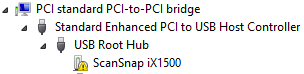
Missing driver
One problem here is that with the Ix500 installed, only the ix500 driver is known to Windows (on my machine it was in C:\Windows\Inf\oem12.inf which is identical to C:\Windows\SSDriver\SSMini\SSiX500-x64.inf) and the ScanSnap Installer software did not copy all drivers to C:\Windows\SSDriver\SSMini:
fi5110e-x64.cab
fi5110e-x64.cat
fi5110e-x64.inf
S1100-x64.cab
s1100-x64.cat
S1100-x64.inf
S1300-x64.cab
s1300-x64.cat
S1300-x64.inf
S1300i-x64.cab
s1300i-x64.cat
S1300i-x64.inf
S1500-x64.cab
S1500-x64.cat
S1500-x64.inf
S300-x64.cab
s300-x64.cat
S300-x64.inf
S500-x64.cab
s500-x64.cat
S500-x64.inf
SSiX100-x64.cab
ssix100-x64.cat
SSiX100-x64.inf
SSiX500-x64.cab
ssix500-x64.cat
SSiX500-x64.inf
SV600-x64.cab
sv600-x64.cat
SV600-x64.inf
Incompatible software
I later found out that the ix1500 is incompatible with the ScanSnap Manager: [WayBack] ScanSnap iX1500 Before you buy 03 – Fujitsu Global
Read the rest of this entry »
Posted in Fujitsu ScanSnap, Hardware, ix1500, ix500, Power User, Scanners | Leave a Comment »
Posted by jpluimers on 2021/08/05
There is a known saying phrased using cardinal, adverbial or ordinal numbers, and several naming for the first:
- One is change, two is coincidence, three is a pattern
- Once Is Chance, Twice is Coincidence, Third Time Is A Pattern
- One is an anomaly, two is a coincidence, three is a pattern
- First time is an incident, second a coincidence, third a pattern
Sometimes the second can lead to a pattern.
Read the rest of this entry »
Posted in Algorithms, Development, LifeHacker, Power User, Software Development | Leave a Comment »
Posted by jpluimers on 2021/08/05
Steps:
- Add the conditional define
FASTMM to your project
- Ensure you have
$(BDS)\source\DUnit\src in your search path in your project (as otherwise Delphi will pick the pre-built TestFramework.dcu file which was compiled without the FASTMM conditional define)
- Inside a test method, or the
SetUp method of a class, set FailsOnMemoryLeak to True
- If the
SetUp method of the class allocates memory, ensure the TearDown de-allocates it. Otherwise you will have leaks:
- DUnit will check memory differences from the start of the
SetUp until the end of the TearDown
- DUnit will not take into account what is freed in the
destructor or by automatic finalization after the destructor!
- Re-build your application (otherwise the DUnit
TestFramework unit will not take into account the FASTMM conditional define)
Depending in your test framework, FailsOnMemoryLeak might be by default be False or True:
- TestInsight by default has
FailsIfMemoryLeaked set to True for the root test suite (which is then applied to FailsOnMemoryLeak of any test method).
procedure RunRegisteredTests(const baseUrl: string);
var
  suite: ITestSuite;
  result: TTestResult;
  listener: ITestListener;
begin
  suite := RegisteredTests;
  if not Assigned(suite) then Exit;
  result := TTestResult.Create;
  result.FailsIfNoChecksExecuted := True;
  result.FailsIfMemoryLeaked := True;
  listener := TTestInsightListener.Create(baseUrl, suite.CountEnabledTestCases);
  result.AddListener(listener);
  try
    suite.Run(result);
  finally
    result.Free;
  end;
end;
- Console DUnit runners (Text, or XML) by default have
FailsIfMemoryLeaked set to False.
- GUI DUnit runner has
FailsIfMemoryLeaked depending on the options:

DUnit source differences
Note that recent Delphi versions (I think XE and up) ship with almost the same sources as https://sourceforge.net/code-snapshots/svn/d/du/dunit/svn/dunit-svn-r44-trunk.zip, with these Embarcadero changes:
- all SVN timestamps are based on time zone -0400 instead of +0000:
$Date: 2008-04-24 07:59:47 -0400 (Thu, 24 Apr 2008) $ $Date: 2008-04-24 11:59:47 +0000 (Thu, 24 Apr 2008) $
- Embarcadero removed:
- all comment lines having
TODO in them
- all files of types
.dof, .cfg, and.wmz
- the files
NGUITestRunner.nfm and NGUITestRunner.pas
- the file
/etc/usermap
- the directory trees
/private and /projects
- Embarcadero changed
- file
/src/versioninfo.res from 9.3.0 to 9.2.1 (which is odd, as all files are from 9.3.0)
- unit
TextTestRunner to support:
- CLR (used last in Delphi 2007)
FailureCountErrorCountIndentLevelPrefixChars- conditional defines
ADDITIONAL_INFO, BASIC_INFO
- output of
UnitName
- unit
TestExtensions to support:
- CLR (used last in Delphi 2007)
- conditional defines
ANDROID_FIXME and LINUX
- compiler directive
LEGACYIFEND
GUITestRunner.dfm to have ResultsView: TListView property Height value 45 instead of 39- the below methods to use
ReturnAddress in stead of CallerAddr:
TGUITestCase.FindControlTGUITestCase.ClickTGUITestCase.EnterKeyIntoTGUITestCase.EnterTextIntoTGUITestCase.ShowTGUITestCase.CheckTabTo overloadsTGUITestCase.CheckFocused overloadsTGUITestCase.CheckEnabled overloadsTGUITestCase.SetFocus overloadsTGUITestCase.CheckVisible overloads
- method
TGUITestRunner.RunTest
- from
class procedure TGUITestRunner.RunTest(test: ITest);
begin
  with TGUITestRunner.Create(nil) do
  begin
   try
    suite := test;
    ShowModal;
   finally
    Free;
   end;
  end;
end;
- to
class procedure TGUITestRunner.RunTest(test: ITest);
var
  GUI :TGUITestRunner;
begin
  Application.CreateForm(TGUITestRunner, GUI);
  with GUI do
  begin
   try
    suite := test;
    ShowModal;
   finally
    Free;
   end;
  end;
end;
- unit
GUITestRunner:
- from
procedure RunTest(test: ITest);
begin
  with TGUITestRunner.Create(nil) do
  begin
    try
      Suite := test;
      ShowModal;
    finally
      Free;
    end;
  end;
end;
- to
procedure RunTest(test: ITest);
var
  GUI :TGUITestRunner;
begin
  Application.CreateForm(TGUITestRunner, GUI);
  with GUI do
  begin
    try
      Suite := test;
      if Suite <> nil then
        ShowModal;
    finally
      Free;
    end;
  end;
end;
- method
TGUITestRunner.SetUp not to set SubItems[0] := ''; when there is no test suite.
- method
TGUITestRunner.FormCreate to use FormatSettings.TimeSeparator instead of TimeSeparator.
- unit TestFramework to support:
HPPEMITLEGACYIFENDCLR and _USE_SYSDEBUG_AUTOREFCOUNTNEXTGENANDROID- the
RunCountAttribute and RunCount support
- a
CheckEquals overload for uint64
- a
CheckNotEquals overload for TCharArray
CheckCircularRefCompareFloatRelativeNotSameErrorMessage with WideString arguments instead of string- a
TestDataDir function
ReturnAddress for older compilers
- a new unit
DUnitTestRunner
- a new
Makefile file
- a new UnitTests.log file
–jeroen
Posted in Conference Topics, Conferences, Delphi, Development, DUnit, Event, FastMM, Software Development, TestInsight | 1 Comment »
Posted by jpluimers on 2021/08/04
Not all letters have superscript or subscript counterparts. The counterparts are from different ranges, so might not look nice when next to each other.
I think 20th using Unicode lowercase superscript looks ugly 20ᵗʰ. With uppercase superscript it is somewhat OK: 20ᵀᴴ.
The list is from [WayBack] javascript – How to find the unicode of the subscript alphabet? – Stack Overflow:
Take a look at the wikipedia article Unicode subscripts and superscripts. It looks like these are spread out across different ranges, and not all characters are available.
Consolidated for cut-and-pasting purposes, the Unicode standard defines complete sub- and super-scripts for numbers and common mathematical symbols ( ⁰ ¹ ² ³ ⁴ ⁵ ⁶ ⁷ ⁸ ⁹ ⁺ ⁻ ⁼ ⁽ ⁾ ₀ ₁ ₂ ₃ ₄ ₅ ₆ ₇ ₈ ₉ ₊ ₋ ₌ ₍ ₎ ), a full superscript Latin lowercase alphabet except q ( ᵃ ᵇ ᶜ ᵈ ᵉ ᶠ ᵍ ʰ ⁱ ʲ ᵏ ˡ ᵐ ⁿ ᵒ ᵖ ʳ ˢ ᵗ ᵘ ᵛ ʷ ˣ ʸ ᶻ ), a limited uppercase Latin alphabet ( ᴬ ᴮ ᴰ ᴱ ᴳ ᴴ ᴵ ᴶ ᴷ ᴸ ᴹ ᴺ ᴼ ᴾ ᴿ ᵀ ᵁ ⱽ ᵂ ), a few subscripted lowercase letters ( ₐ ₑ ₕ ᵢ ⱼ ₖ ₗ ₘ ₙ ₒ ₚ ᵣ ₛ ₜ ᵤ ᵥ ₓ ), and some Greek letters ( ᵅ ᵝ ᵞ ᵟ ᵋ ᶿ ᶥ ᶲ ᵠ ᵡ ᵦ ᵧ ᵨ ᵩ ᵪ ). Note that since these glyphs come from different ranges, they may not be of the same size and position, depending on the typeface.
After a nice chat with my nephew EWD, I did some research and found the above via
–jeroen
Posted in Development, Encoding, internatiolanization (i18n) and localization (l10), Power User, Software Development, Unicode | Leave a Comment »
Posted by jpluimers on 2021/08/04
If this is still open, please vote for it: [WayBack] Naming of naming styles should reflect their casing · Issue #35243 · dotnet/roslyn · GitHub
Having the drop down of naming styles reflect the actual output in one way or the other will make it way easier to select the correct one.
Besides that, a few new naming styles are suggested in this issue, like snake_case which is great for translating APIs that are already in that form.
Via:
–jeroen
Posted in .NET, C#, C# 6 (Roslyn), C# 7, C# 8, Development, Software Development | Leave a Comment »
Posted by jpluimers on 2021/08/04
You’d think the math does not add up:
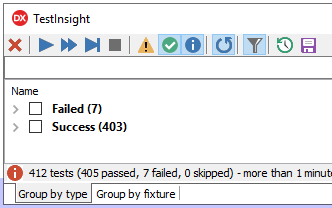
But it does: both “Success” and “Warnings” are counted as “passed”.

TL;DR: ensure the yellow “Warning” triangle is enabled
–jeroen
Posted in Delphi, Development, Software Development, TestInsight | Leave a Comment »


 The Wiert Corner - irregular stream of stuff