


[WayBack] Use the System File Checker tool to repair missing or corrupted system files:
Archive for September, 2021
Use the System File Checker tool to repair missing or corrupted system files
Posted by jpluimers on 2021/09/30

Posted in Development, Power User, Software Development, Windows, Windows 10, Windows 7, Windows 8, Windows 8.1, Windows Development | Leave a Comment »
One of the Let’s Encrypt’s Root Certificates expired today (and their corresponding intermediate yesterday); how is your infrastructure doing?
Posted by jpluimers on 2021/09/30
Last weekend I published 5 days before the Let’s Encrypt’s Root Certificate is expiring!
It basically was a post trying to amplify the [Wayback/Archive.is] Let’s Encrypt’s Root Certificate is expiring! message by [Wayback] Scott Helme .
Yesterday and today, he is maintaining a Twitter thread on things that have broken.
Quite a few things have, including some versions of curl, on which a lot of infrastructure relies (the certificate for it got fixed later on 20120930), see:
- [Archive.is] Scott Helme on Twitter: “Yeah that’s reasonable, we’ve not had a notable certificate chain expiry issue like this to speak of really.… “
- [Archive.is] Daniel 🥌 Stenberg on Twitter: “the Mozilla CA cert bundle on curl.se now has the expired ‘DST Root CA X3’ cert removed: …”
- [Wayback/Archive.is] curl – Extract CA Certs from Mozilla:
This bundle was generated at Thu Sep 30 03:12:05 2021 GMT .
- [Wayback/Archive.is] curl – Extract CA Certs from Mozilla:
- [Archive.is] Daniel 🥌 Stenberg on Twitter: “The order is restored and https://libssh2.org/ is again served by a good cert. Sorry for the minor disruption.”
Two important starting points in his thread:
- [Archive.is] Scott Helme on Twitter: “🚨🚨🚨 5 minutes until the Let’s Encrypt R3 intermediate expires 🚨🚨🚨 29 September 2021 19:21:40 UTC”
- [Archive.is] Scott Helme on Twitter: “🚨🚨🚨 30 minute warning 🚨🚨🚨 IdentTrust DST Root CA X3 Expires: Sep 30 14:01:15 2021 UTC… “
If you want to check from one of your own clients, try [Archive.is] Scott Helme on Twitter: “I’ve created a test site to help identify issues with clients. If you can connect to https://t.co/bXHsnlRk8D then your client can handle being served the expired R3 Intermediate in the server chain!… “
[Wayback/Archive.is] https://expired-r3-test.scotthelme.co.uk/
Note that neither SSLabs, nor Cencys, nor CertCheckkerApp do show the expired certificate, only the new one:
- [Wayback/Archive.is] SSL Server Test: pluimers.com (Powered by Qualys SSL Labs)
- [Wayback/Archive.is] CN=pluimers.com – Censys
- [Wayback/Archive.is] CertCheckerApp Certificate Checker: pluimers.com
Yes, I know the pluimers.com web server is rated B from a TLS perspective. Will be working on it, but I’m still recovering from rectum cancer treatments, and have an almost 1.5 year backlog to get through.
–jeroen
Share this:
Posted in Communications Development, Development, Encryption, HTTP, https, HTTPS/TLS security, Internet protocol suite, Let's Encrypt (letsencrypt/certbot), Power User, Security, Software Development, TCP, TLS, Uncategorized, Web Development | Leave a Comment »
Ian Colwater: Here are some terms to mute on Twitter to clean your timeline up a bit. · GitHub
Posted by jpluimers on 2021/09/30
[WayBack/Archive.is] Here are some terms to mute on Twitter to clean your timeline up a bit. · GitHub
Here are some terms to mute on Twitter to clean your timeline up a bit. –
twittermute.txt
Via:
- [WayBack/Archive.is] Ian Coldwater on Twitter: “Me, oblivious: Why is my GitHub blowing up right now? That’s weird Work Slack: HEY COLDWATER YOU’RE #1 ON HACKER NEWS Me: I’m sorry what” / Twitter
- [WayBack/Archive.is] Hacker News
1. List of Twitter mute words for your timeline (gist.github.com) 260 points by rmason 2 hours ago | hide | 102 comments
Related:
- [Archive.is] https://twitter.com/settings/muted_keywords
- https://twitter.com/settings/add_muted_keyword
- [WayBack/Archive.is] Muting the Twitter algorithm and using basic search operators for better OSINT research – We are OSINTCurio.us
The parameters are:
- suggest_recap
- suggest_who_to_follow
- suggest_activity
- suggest_activity_tweet
- suggest_recycled_tweet_inline
- suggest_recycled_tweet
- suggest_grouped_tweet_hashtag
- suggest_sc_tweet
- suggest_pyle_tweet
- suggest_ranked_timeline_tweet
- suggest_ranked_organic_tweet
- generic_activity_highlights
- generic_activity_momentsbreaking
- ActivityTweet
- RankedOrganicTweet
More details in [WayBack/Archive.is] List of Twitter mute words for your timeline | Hacker News curated comments:
Share this:
Posted in Development, LifeHacker, Power User, SocialMedia, Software Development, Twitter, Web Development | Leave a Comment »
JetBrains Mono: A free and open source typeface for developers | JetBrains: Developer Tools for Professionals and Teams
Posted by jpluimers on 2021/09/30
Font I want to try out: [Archive.is] JetBrains Mono: A free and open source typeface for developers | JetBrains: Developer Tools for Professionals and Teams.
It has a large X-height and is sans serif, just like the lovely [WayBack] Lucida Console font, which I have been using for almost 3 decades.
So I wonder if JetBrains Mono can convince me to switch away from Lucida Console: no other monospaced font has convinced me yet (:
Via: [Archive.is] Matt Ellis on Twitter: “JetBrains Mono. A really nice, open source, ligature friendly, developer typeface. I’ve been using this for a while now, it’s my default font. And a really cool landing page! “
Edit 202109301T1300
JetBrains is discussing on how to update the Chocolaty support, see the twitter posts below:
- [Archive.is] Jeroen Wiert Pluimers on Twitter: “Will try later. Like the sans serif and large X-height they share with Lucida Console. Maybe they can convince me to switch away from that after close to 3 decades of use.…”
- [Archive.is] Jeroen Wiert Pluimers on Twitter: “Blogged about it today. Are you planning to work with the Chocolatey maintainers to update their install from 2.002 to more current versions? … The current maintainer is David Johnson (hopefully it is @cirzen)… “
- [Archive.is] David Johnson on Twitter: “It is me, but it probably needs a new maintainer – the current install process needs a rewrite and I don’t know when I’ll get to it.… “
- [Archive.is] Jeroen Wiert Pluimers on Twitter: “I posted a few links in the thread leading up to … Would that help you to get JetBrains going to update it?… “
- [Archive.is] Matt Ellis on Twitter: “Good point. I’ll speak to some folks internally. That said, I have no idea about rewriting the install script…… “
- [Archive.is] Jeroen Wiert Pluimers on Twitter: “Thanks. The current repository is at … I’m still slowly but steadily recovering, so I won’t be able to take this up either.… “
- [Archive.is] Jeroen Wiert Pluimers on Twitter: “Project page pointing to it: … “
- [Archive.is] Jeroen Wiert Pluimers on Twitter: “This is another font repository that might be of help as it is more recent: … “
- [Archive.is] Jeroen Wiert Pluimers on Twitter: “… is even more recent and supports auto-update.… “
- [Archive.is] Jeroen Wiert Pluimers on Twitter: “That’s it for now. Need to spare my energy so I will have some left tonight during care for my mentally retarded brother.… “
- [Archive.is] Matt Ellis on Twitter: “Thanks for all the links! I’ll try and follow up and see what we can do. 👍… “
Referred repositories in that thread:
- [Wayback/Archive.is] Cirzen/choco-jetbrainsmono: Chocolately nuspec for the JetbrainsMono package
- [Wayback/Archive.is] JetBrains/JetBrainsMono: JetBrains Mono – the free and open-source typeface for developers
- [Wayback/Archive.is] ChocoPackages/manual/nerdfont-hack at master · pauby/ChocoPackages
- [Wayback/Archive.is] chocolatey-packages/font-hackgen at master · kai2nenobu/chocolatey-packages
–jeroen
Share this:
Posted in Development, Font, JetBrains Mono, Lucida Console, Power User, Programmers Font, Software Development | Leave a Comment »
Windows Sandbox: a feature I forgot about
Posted by jpluimers on 2021/09/29
The Windows Sandbox can be useful, but since it was never there in the first decades of my Windows usage, I forgot it was added.
I wonder how it is implemented, as it is really useful to test out new stuff, but I wonder what it protects against.
A few years back, I bumped into this because the [WayBack] Desktop Goose by samperson got viral (it can be downloaded from [WayBack/Archive.is] Desktop Goose v0.2.zip)
via [Archive.is] Samperson on Twitter: “I made a goose that destroys your computer Download it free here: samperson.itch.io/desktop-goose” / Twitter
So here are some links (you need at least build 1903 ([WayBack] Windows 10 May 2019 or 19H1) or Insider Preview Build 18305):
- [Archive.is] Jen Gentleman 🌺 on Twitter: “Thank you, Windows Sandbox, for enabling me to play with this ridiculous desktop destroying goose in an isolated container 😂 https://t.co/EPqM1FROg3” / Twitter
- [WayBack] Jen Gentleman 🌺 on Twitter: “If you’re not familiar with Windows Sandbox, it’s something we shipped with Windows 10 version 1903 😊👉 …” / Twitter
- [WayBack] Windows Sandbox – Microsoft Tech Community – 301849
- Sandbox in [WayBack] Announcing Windows 10 Insider Preview Build 18305 | Windows Experience Blog
Windows Sandbox has the following properties:
- Part of Windows – everything required for this feature ships with Windows 10 Pro and Enterprise. No need to download a VHD!
- Pristine – every time Windows Sandbox runs, it’s as clean as a brand-new installation of Windows
- Disposable – nothing persists on the device; everything is discarded after you close the application
- Secure – uses hardware-based virtualization for kernel isolation, which relies on the Microsoft Hypervisor to run a separate kernel which isolates Windows Sandbox from the host
- Efficient – uses integrated kernel scheduler, smart memory management, and virtual GPU
To install Windows Sandbox, go to Settings > Apps > Apps & Features > Programs and Features > Turn Windows Features on or off, and then select Enable Windows Sandbox.
To start Windows Sandbox, open the Start menu, enter Windows Sandbox and then select it.
You can install it even if your Windows machine itself is a VM. For a physical machine, hardware virtualisation needs to be enabled (usually in the BIOS); for a VM, nested virtualisation enabled (check that in your virtualisation environment: Hyper-V, ESXi and others vary slightly on how to enable this).
Installation inside the Windows machine can be done via PowerShell (or the UI):
- [WayBack] Enable Windows 10 Sandbox with PowerShell and Dism
-
To Enable Windows 10 Sandbox with PowerShell,
- Open PowerShell as Administrator.Tip: You can add “Open PowerShell As Administrator” context menu.
- Type or copy-paste the following command:
Enable-WindowsOptionalFeature -FeatureName "Containers-DisposableClientVM" -All -Online
- When prompted to restart the computer, type Y, and press Enter.
- The change can be undone with the following command:
Disable-WindowsOptionalFeature -FeatureName "Containers-DisposableClientVM" -Online
You are done.
-
Enable Windows 10 Sandbox with DISM
- Open an elevated command prompt.
- Type or copy-paste the following command:
dism /online /Enable-Feature /FeatureName:"Containers-DisposableClientVM" -All
- Restart the computer when prompted.
- To disable the Sandbox feature, use this command:
dism /online /Disable-Feature /FeatureName:"Containers-DisposableClientVM"
That’s it.
-
- These two also discussies WSB configuration files (which can passed as first parameter to
C:\WINDOWS\System32\WindowsSandbox.exe "%1"):
Note that starting the SandBox from an x86 process might require you to run a different WindowsSandBox.exe; see [WayBack] Launching Wsb (Windows Sandbox Config file) gives error – Total Commander:
you can use
C:\WINDOWS\Sysnative\WindowsSandbox.exein stead ofC:\WINDOWS\System32\WindowsSandbox.exein TC 32bit.Also see:
[WayBack] On 64-bit Windows versions, some files and folders shown by Windows Explorer are not shown by Total Commander![WayBack] Windows x64: Explorer vs TC: Content of System32 different
–jeroen
Share this:
Posted in Development, Power User, Software Development, Windows, Windows Development | Leave a Comment »
Moore’s law has almost ended: back to the future
Posted by jpluimers on 2021/09/29
[WayBack] We’re approaching the limits of computer power – we need new programmers now | John Naughton | Opinion | The Guardian
Ever-faster processors led to bloated software, but physical limits may force a return to the concise code of the past
So back to optimisation and maybe even assembly language.
Which brings back the days gone by.
- [WayBack] Paul Stalenhoef on Twitter: “We’re approaching the limits of computer power – we need new programmers now | John Naughton …”
- [WayBack] Jeroen Pluimers on Twitter: “Assembly language and optimisation will be hot topics again.… “
- [WayBack] Paul Stalenhoef on Twitter: “Ooit een halve File Commander in Assembly geschreven… Rechtstreeks in het videogeheugen schrijven vanaf B000 of B800 of zoiets. Int 10 en Int 13! Dat waren nog eens tijden!… “
- [WayBack] Jeroen Pluimers on Twitter: “Oh, the days!… “
- [WayBack] Jeroen Pluimers on Twitter: “Ik bouwde een MS-DOS device driver in de onderste 1K geheugen zodat je een 128 karakter keyboard buffer had in plaats van 8 (of 16?): kon je doortikken terwijl je huidige programma nog druk was. En een grafische mouse-pointer in tekst-mode. Plus een memory password sniffer…… “
–jeroen
Share this:
Posted in Algorithms, Assembly Language, Development, Software Development | Leave a Comment »
PowerShell error in a script but not on the console: The string is missing the terminator: “.
Posted by jpluimers on 2021/09/29
The below one will fail in a script, both both work from the PowerShell prompt:
Success
Get-NetFirewallRule -DisplayGroup "File and Printer Sharing" | ForEach-Object { Write-Host $_.DisplayName ; Get-NetFirewallAddressFilter -AssociatedNetFirewallRule $_ }
Failure
Get-NetFirewallRule –DisplayGroup "File and Printer Sharing" | ForEach-Object { Write-Host $_.DisplayName ; Get-NetFirewallAddressFilter -AssociatedNetFirewallRule $_ }
The error you get this this:
At C:\bin\Show-File-and-Printer-Sharing-firewall-rules.ps1:5 char:52
+ ... -TCP-NoScope" | ForEach-Object { Write-Host $_.DisplayName ; Get-NetF ...
+                 ~~~~~~~~~~~~~~~~~~~~~~~~~~~~~~~~~~~~~~~~~~~~~~~~~~~~~~~~~
The string is missing the terminator: ".
    + CategoryInfo          : ParserError: (:) [], ParentContainsErrorRecordException
    + FullyQualifiedErrorId : TerminatorExpectedAtEndOfString
Via [WayBack] script file ‘The string is missing the terminator: “.’ – Google Search, I quickly found these that stood out:
- [WayBack] Reddit: Getting error- the string is missing the terminator: “. : PowerShell
That hyphen character in your
-Reset(noticed by /u/SeeminglyScience) is an En-Dash (Decimal unicode character 8211). (Copy paste it and do[int]([char]'–')to see).PowerShell can handle en-dash as a hyphen (for the curious, see the case for it in the PowerShell tokenizer source code here where hyphen, en-dash, em-dash and horizontalBar all fall into the same code block), but because it’s a Unicode character your source code will have to be saved as a unicode encoded .ps1 file. (UCS2-LE, UTF8+BOM, UTF8-BOM seem to work for me).
If you don’t, and you save it as ASCII/ANSI, what gets saved is
–which has a string opening in it. So the code becomes:Set-ADAccountPassword $uname -NewPassword $newpwd –Reset -confirm -PassThruWhich now has an open string that doesn’t finish, and throws errors about unterminated strings.
- [WayBack] azure – PowerShell script error: the string is missing the terminator: – Stack Overflow
- [WayBack] powershell is missing the terminator: ” – Stack Overflow
Look closely at the two dashes in
unzipRelease –Src '$ReleaseFile' -Dst '$Destination'This first one is not a normal dash but an en-dash (
–in HTML). Replace that with the dash found beforeDst.
Cause and solution
Before DisplayGroup, the first line has a minus sign and the second an en-dash. You can see this via [WayBack] What Unicode character is this ?.
Apparently, when using Unicode on the console, it does not matter if you have a minus sign (-), en-dash (–), em-dash (—) or horizontal bar (―) as dash character. You can see this in [WayBack] tokenizer.cs at function [WayBack] NextToken and [WayBack] CharTraits.cs at function [WayBack] IsChar).
When saving to a non-Unicode file, it does matter, even though it does not display as garbage in the error message.
Similarly, PowerShell has support for these special characters:
    internal static class SpecialChars
    {
        // Uncommon whitespace
        internal const char NoBreakSpace = (char)0x00a0;
        internal const char NextLine = (char)0x0085;

        // Special dashes
        internal const char EnDash = (char)0x2013;
        internal const char EmDash = (char)0x2014;
        internal const char HorizontalBar = (char)0x2015;

        // Special quotes
        internal const char QuoteSingleLeft = (char)0x2018; // left single quotation mark
        internal const char QuoteSingleRight = (char)0x2019; // right single quotation mark
        internal const char QuoteSingleBase = (char)0x201a; // single low-9 quotation mark
        internal const char QuoteReversed = (char)0x201b; // single high-reversed-9 quotation mark
        internal const char QuoteDoubleLeft = (char)0x201c; // left double quotation mark
        internal const char QuoteDoubleRight = (char)0x201d; // right double quotation mark
        internal const char QuoteLowDoubleLeft = (char)0x201E; // low double left quote used in german.
    }
The easiest solution is to use minus signs everywhere.
Another solution is to save files as Unicode UTF-8 encoding (preferred) or UTF-16 encoding (which I dislike).
–jeroen
Share this:
Posted in .NET, CommandLine, Development, Encoding, PowerShell, PowerShell, Scripting, Software Development, Unicode, UTF-16, UTF-8, UTF16, UTF8 | Leave a Comment »
Google Cloud Shell: connecting to cloud storage buckets
Posted by jpluimers on 2021/09/28
One of the drawbacks of Google Cloud Shell is that it will delete the home directory after 120 days of not using it: [WayBack] Deletion notice for my Google Cloud Shell home directory – Stack Overflow
This is documented [WayBack] here:
If you do not access Cloud Shell for 120 days, we will delete your home disk. You will receive an email notification before we do so and simply starting a session will prevent its removal.
This only applies to the home directory of your Cloud Shell instance (you may want to store it on Cloud Storage anyway if you want to keep it). Any other Google services you use will be unaffected.
I hardly use the cloud shell, as it is a last resort to shell out from overly protected networks. Fewer and fewer environments restrict so much, so I’ve bumped into the home directory deletion a few times now.
I might use it more in the future, as I recently discovered there is a URL trick so you can start a cloud shell with parameters like an initial git repository: [WayBack] Open in Cloud Shell | Google Cloud
The Open in Cloud Shell feature allows you to publish a link that opens the Cloud Console and either automatically clones a Git repository into Cloud Shell or starts Cloud Shell with a custom image. It also allows for instructions to be printed to the terminal to help users interact with the content.
The Open in Cloud Shell feature helps developers experiment with code samples and APIs without having to worry about downloading Cloud SDK, installing required dependencies, or searching for relevant source files. This page explains how to add this feature to your Git repository.
Currently, only GitHub and Bitbucket repositories are whitelisted. If you would like to add a different repository, send feedback with the repository type you’d like to use with Open in Cloud Shell.
Setting up the home directory with my scripts can be a curse, so I have contemplated on these kinds of solutions:
- store scripts in Google Drive, and mount part of Google Drive into the Cloud Shell
- store scripts in Google Cloud Storage
- script the setup of the home directory via a bash script in a gist
Some links that will hopefully help me with that:
- [WayBack] Use the Google Cloud Shell to Upload files to Google Drive : DataHoarder
- [WayBack] Open Your Repository In Google Cloud Shell – Daisuke Maki – Medium
- [WayBack] gsutil – Google cloud storage – Download file from web – Stack Overflow
mount the bucket in your Cloud Shell using gcsfuse:
Create a directory in your Cloud Shell user home
mkdir ~/mybucketNow mount your bucket in that directory using gcsfuse:
gcsfuse bucket_name ~/mybucketChange the current directory to mount point directory:
cd mybucket(if you want to have some fun run “df -h .” to see how much space you got in that mount point)
…
seems to work for all file sizes:
curl http://speedtest.tele2.net/10GB.zip | gsutil cp - gs://YOUR_BUCKET_NAME/10GB.zipBasically curl “streams” the data directly to the bucket.
 [WayBack] Limitations and restrictions | Cloud Shell | Google Cloud
Usage limits
Cloud Shell inactivity: If you do not access Cloud Shell for 120 days, your home disk will be deleted. You will receive an email notification before its deletion and simply starting a session will prevent its removal. Please consider a different solution on Google Cloud storage for sensitive data you wish to store long term.
Non-interactive usage: Cloud Shell is intended for interactive use only. Non-interactive sessions will be ended automatically after a warning. Note that Cloud Shell sessions are capped at 12 hours, after which sessions are automatically terminated. You can use a new session immediately after.
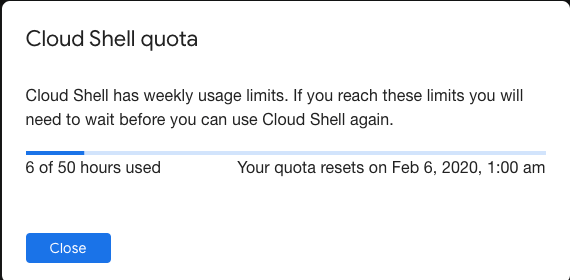
Weekly usage: Cloud Shell also has weekly usage limits. If you reach your usage limit, you’ll need to wait until the specified time (listed under Usage Quota, found under the three dots menu icon) before you can use Cloud Shell again.
Restoring a session after a service limit violation: If your session is terminated or cannot be established because you exceeded a service limit, Cloud Shell will display an error with a link to a form that allows you to appeal the limit violation. Click the feedback link and submit the form with more information about the tasks you were performing before your session was terminated.
–jeroen
Share this:

Posted in bash, Development, Google, GoogleCloudShell, GoogleDrive, Internet, Power User, Scripting, Software Development, SpeedTest | Leave a Comment »
GitHub – proxykit/ProxyKit: A toolkit to create code-first HTTP reverse proxies on ASP.NET Core
Posted by jpluimers on 2021/09/28
Interesting: [Archive.is] GitHub – proxykit/ProxyKit: A toolkit to create code-first HTTP reverse proxies on ASP.NET Core:
Having built proxies many times before, I felt it is time to make a package. Forked from ASP.NET labs, it has been heavily modified with a different API, to facilitate a wider variety of proxying scenarios (i.e. routing based on a JWT claim) and interception of the proxy requests / responses for customization of headers and (optionally) request / response bodies. It also usesHttpClientFactoryinternally that will mitigate against DNS caching issues making it suitable for microservice / container environments.
- 1. Quick Start
- 2. Core Features
- 3. Recipes
- 4. Making upstream servers reverse proxy friendly
- 5. Performance considerations
- 6. Note about serverless
- 7. Comparison with Ocelot
- 8. How to build
- 9. Contributing / Feedback / Questions
- 10. Articles, blogs and other external links
Related:
- [Archive.is] URL Rewriting Middleware in ASP.NET Core | Microsoft Docs
- [Archive.is] ASP.NET core 2 act as reverse proxy usering rewrite middleware – Stack Overflow
–jeroen
Share this:
Posted in .NET, .NET Core, .NET Standard, ASP.NET, C#, Communications Development, Development, HTTP, Internet protocol suite, Software Development, TCP | Leave a Comment »
Chocolatey: force install sysinternals after hash mismatch
Posted by jpluimers on 2021/09/28
Shortly after UltraVNC mismatching sha256 hash the chocolatey checksum check (Chocolatey: when upgrades or installs keep insisting the hash has changed, and over time the mismatch changes as well), I bumped into another occasion: now (because of a zero sized .nupkg file), I had to force reinstall sysinternals.
The problem however is that sysinternals chocolatey will always install the latest version as per [WayBack] Chocolatey Software | Sysinternals 2019.12.19
Notes
- This package supports only latest version.
- This package by default installs to tools directory which will create shims for all applications. When you install to different directory, shims are not created but directory is added to the PATH.
- This package downloads the nano edition of sysinternals suite when installing it on a nano server.
- To have GUI for the tools, install nirlauncher package and use
/Sysinternalspackage parameter.
It means that when reinstalling an older version (in the process of fixing a broken chocolatey install), it is OK to ignore the error caused during forced reinstall:
C:\bin\bin>choco install --force --yes sysinternals
Chocolatey v0.10.15
Installing the following packages:
sysinternals
By installing you accept licenses for the packages.
sysinternals v2019.6.29 already installed. Forcing reinstall of version '2019.6.29'.
 Please use upgrade if you meant to upgrade to a new version.
Progress: Downloading sysinternals 2019.6.29... 100%

sysinternals v2019.6.29 (forced) [Approved]
sysinternals package files install completed. Performing other installation steps.
Sysinternals Suite is going to be installed in 'C:\ProgramData\chocolatey\lib\sysinternals\tools'
Downloading sysinternals
  from 'https://download.sysinternals.com/files/SysinternalsSuite.zip'
Progress: 100% - Completed download of C:\Users\jeroenp\AppData\Local\Temp\chocolatey\sysinternals\2019.6.29\SysinternalsSuite.zip (29 MB).
Download of SysinternalsSuite.zip (29 MB) completed.
Error - hashes do not match. Actual value was 'AE0AB906A61234D1ECCB027D04F5A920D78A31494372193EE944DD419842625C'.
ERROR: Checksum for 'C:\Users\jeroenp\AppData\Local\Temp\chocolatey\sysinternals\2019.6.29\SysinternalsSuite.zip' did not meet 'db59efe1739a2262104874347277f9faa0805a1a7a0acd9cc29e9544fb8040c5' for checksum type 'sha256'. Consider passing the actual checksums through with --checksum --checksum64 once you validate the checksums are appropriate. A less secure option is to pass --ignore-checksums if necessary.
The install of sysinternals was NOT successful.
Error while running 'C:\ProgramData\chocolatey\lib\sysinternals\tools\chocolateyInstall.ps1'.
 See log for details.

Chocolatey installed 0/1 packages. 1 packages failed.
 See the log for details (C:\ProgramData\chocolatey\logs\chocolatey.log).

Failures
 - sysinternals (exited -1) - Error while running 'C:\ProgramData\chocolatey\lib\sysinternals\tools\chocolateyInstall.ps1'.
 See log for details.
So in this case, as always the most recent Sysinternals file is used, it is OK to follow the bold guideline above (and quoted below) use the checksum for that file. You might even want to ignore it, as the file is downloaded over https so tampering is virtually impossible:
Consider passing the actual checksums through with --checksum --checksum64 once you validate the checksums are appropriate. A less secure option is to pass --ignore-checksums if necessary.
For this checksum, the forced reinstall becomes choco install --force --yes sysinternals --checksum AE0AB906A61234D1ECCB027D04F5A920D78A31494372193EE944DD419842625C
Alternatively (with a slight chance of yet another checksum) would be choco install --force --yes sysinternals --ignore-checksums
Related:
Share this:
Posted in .NET, Chocolatey, CommandLine, Development, Power User, PowerShell, PowerShell, Scripting, Software Development, SysInternals, Windows | Leave a Comment »
 The Wiert Corner - irregular stream of stuff